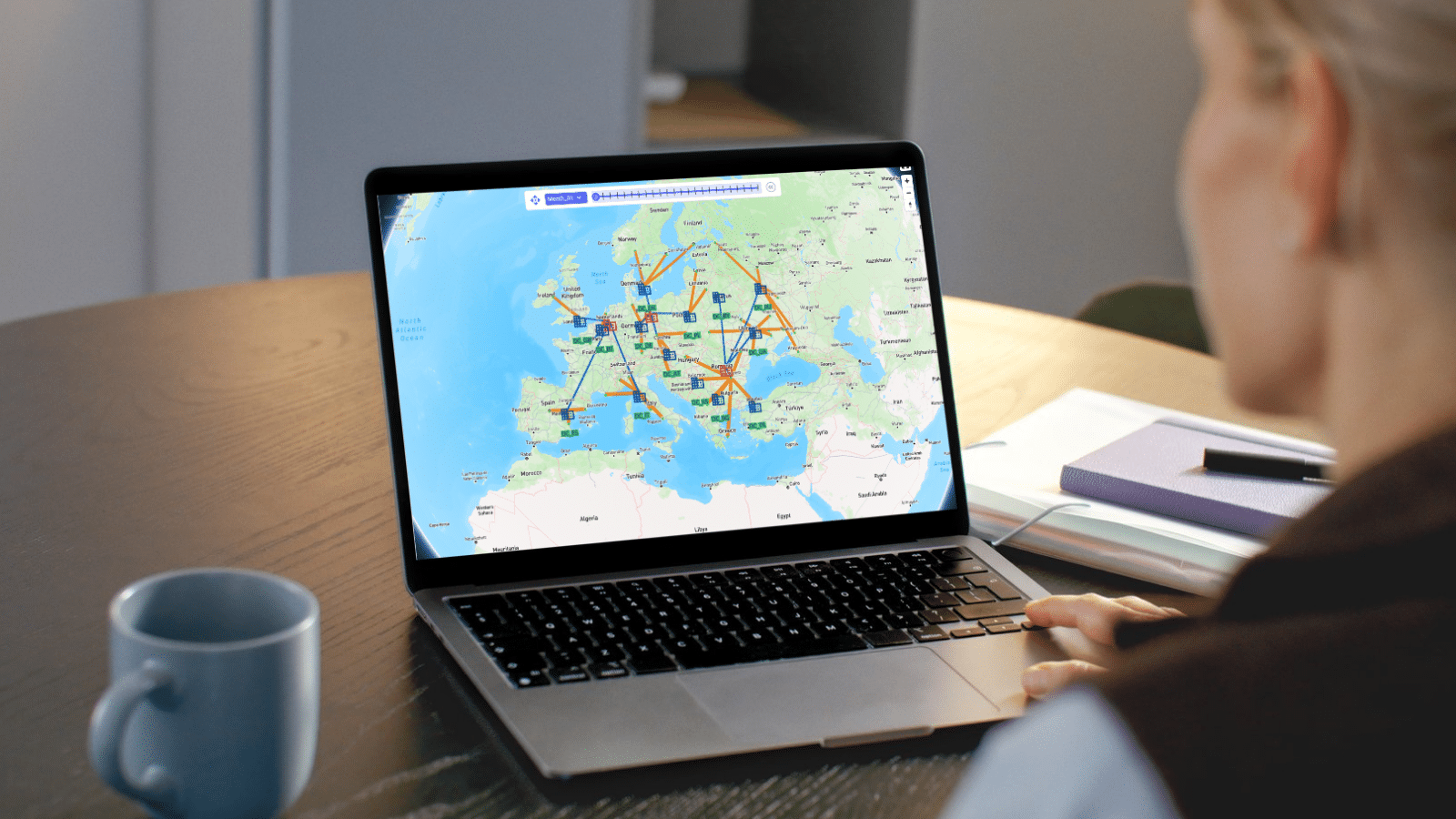

The Optilogic Model Context Protocol (MCP) Connector links AI Agents like Claude and ChatGPT to Ada, Optilogic’s agentic AI for supply chain modeling. Together, they give teams a faster way to make better tactical decisions within today’s supply chain — and design the supply chain they need for tomorrow. Ada works with a live digital twin of your supply chain, combining mathematical optimization, simulation, and demand modeling to answer questions across the full planning horizon, from day-to-day operational response to long-term network, transportation, inventory, and production strategy.
Once connected, the AI Agent can list the model databases in your Optilogic account, open a conversation with Ada, attach one or more databases, and relay prompts and responses back and forth — all from inside the agent. This enables AI-powered what-if analysis, demand and sourcing analysis, routing and inventory tradeoffs, tariff scenarios, and network strategy without switching tools.
In practice, Ada continues to do what she does best — reasoning over your supply chain data, running analyses, and answering modeling questions. The AI Agent adds a complementary layer on top: turning Ada’s outputs into decision-ready executive summaries, spreadsheets, slide decks, and interactive dashboards, while combining them with web research and other connected tools in a single workflow.
The connector is currently available in Claude (Anthropic), ChatGPT (OpenAI), Copilot (Microsoft), Grok (SpaceXAI), and Vibe (Mistral AI).
Detailed step-by-step instructions for Claude, ChatGPT, and Copilot, including screenshots, can be found here:
The Optilogic MCP Connector is a Custom Connector for AI Agents built on the Model Context Protocol (MCP). It gives AI Agents a set of tools that let it act as an orchestrator for Ada conversations: discovering your models, starting and managing Ada sessions, attaching databases, and polling for Ada's (asynchronous) responses.
It is not a replacement for Ada or for the Optilogic platform — it is a bridge. Ada still does the actual modeling work; the connector simply gives the agent a way to ask it questions and receive answers.
A useful mental model: the AI Agent is the orchestrator and communicator; Ada is the subject-matter expert on your models.
Teams are using the Optilogic MCP Connector for tasks like:
The Connector works best for grounded, model-based questions where Ada supplies the underlying facts and the agent handles synthesis, formatting, and communication. It is less suited to open-ended business strategy discussions that have no connection to an actual model or dataset - “What happens to warehouse utilization if demand is up 5% across category A?” is only meaningful when asked in the context of a model.
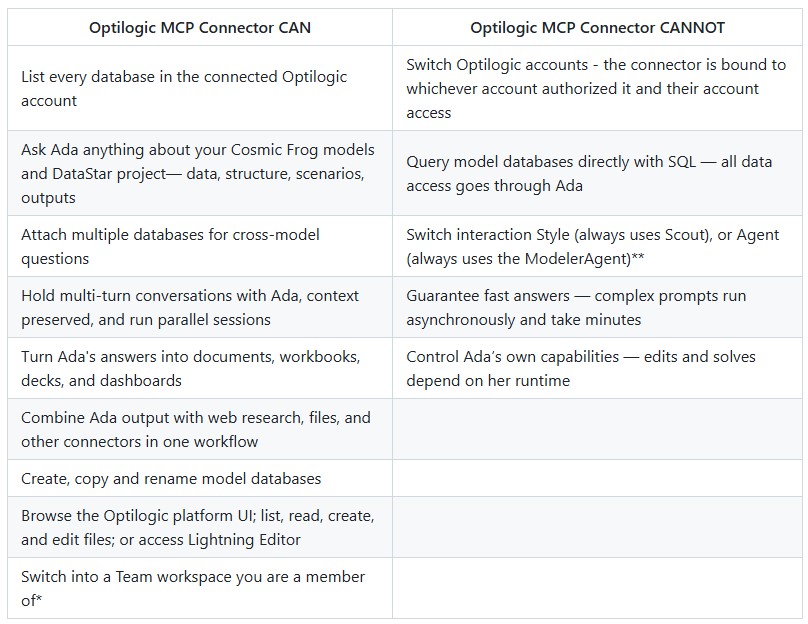
*To learn more about using Optilogic Teams, please see this Getting Started with Optilogic Teams Help Center article.
**To learn more about Ada’s interaction style and agent options, please see the Create Your First Prompt section in the Getting Started with Ada & Agentic AI Help Center article.
Before you set up and start working with the Optilogic MCP connector, please take note of following:
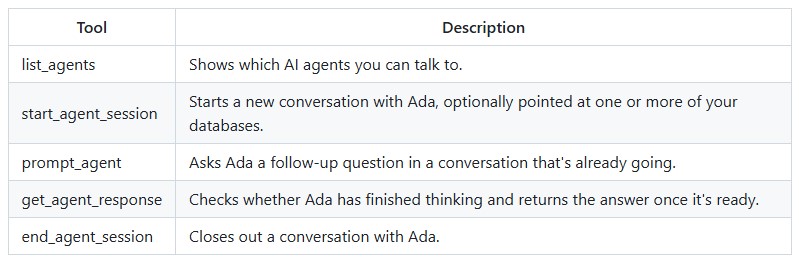
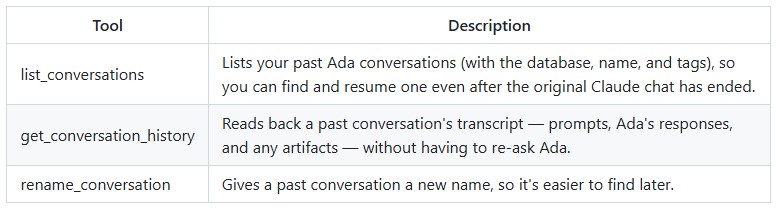
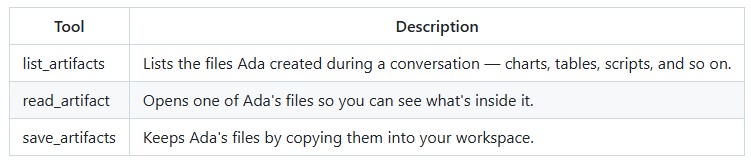
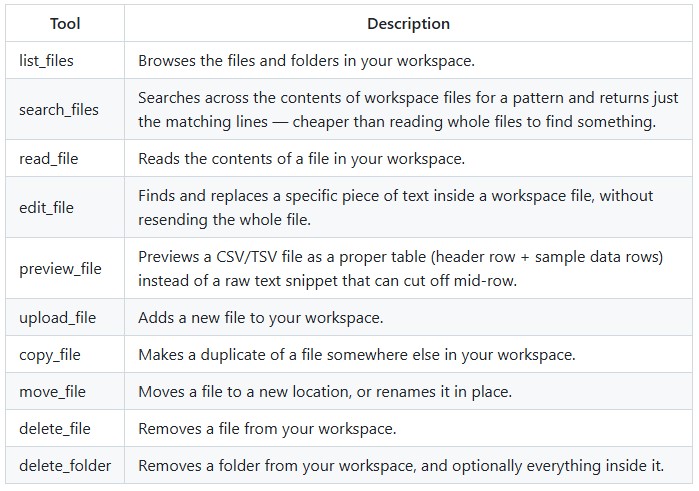
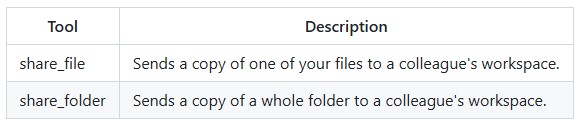
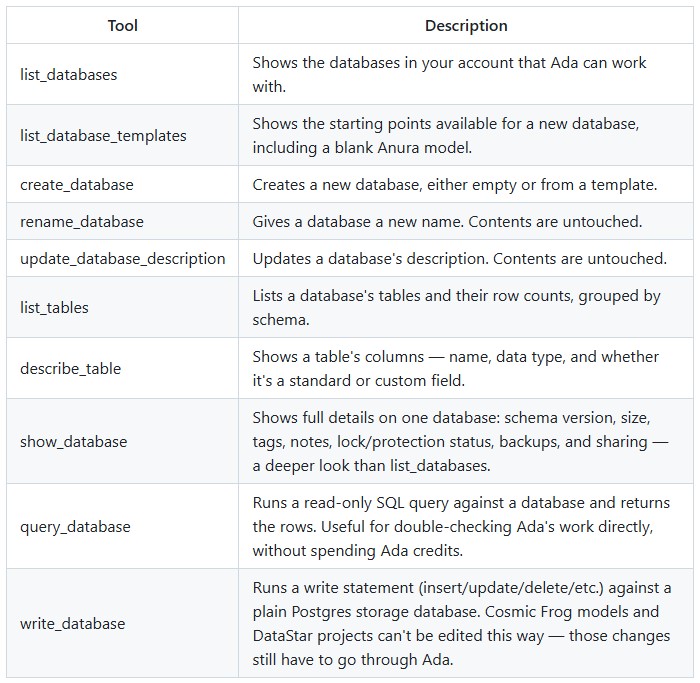
The following tools are available to the connector:
Agent Lifecycle
Past Conversations
Artifacts
Workspace Files
Sharing
Account / Teams

Data
The prompts below are starting points — swap in your own model names, regions, priorities, etc.
When you use the Optilogic MCP Connector, prompts and the data Ada returns pass through the agent in order to be displayed, summarized, or turned into a deliverable. This is in addition to — not a replacement for — Optilogic's own data handling for Ada itself.
Please note that when you connect to the MCP connector:
The MCP Server connects AI agents to Optilogic's Public APIs and Ada, Optilogic’s native AI agent. Ada and the Public APIs have logging in place; MCP server calls are logged in accordance with those practices with additional meta data to identify it as coming from the MCP, nothing additional - it does not have any user identifiers in it.
The MCP Server only processes the tool-call payloads needed to fulfill the requests; surrounding conversation context from the agent is not retained. In addition to serving the request, tool-call data is also used for the following purposes:
For clarity, Optilogic does not use logs for model training.
MCP request/response data and associated logs are stored in accordance with Optilogic's Data Retention Policy. You can learn more here -- How We Safeguard Your Data: Backups & Retention Explained.
Disconnecting the Connector on the AI Agent’s settings tells the agent to stop using and refreshing your Optilogic tokens — that is the immediate effect.
After disconnecting, the historical chats that were had through the connector are still accessible to the user, just no follow-up prompts that require accessing Ada can be added.
Please note that users have visibility into the MCP Connector conversations and actions on the Optilogic platform in following places:
If the conversation with Ada through the AI Agent seems to go off track, e.g., gives no response or odd/incorrect responses, please follow these troubleshooting steps:
In this example, we will:
Claude was used in this example; using the same prompts in another AI Agent will result in similar responses.
The prompts used and a summary of the responses follows here, see the appendix for the full conversation captured in screenshots. Note that the some of the “Please check” prompts to check back in with Claude if there is a response from Ada yet when Claude has stopped polling are omitted here.
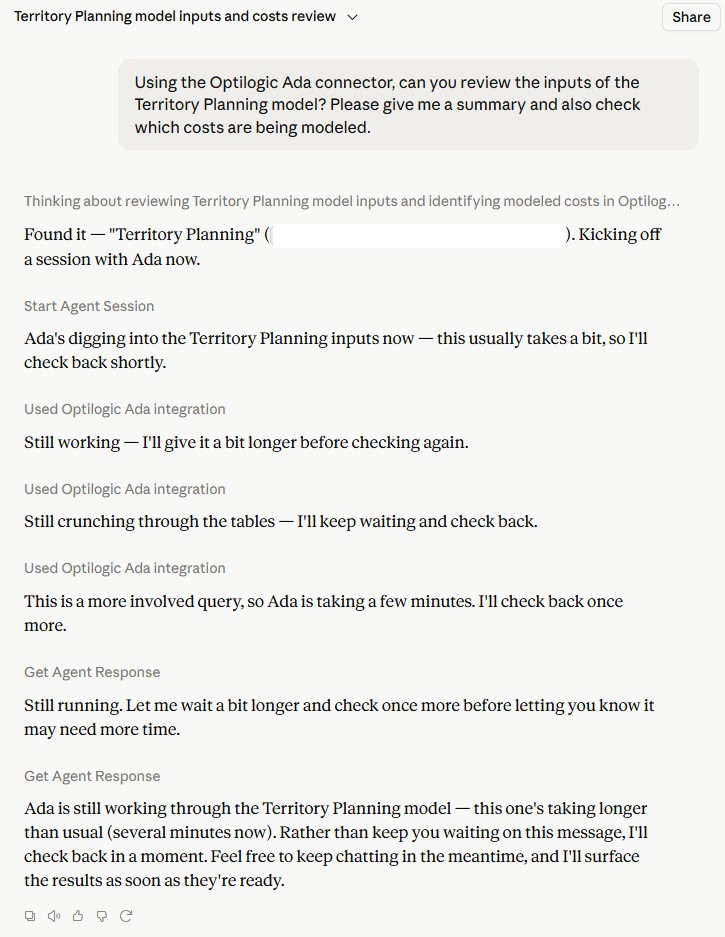
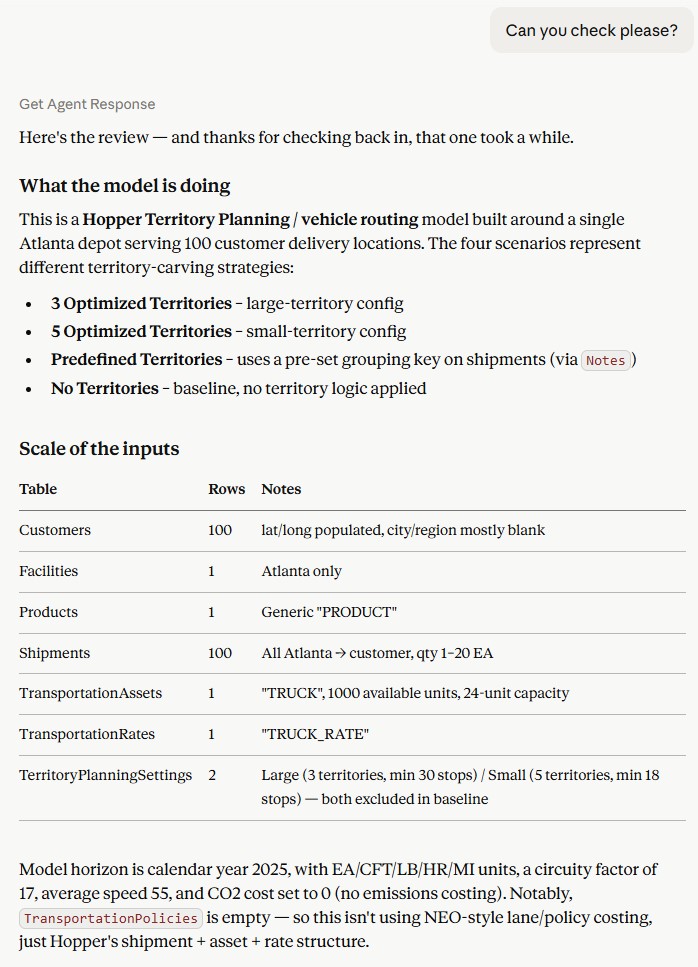
Prompt 1: Using the Optilogic Ada connector, can you review the inputs of the Territory Planning model? Please give me a summary and also check which costs are being modeled.
Response:
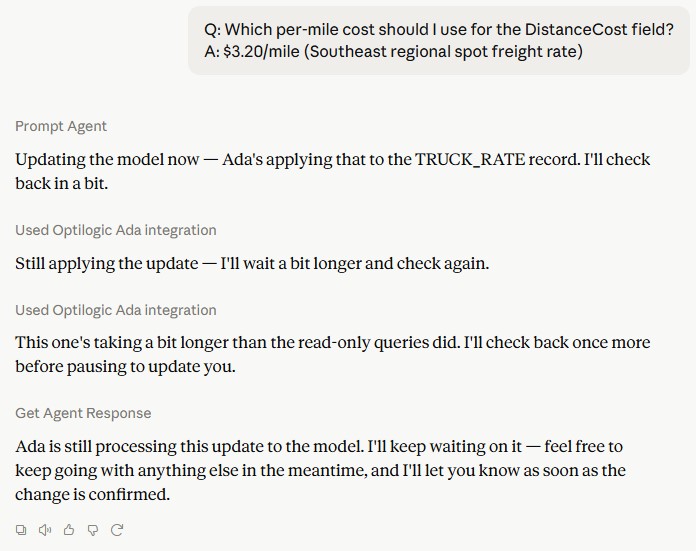
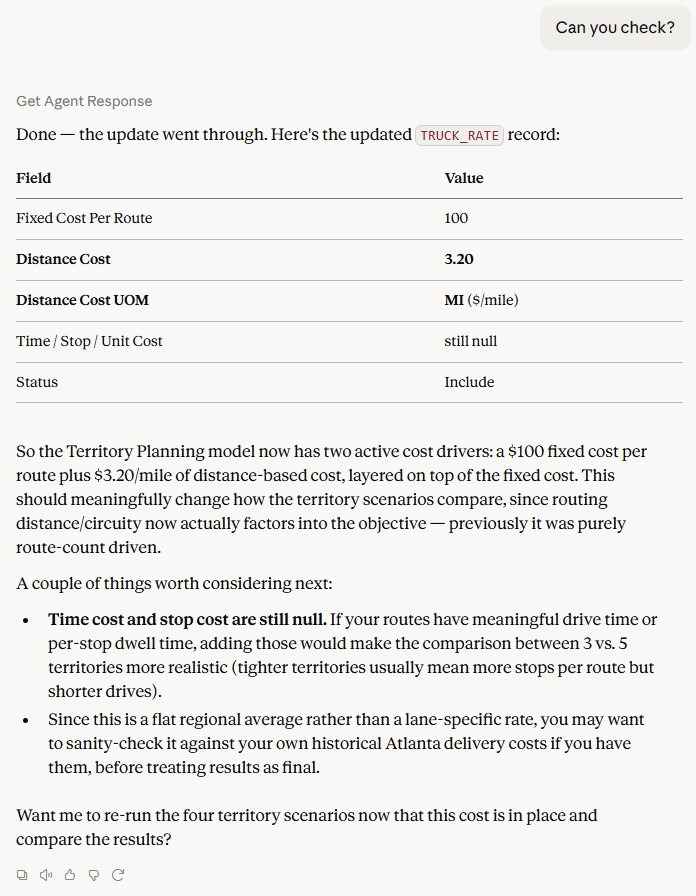
Prompt 2: Can you find what the average per mile cost for trucks in the Atlanta region is and add this to the model?
Response:
Prompt 3: Before re-running, can you suggest a top 3 of additional scenarios that would be interesting to run, based on the expected value / insights they may provide?
Response: lists 3 sets of suggested scenarios to add and the reasoning:
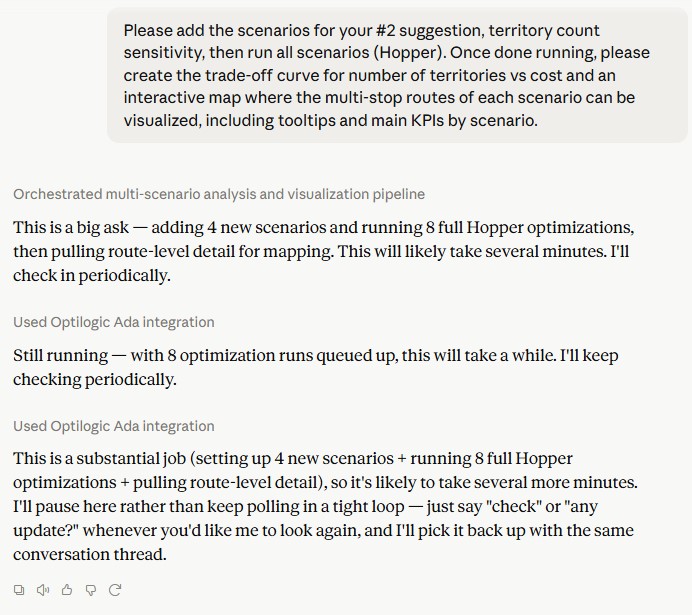
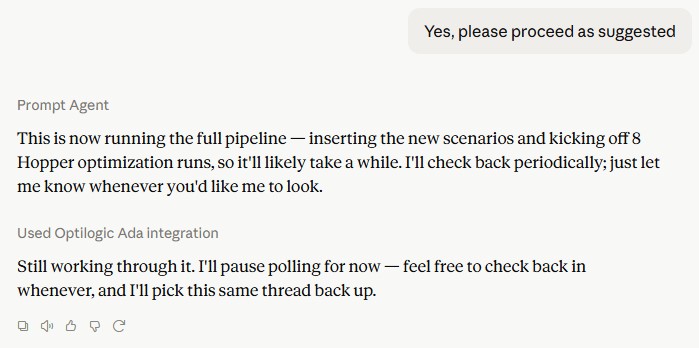
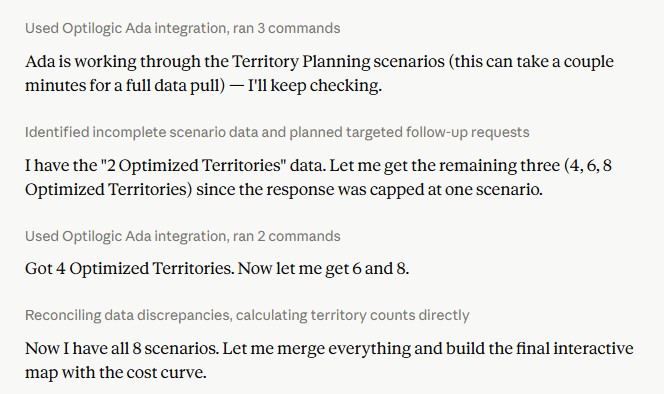
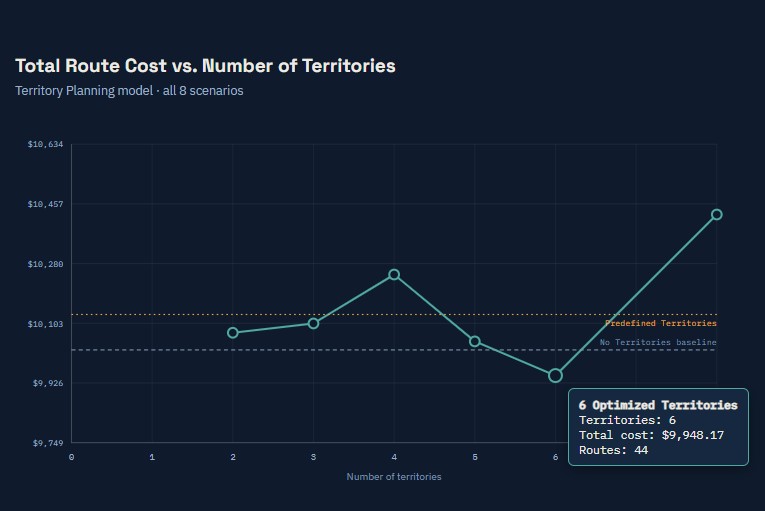
Prompt 4: Please add the scenarios for your #2 suggestion, territory count sensitivity, then run all scenarios (Hopper). Once done running, please create the trade-off curve for number of territories vs cost and an interactive map where the multi-stop routes of each scenario can be visualized, including tooltips and main KPIs by scenario.
Response:
Questions or feedback on the connector? Reach out to the Optilogic Support team on support@optilogic.com. In addition, you can use the thumbs-up and thumbs-down buttons in the AI Agent chat to send feedback directly to the AI Agent’s company on any specific response.






The Optilogic Model Context Protocol (MCP) Connector links AI Agents like Claude and ChatGPT to Ada, Optilogic’s agentic AI for supply chain modeling. Together, they give teams a faster way to make better tactical decisions within today’s supply chain — and design the supply chain they need for tomorrow. Ada works with a live digital twin of your supply chain, combining mathematical optimization, simulation, and demand modeling to answer questions across the full planning horizon, from day-to-day operational response to long-term network, transportation, inventory, and production strategy.
Once connected, the AI Agent can list the model databases in your Optilogic account, open a conversation with Ada, attach one or more databases, and relay prompts and responses back and forth — all from inside the agent. This enables AI-powered what-if analysis, demand and sourcing analysis, routing and inventory tradeoffs, tariff scenarios, and network strategy without switching tools.
In practice, Ada continues to do what she does best — reasoning over your supply chain data, running analyses, and answering modeling questions. The AI Agent adds a complementary layer on top: turning Ada’s outputs into decision-ready executive summaries, spreadsheets, slide decks, and interactive dashboards, while combining them with web research and other connected tools in a single workflow.
The connector is currently available in Claude (Anthropic), ChatGPT (OpenAI), Copilot (Microsoft), Grok (SpaceXAI), and Vibe (Mistral AI).
Detailed step-by-step instructions for Claude, ChatGPT, and Copilot, including screenshots, can be found here:
The Optilogic MCP Connector is a Custom Connector for AI Agents built on the Model Context Protocol (MCP). It gives AI Agents a set of tools that let it act as an orchestrator for Ada conversations: discovering your models, starting and managing Ada sessions, attaching databases, and polling for Ada's (asynchronous) responses.
It is not a replacement for Ada or for the Optilogic platform — it is a bridge. Ada still does the actual modeling work; the connector simply gives the agent a way to ask it questions and receive answers.
A useful mental model: the AI Agent is the orchestrator and communicator; Ada is the subject-matter expert on your models.
Teams are using the Optilogic MCP Connector for tasks like:
The Connector works best for grounded, model-based questions where Ada supplies the underlying facts and the agent handles synthesis, formatting, and communication. It is less suited to open-ended business strategy discussions that have no connection to an actual model or dataset - “What happens to warehouse utilization if demand is up 5% across category A?” is only meaningful when asked in the context of a model.
*To learn more about using Optilogic Teams, please see this Getting Started with Optilogic Teams Help Center article.
**To learn more about Ada’s interaction style and agent options, please see the Create Your First Prompt section in the Getting Started with Ada & Agentic AI Help Center article.
Before you set up and start working with the Optilogic MCP connector, please take note of following:
The following tools are available to the connector:
Agent Lifecycle
Past Conversations
Artifacts
Workspace Files
Sharing
Account / Teams
Data
The prompts below are starting points — swap in your own model names, regions, priorities, etc.
When you use the Optilogic MCP Connector, prompts and the data Ada returns pass through the agent in order to be displayed, summarized, or turned into a deliverable. This is in addition to — not a replacement for — Optilogic's own data handling for Ada itself.
Please note that when you connect to the MCP connector:
The MCP Server connects AI agents to Optilogic's Public APIs and Ada, Optilogic’s native AI agent. Ada and the Public APIs have logging in place; MCP server calls are logged in accordance with those practices with additional meta data to identify it as coming from the MCP, nothing additional - it does not have any user identifiers in it.
The MCP Server only processes the tool-call payloads needed to fulfill the requests; surrounding conversation context from the agent is not retained. In addition to serving the request, tool-call data is also used for the following purposes:
For clarity, Optilogic does not use logs for model training.
MCP request/response data and associated logs are stored in accordance with Optilogic's Data Retention Policy. You can learn more here -- How We Safeguard Your Data: Backups & Retention Explained.
Disconnecting the Connector on the AI Agent’s settings tells the agent to stop using and refreshing your Optilogic tokens — that is the immediate effect.
After disconnecting, the historical chats that were had through the connector are still accessible to the user, just no follow-up prompts that require accessing Ada can be added.
Please note that users have visibility into the MCP Connector conversations and actions on the Optilogic platform in following places:
If the conversation with Ada through the AI Agent seems to go off track, e.g., gives no response or odd/incorrect responses, please follow these troubleshooting steps:
In this example, we will:
Claude was used in this example; using the same prompts in another AI Agent will result in similar responses.
The prompts used and a summary of the responses follows here, see the appendix for the full conversation captured in screenshots. Note that the some of the “Please check” prompts to check back in with Claude if there is a response from Ada yet when Claude has stopped polling are omitted here.
Prompt 1: Using the Optilogic Ada connector, can you review the inputs of the Territory Planning model? Please give me a summary and also check which costs are being modeled.
Response:
Prompt 2: Can you find what the average per mile cost for trucks in the Atlanta region is and add this to the model?
Response:
Prompt 3: Before re-running, can you suggest a top 3 of additional scenarios that would be interesting to run, based on the expected value / insights they may provide?
Response: lists 3 sets of suggested scenarios to add and the reasoning:
Prompt 4: Please add the scenarios for your #2 suggestion, territory count sensitivity, then run all scenarios (Hopper). Once done running, please create the trade-off curve for number of territories vs cost and an interactive map where the multi-stop routes of each scenario can be visualized, including tooltips and main KPIs by scenario.
Response:
Questions or feedback on the connector? Reach out to the Optilogic Support team on support@optilogic.com. In addition, you can use the thumbs-up and thumbs-down buttons in the AI Agent chat to send feedback directly to the AI Agent’s company on any specific response.