

Ada Credits are used to access Ada and other AI-powered capabilities in the Optilogic platform. Credits are provisioned as a shared pool at the organization level, so eligible users draw from the same balance.
This article explains how Ada Credits work, where to see your organization’s usage, what happens as credits are consumed, and what to do when an organization’s credits are exhausted.
Ada uses large language models (LLMs) to process requests and generate responses. LLMs use tokens as part of that process. Tokens and Ada Credits are related, but they are not the same:
Any conversation with Ada — whether in the Ada chat interface, through an AI Agent via the Optilogic MCP Connector, or as a DataStar Run AI Agent task — consumes Ada Credits. This applies to the entire interaction, not select messages within it. Attaching a database or file to a conversation does not carry any additional cost on its own.
Does not consume Ada Credits:
Consumes Ada Credits:
Ada Credit consumption is calculated per response, not per conversation as a whole. The number of credits a response consumes depends on:
Because of this, credit consumption varies from response to response, even for requests that look similar on the surface. This is expected behavior, not an error — the same way token usage varies by LLM request. Optilogic does not publish a fixed credit cost per response or per task, since it depends on the nature of the work being done.
When an AI Agent such as Claude or ChatGPT uses the Optilogic MCP Connector to interact with Ada as part of completing a task, the work performed through that interaction contributes to Ada Credit usage.
MCP Connector usage can therefore consume Ada Credits. This is separate from the AI Agent’s own token usage.
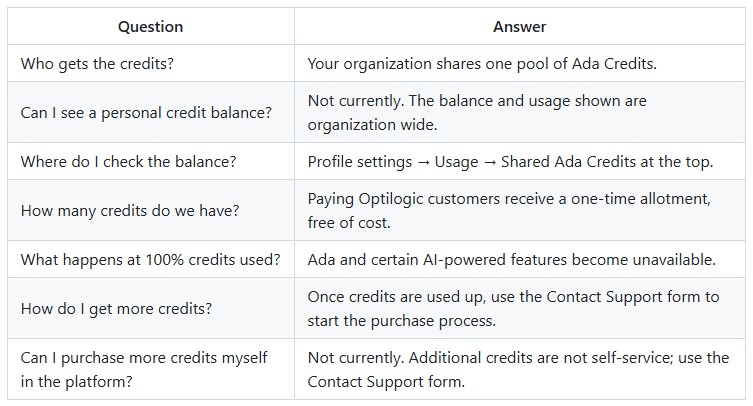
Ada Credits are provisioned as a shared pool for your organization rather than as individual allocations for each user or team.
If your organization is a paying Optilogic customer, it receives a one-time credits allotment, free of cost. Once credits are used up, more can be purchased, see below how.
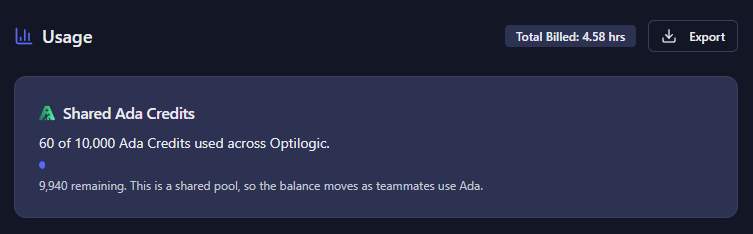
You can view your organization’s Ada Credit balance from your profile settings.
Because Ada Credits are shared at the organization level, the usage shown represents organization-wide usage, not just your individual usage.
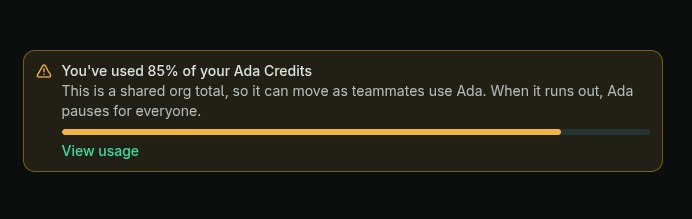
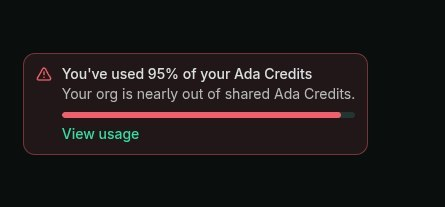
Ada displays notifications directly in the Ada chat interface as your organization approaches its credit limit.
You will see warning banners when your organization reaches 75%, 85%, 95%, and 100% of its available credits. The banners change as usage increases so that you know when your organization is approaching its limit.
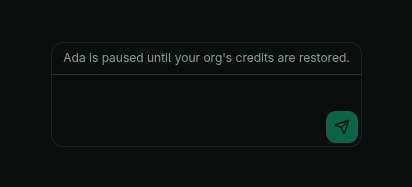
Once your organization’s Ada Credits are exhausted, you can no longer use Ada. The Ada chat interface displays a notification indicating that the organization’s credits have been used and provides a Contact Support option.
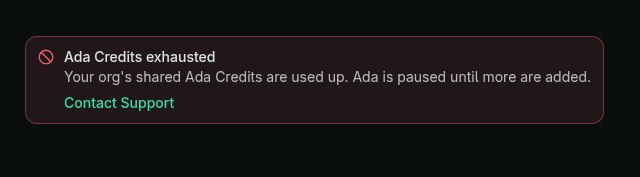
The following features are affected when Ada Credits are exhausted:
Leapfrog is not affected by Ada Credit exhaustion. Users can continue to use Leapfrog within DataStar and Cosmic Frog.
If your organization needs additional Ada Credits, use the Contact Support link shown in the banner saying 100% of credits have been used, see the first screenshot in the previous section.
Support will review and route the request as appropriate. If additional credits are purchased, the organization’s credit pool is updated by Optilogic, and the new balance becomes available on the platform.
Additional credits cannot currently be purchased or added directly within the platform.

Ada Credits are used to access Ada and other AI-powered capabilities in the Optilogic platform. Credits are provisioned as a shared pool at the organization level, so eligible users draw from the same balance.
This article explains how Ada Credits work, where to see your organization’s usage, what happens as credits are consumed, and what to do when an organization’s credits are exhausted.
Ada uses large language models (LLMs) to process requests and generate responses. LLMs use tokens as part of that process. Tokens and Ada Credits are related, but they are not the same:
Any conversation with Ada — whether in the Ada chat interface, through an AI Agent via the Optilogic MCP Connector, or as a DataStar Run AI Agent task — consumes Ada Credits. This applies to the entire interaction, not select messages within it. Attaching a database or file to a conversation does not carry any additional cost on its own.
Does not consume Ada Credits:
Consumes Ada Credits:
Ada Credit consumption is calculated per response, not per conversation as a whole. The number of credits a response consumes depends on:
Because of this, credit consumption varies from response to response, even for requests that look similar on the surface. This is expected behavior, not an error — the same way token usage varies by LLM request. Optilogic does not publish a fixed credit cost per response or per task, since it depends on the nature of the work being done.
When an AI Agent such as Claude or ChatGPT uses the Optilogic MCP Connector to interact with Ada as part of completing a task, the work performed through that interaction contributes to Ada Credit usage.
MCP Connector usage can therefore consume Ada Credits. This is separate from the AI Agent’s own token usage.
Ada Credits are provisioned as a shared pool for your organization rather than as individual allocations for each user or team.
If your organization is a paying Optilogic customer, it receives a one-time credits allotment, free of cost. Once credits are used up, more can be purchased, see below how.
You can view your organization’s Ada Credit balance from your profile settings.
Because Ada Credits are shared at the organization level, the usage shown represents organization-wide usage, not just your individual usage.
Ada displays notifications directly in the Ada chat interface as your organization approaches its credit limit.
You will see warning banners when your organization reaches 75%, 85%, 95%, and 100% of its available credits. The banners change as usage increases so that you know when your organization is approaching its limit.
Once your organization’s Ada Credits are exhausted, you can no longer use Ada. The Ada chat interface displays a notification indicating that the organization’s credits have been used and provides a Contact Support option.
The following features are affected when Ada Credits are exhausted:
Leapfrog is not affected by Ada Credit exhaustion. Users can continue to use Leapfrog within DataStar and Cosmic Frog.
If your organization needs additional Ada Credits, use the Contact Support link shown in the banner saying 100% of credits have been used, see the first screenshot in the previous section.
Support will review and route the request as appropriate. If additional credits are purchased, the organization’s credit pool is updated by Optilogic, and the new balance becomes available on the platform.
Additional credits cannot currently be purchased or added directly within the platform.