
Getting Started with Dendro

Introduction

Dendro is Optilogic's simulation-optimization engine. A prime use case for Dendro is inventory policy optimization.

Simulation-optimization is a method in which simulation is leveraged to intelligently explore alternative configurations of a system. Dendro accomplishes this data-driven search by layering a genetic algorithm on top of simulation; simulation is the core of a Dendro model. Before a Dendro study can begin, a simulation model (run with the Throg engine) must be built, verified, and validated.

Simulation-optimization enables us to ask and answer questions that we cannot address in traditional network optimization or simulation alone.

In this article, we will explore:

  • Dendro methodology, differentiators from other engines, best practices
  • Dendro modeling requirements, including notes on establishing a Baseline simulation model
  • Running a Dendro model
  • Dendro results interpretation

Dendro Capability

The modeling methods of network optimization (Neo), discrete event simulation (Throg), and simulation-optimization (Dendro) address different supply chain design use cases.
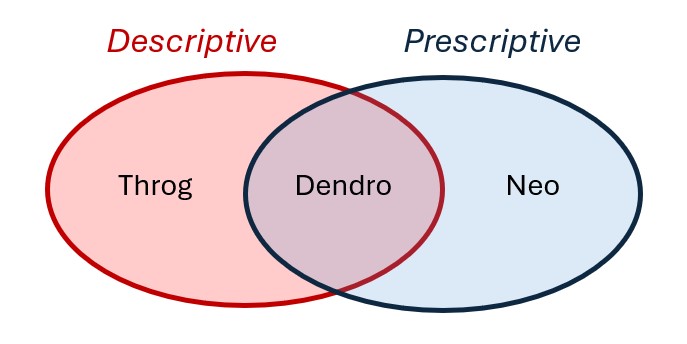
  • Network optimization leverages mixed integer linear programming to prescribe network changes that achieve an objective (e.g., maximizing total profit) while satisfying constraints. Network design decisions are made at an aggregated level: products and/or customers with similar characteristics may be grouped, demand and decisions occur on a periodic basis (e.g., annual customer assignments, monthly production and product flow). Temporal data (e.g., production rates) is often less impactful in these models. A single solution is provided. Because model inputs are aggregated into time buckets, evaluation of business rules and policies that drive events in the operation of the supply chain are difficult to evaluate (e.g., inventory reorder points and replenishment logic, daily or hourly processing capacity, mode selection and shipment-building logic, etc.).
  • Discrete event simulation describes network performance. Network structure and operating policies (business rules) are given as model inputs and the resulting supply chain events, each with an associated timestamp in the model horizon, are used to derive detailed insights. Network elements are not aggregated: customer demand occurs and is sourced/filled at an order-line level, individual shipments are built, replenishment orders are generated in response to inventory policies, stockouts and surplus inventory can be observed by site-product, bottlenecks and daily work center utilization can be studied, etc. Notably, simulation enables modelers to study customer service (on-time-in-full rates, quantity fill rates, backorders, lost sales, etc.). Temporal data is a key element of simulation modeling as it shapes the event progression and resulting performance metrics. Variability can be incorporated (demand, supply, travel times, etc.), enabling the study of network robustness subject to uncertainty and providing visibility into a variety of possible outcomes.
  • Simulation-optimization combines the unique value of simulation (granularity, temporal insights, performance evaluation under uncertainty) with prescriptive recommendations, marrying "what happens to my system's performance if...?" and "how can I improve the system?" Dendro accomplishes this by iteratively altering model inputs, simulating and evaluating the resulting network performance, and leveraging high-performing scenarios to generate new ones. The modeler tells Dendro which aspects of the supply chain are candidates for adjustment and defines a utility function by which Dendro evaluates scenario performance; often, this is a function of both cost and service. In contrast with the structural decisions made in a Neo model (customer assignments, facility location, production strategy, etc.), Dendro lends itself to improving business rules within an existing network structure. A single Dendro run explores hundreds of simulation scenarios and reports the resulting performance to the modeler, providing a range of solutions to consider. The ability to incorporate variability in Throg models extends to Dendro.

Use Case Comparison

A prime use case for Dendro is inventory policy optimization: right-sizing inventory levels by changing inventory policy parameters (reorder points, reorder quantities, etc.) with the goal of balancing cost and service. Dendro's foundation in simulation minimizes the abstraction of cost accounting, service metrics, and the business rules surrounding inventory management. Dendro provides actionable inventory policy recommendations and data-driven evidence to support those changes.

Neo (Network Optimization): Strategic Stocking Strategy Decisions

Primary Focus: Determining where inventory should be positioned across the network.

Use Case: Network design decisions that include high-level inventory considerations -- such as stocking locations, target turns, and working capital trade-offs.

How It Handles Inventory:

  • Uses abstracted inventory metrics (e.g., inventory turns, carrying cost assumptions) rather than time-based calculations.
  • Considers capacity and flow constraints at a strategic level.
  • Answers questions like:
    • Which facilities should stock which products?
    • What is the right balance between centralization and responsiveness?
    • How do inventory turns or holding cost assumptions affect network design?

Throg: Simulation of Inventory Policies

Primary Focus: Testing and observing how specific inventory policies perform under realistic operational dynamics.

Use Case: Evaluate inventory control logic (e.g., reorder point, order quantity, order-up-to level) in a time-based simulation environment.

How It Handles Inventory:

  • Simulates daily inventory behavior by site-product, capturing demand variability, lead times, and replenishment timing.
  • Measures performance in terms of costs, service levels, and on-hand inventory patterns.
  • Answers questions like:
    • How does a specific reorder policy perform under variable demand?
    • What are the service implications of adjusting the reorder point?
    • How does safety stock behave over time in different facilities?

Dendro: Optimization of Inventory Policies

Primary Focus: Finding better inventory policies that balance cost and service, combining Throg's simulation accuracy with an optimization engine.

Use Case: Adjust inventory policy parameters (e.g., reorder point, reorder quantity, policy type) to find configurations that deliver the best cost-service trade-offs.

How It Handles Inventory:

  • Uses genetic algorithm optimization to explore thousands of policy combinations.
  • Evaluates each configuration with Throg-based simulation to accurately capture costs and service levels.
  • Uses utility curves to quantify trade-offs between cost and service.
  • Answers questions like:
    • What inventory parameters yield the best cost-service balance?
    • Is there a better inventory policy type for certain products or facilities?
    • How much cost reduction is possible without service degradation?

While this comparison highlights how each engine contributes to inventory management decisions, the specific use case covered in this article is inventory policy optimization -- using Dendro to balance total inventory carrying cost and network-level customer service (measured as quantity fill rate).

That said, Dendro's capabilities extend far beyond inventory. The same framework of input factors, output factors, and utility functions can be applied to a wide range of optimization problems -- and its utility components are not limited to just cost and service. Dendro can optimize for any measurable performance metric that matters to your business.

Prerequisites

As stated above, a Dendro study cannot be initiated without first establishing a Throg simulation model; a Dendro project should be thought of as a simulation project with an added layer of analysis. Careful Throg model verification and validation are part of a simulation project and are therefore a prerequisite for a Dendro study. To learn how to set up a Throg simulation model, we recommend reviewing the following on-demand training content:

In addition, Throg-specific articles can be found here on the Help Center.

Throg scenario results serve as one piece of input for a Dendro run. Identification of the appropriate Throg scenario to apply Dendro to depends on the goal of the Dendro study. The network structure under which the modeler is seeking to optimize inventory policies must be represented in a Throg scenario.

Inventory policies are required to run a simulation scenario. In some cases, a modeler may not have existing inventory policies to utilize in a baseline scenario. Similarly, simulating a proposed network structure requires first setting inventory policies for new site-product combinations. To set policies, we recommend utilizing the Demand Classification utility in Cosmic Frog's Utilities module.
  • The utility uses the following modeling elements as inputs: simulation sites (Facilities, Customers), products, inventory policy structure (Inventory Policies entries for relevant site-product combinations), and customer orders.
  • The output of the utility is to populate the following 2 output tables:
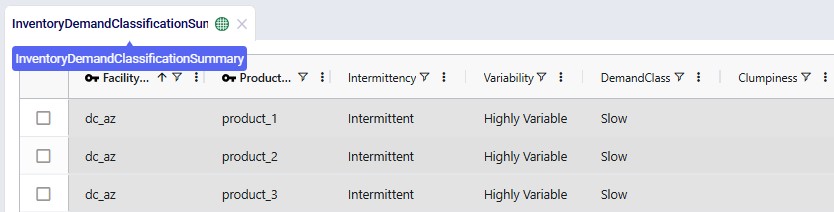
    • Inventory Demand Classification Summary: demand classification results by scenario, site, product:
    • Inventory Policy Data Summary: suggested inventory policies by scenario, site, product:

Suggested inventory policies from the Inventory Policy Data Summary output table can then be employed in the Inventory Policies input table. For the sake of testing while the Throg model is being built and verified, users may find it helpful to initially leverage simple placeholder inventory policies where policies are unknown or not yet in existence (e.g., (s,S) = (0,0)).

Note: if the modeler's goal is to set policies for a proposed network structure, it is recommended to first optimize Baseline inventory policies. This enables the modeler to compare potential performance of the existing network structure (i.e., performance under optimized policies) with performance of the proposed network structure. This is especially encouraged if the Demand Classification utility was used to set Baseline inventory policies.

Before running Dendro to optimize inventory policies, the modeler must consider

  1. The scope of the optimization: which parameters are candidates for adjustment?
    1. Are the inventory policies for all site-products in the network open for optimization? If not, what subset is being targeted?
    2. What policy approaches or adjustments have already been tried in practice? Were these attempts successful or not? What lessons were learned and what new hypotheses arose?
  2. The objectives of the optimization: what tradeoffs are we seeking to balance?
    1. Example: balance inventory holding cost with customer service (e.g., quantity fill rate).

The answers to these questions will inform the design of Dendro model inputs.

Model Inputs and Configuration

Every Dendro optimization begins with a well-defined model foundation and input configuration.
This configuration tells Dendro three essential things:

  1. What it can change -- the input factors or decision levers.
  2. How it will measure success -- the output factors or KPIs.
  3. How it should explore possibilities -- the Dendro technology parameters or Genetic Algorithm (GA) settings.

Together, these define the search space and fitness criteria that drive optimization.

Start with Your Throg Model

Dendro builds directly on your validated Throg simulation model, which serves as the environment for its optimization runs.
All Throg input tables -- facilities, customers, products, and policies -- are carried into Dendro.

For inventory-focused optimizations, the Inventory Policies input table is most critical.
It defines policy types and parameters such as reorder points and order-up-to levels. These become natural candidates for Dendro input factors.
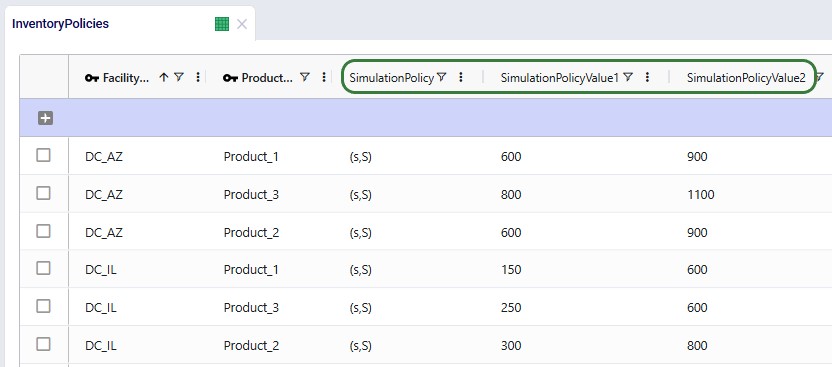
Screenshot of an Inventory Policies input table from a Throg model, highlighting the columns which are the potential Dendro input factors.

Input Factors - What Dendro Can Vary

The Input Factors input table tells Dendro which parameters it can adjust during optimization. Each input factor represents a decision lever -- for instance, a reorder point or a policy type -- that Dendro will tune to seek better outcomes.
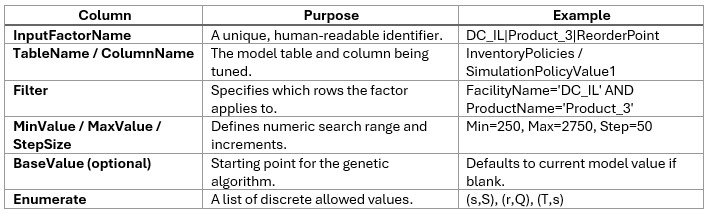
Key Columns

Defining the Search Space

The search space defines both the breadth (how wide Dendro can explore) and the granularity (how detailed the exploration is).

  • If the range is too narrow, Dendro cannot escape local optima and will only make incremental improvements.
  • If it is too wide, runtime and noise increase, making convergence slow and less meaningful.

The goal is a "computationally tractable search space" -- broad enough for Dendro to discover impactful alternatives but focused enough to identify patterns efficiently.
Practical guidance:

  • Include only parameters that materially influence cost, service, or flow.
  • Aim for 5-10 discrete levels per numeric factor (or at least 3 options for enumerated factors).
  • Keep total possible combinations per generation within a practical bound (approx 10^5).
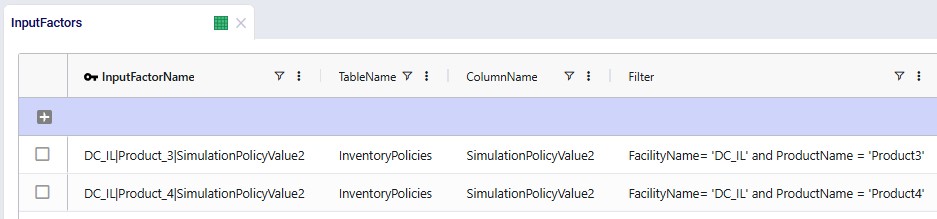
These 2 screenshots display two example rows and illustrate the input factors table used in Cosmic Frog. The input factors configure Dendro search parameters for DC_IL InventoryPolicies related to products 3 and 4. For product_3, the policy assigns a base value of 500, indicating that Dendro will use 500 as the starting point for this parameter. In contrast, product_4 does not specify a base value and will instead use the value found in the current inventory policies input for its initial search. Both parameters correspond to the second parameter in the simulation policies—if the inventory policy is (s, S), the parameters refer to S, the order-up-to quantity; if it is (R, Q), they refer to Q, the reorder quantity.

Learn all about input factors in the "Dendro: Input Factors Guide".

Output Factors - How Dendro Measures Success

Once Dendro knows what it can vary, it needs to know how to judge success. The Output Factors input table defines the KPIs Dendro will use to evaluate each scenario and how they are scored.
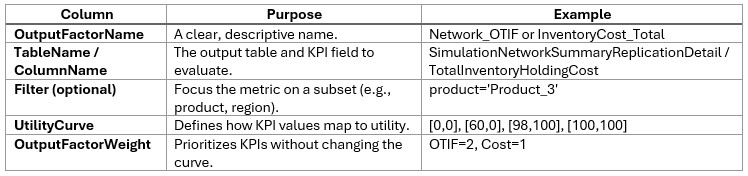
Core Concepts

  • Utility Curves: Map KPI values to a normalized 0-100 "utility" scale.
  • Weights: Determine the relative importance of each KPI in the total fitness score.

Key Columns

Designing Utility Curves

Utility curves express your business preferences:

  • Higher service -> higher utility.
  • Lower cost -> higher utility.
  • [Level, Utility] pairs form a piecewise linear relationship.

Examples:

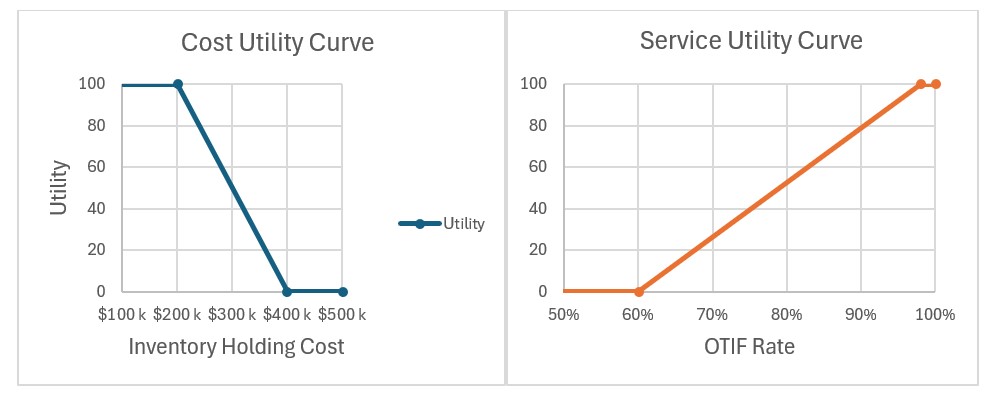
  • OTIF (service): [0,0], [60,0], [98,100], [100,100]
  • Inventory Holding Cost: [0,100], [200000,100], [400000,0], [500000,0]
Two line charts are displayed -- a declining cost curve (left) and a rising OTIF utility curve (right). These visuals illustrate the curves referenced in the preceding examples.

Tip: Curves should span the expected simulation range (e.g., 5th-95th percentile of early results). Dendro will stretch the utility curves if results fall outside the range, which can distort scoring.
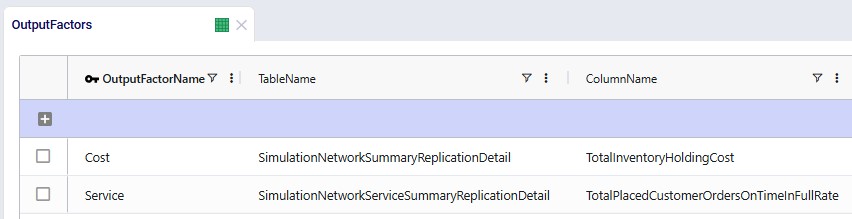
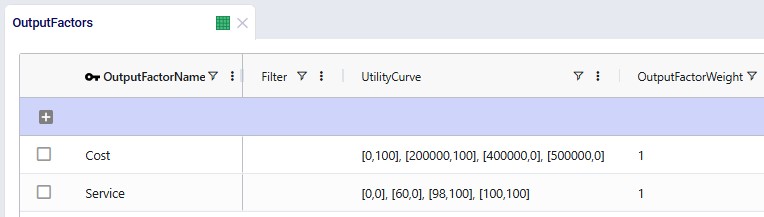
These 2 screenshots demonstrate the configuration of our examples within the Output Factors input table. The utility curves correspond directly to those presented above. Each row has been assigned a weight of 1, ensuring that Cost and Service utilities are evaluated with equal importance.

Balancing KPI Weights

Weights dictate how much influence each KPI has in Dendro's overall fitness score calculation.
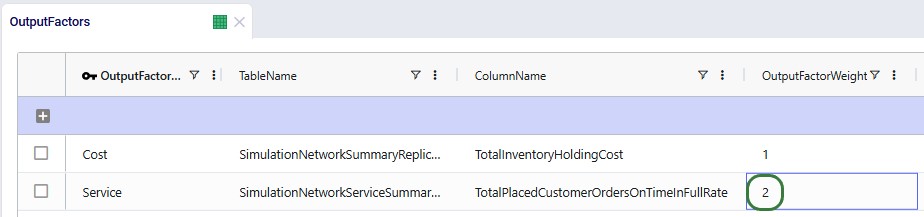
  • Example: If maintaining service is twice as important as cost reduction, set Service (=OTIF) weight = 2, Cost weight = 1:
  • Review the utility contribution breakdown after each run (using the Simulation Evolutionary Algorithm Output Factor Report output table, see also further below) -- dominant KPIs may signal over-weighting.

Best Practices for Output Factors

  • Align with business goals: Start with KPIs that drive key outcomes --think of cost, service, and risk.
  • Shape curves with real data: Base curves on observed KPI ranges, not arbitrary targets.
  • Encourage exploration: Avoid steep cliffs or overly flat curves.
  • Check for balance: No single KPI should dominate the fitness score.

Learn more about output factors in the "Dendro: Output Factors Guide".

Quick Start Workflow

  1. Verify and validate your Throg model. Ensure that model logic aligns with business rules by reviewing transactional outputs; start with a small version of the model. Confirm baseline KPIs like OTIF and cost behave realistically.
  2. Define Input Factors. Identify parameters to vary, set ranges and filters.
  3. Define Output Factors. Choose KPIs, design utility curves, and apply weights.
  4. Tune Dendro technology parameters. Set number of generations, population size, and search settings.
  5. Run a small test. Use a few generations and narrow ranges to validate setup before scaling up.
  6. Review early results. Adjust utility curves, ranges, or weights as needed for next iteration.

A well-scoped input configuration defines the playing field for Dendro's optimization.
By combining realistic input ranges, balanced KPI scoring, and robust run settings, you enable Dendro to explore intelligently finding high-performing, data-backed configurations without unnecessary computation.

Running Dendro

Dendro is built to explore a wide range of supply chain configurations using your verified and validated Throg simulation scenario(s) as the base. Running a Dendro job is straightforward, but there are a few important steps and best practices to keep in mind to ensure smooth operation.

Launching a Dendro Run

To get started:

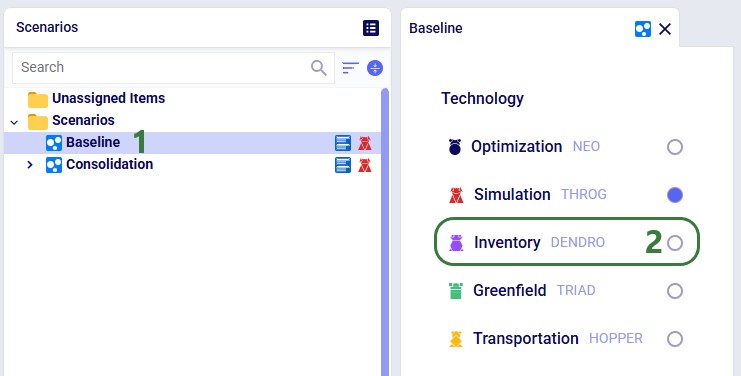
  1. Update the technology type of the target scenario from Throg to Dendro in the Scenario Manager. This tells Cosmic Frog to run the Dendro engine rather than the Throg engine (see also screenshot below).
  2. After clicking on the green Run button, on the Run Settings modal that comes up, select the Dendro scenario for which you would like to optimize inventory policies.
    The outputs of this scenario serve as the foundation for Dendro's genetic algorithm search.
  3. Use default Dendro Technology Parameters (also known as Model Run Options, MROs)
    For your first run, you do not need to modify the technology parameters (see also screenshot below). The default settings are typically sufficient. However, it is recommended to always set a Dendro Timeout value before running.
    • Dendro Timeout: This timeout defines the maximum simulation time allowed per scenario. If it is not set (or set too long), a single long-running or "stuck" scenario can prevent the entire genetic algorithm from progressing to the next generation, effectively halting your Dendro run.
    • Recommendation: Set the Dendro Timeout to a value longer than the runtime of your baseline Throg simulation. This ensures that all scenarios complete within reasonable limits while still allowing Dendro to fully explore the solution space.
    • How to set: this parameter currently needs to be set by using a SQL insert statement into the ModelRunOptions table of a Cosmic Frog model, which can be done using the SQL Editor application. You can use following as the SQL statement, where you can update the last value (3600 for 1 hour in the statement below) to your desired timeout time in seconds:
INSERT INTO anura_2_8.modelrunoptions (
  datatype, 
  description, 
  option, 
  status, 
  technology, 
  uidisplaycategory, 
  uidisplayname, 
  uidisplayorder, 
  uidisplaysubcategory, 
  value)
VALUES (
  'double', 
  'Time limit (seconds) on individual Dendro scenarios', 
  'DendroTimeout', 
  'Include', 
  '[DENDRO]', 
  'Basic', 
  'Dendro Timeout', 
  '', 
  '', 
  '3600');

  1. Let Dendro generate scenarios
    The engine will automatically generate and execute scenarios based on the input and output factors you configured.
This screenshot shows the Scenarios module in Cosmic Frog. 1) The Baseline scenario is selected, which is currently a simulation (Throg) scenario. 2) To switch to a Dendro scenario, click on the round checkbox here.
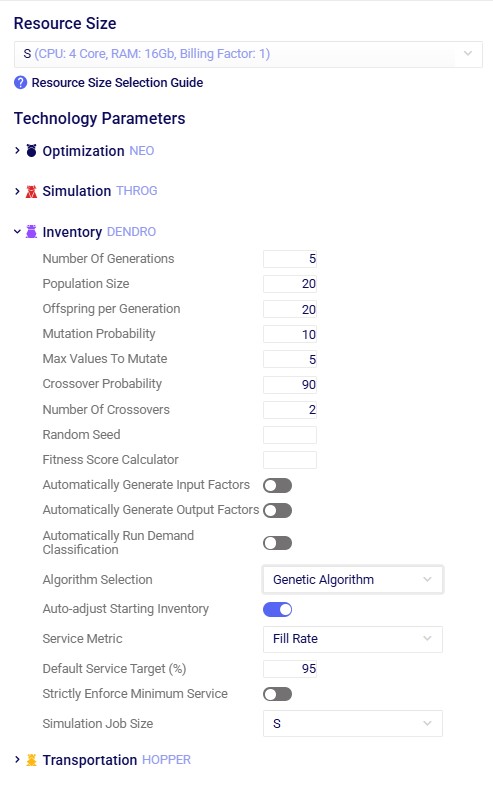
Run Settings screen showing all expanded Dendro technology parameters.

Configuring Dendro technology parameters

The technology parameters define how Dendro explores the solution space -- including how many scenarios to generate, how they evolve, and how long each simulation may run. As mentioned above, the default values are typically sufficient for a first run. The following are the main parameters that users may want to update in case their defaults are not suitable.

Key Settings

  • Number of Generations
    • Defines how many rounds of scenario evolution Dendro performs.
    • More generations = deeper search, longer runtime.
  • Number of Genes per Generation
    • The number of scenarios evaluated per generation (population size).
  • Number of Offspring
    • The number of new scenarios created through crossover and mutation.
    • The remainder of the population is filled by carrying over top performers.

See also more detailed explanations of all Dendro technology parameters here.

Tuning Guidance

Use these principles to fine-tune your technology parameters:

  • If results are not converging, increase Number of Generations or narrow input ranges.
  • If convergence happens too early, reduce generations or increase search diversity (via mutation probability).
  • If improvement stalls:
    • Add or refine Input Factors.
    • Adjust Output Factor Weights to reflect business priorities.
  • Remember: there may be features of the system that inherently constrain the optimization potential. If iterating on Dendro inputs is not leading to desired results, root cause analysis should be explored to identify limiting factors in the network design.

Monitoring Genetic Algorithm Progress

In the course of a Dendro run, the system launches many scenarios for each generation. This is the expected behavior for the genetic algorithm.

Key tips for tracking progress:

  • Run Manager application
    Monitor the run's progress in the Run Manager application on the Optilogic platform.
  • Scenario naming format
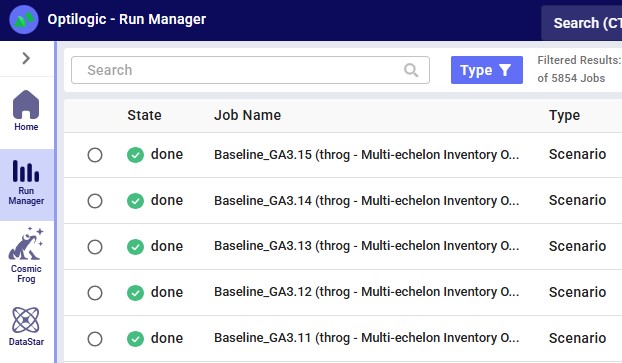
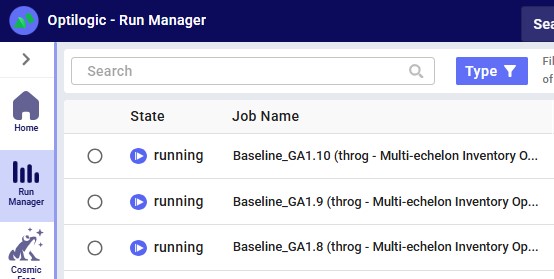
    Each job is automatically named using the pattern: <ThrogScenarioName>_GA<generation#>.<scenario#>
    • Example: 'Baseline_GA1.12' represents a variation of the Baseline scenario (scenario 12 in generation 1) created by Dendro.
  • Avoid editing input tables mid-run
    Do not make changes to model input tables while a Dendro run is in progress. Each generated scenario uses the most recent input data values at the time of generation, so mid-run edits may cause inconsistent results.
  • Canceling a run
    • To stop a Dendro run, cancel the parent job from the Run Manager (see below).
    • The current generation will finish unless you also cancel each scenario manually.
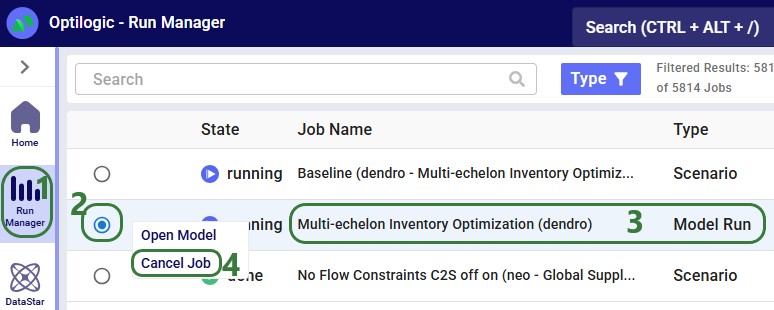
The Run Manager (1) immediately after initiating a Dendro run; the top row is the "Parent" Dendro run of the scenario named Baseline, and the bottom row is the general model run that starts the Dendro Parent Run job. The latter can be cancelled by selecting it (2), right-clicking on it, and then choosing "Cancel Job" (4).
This screenshots shows completed "Child" Dendro runs from generation 3, specifically runs 11 to 15, as indicated by their names.
Ongoing runs of the 1st Generation's 8th, 9th, and 10th scenarios.

Running Dendro is as simple as selecting the engine and starting from a validated Throg model. From there, you can monitor progress, let the algorithm evolve scenarios, and apply best practices for canceling or troubleshooting runs. By following these guidelines, you ensure that Dendro can efficiently search for high-performing supply chain configurations.

To understand how the Dendro genetic algorithm works in detail, please see "Dendro: Genetic Algorithm Guide".

Analyzing Dendro Outputs

When a Dendro run completes, it produces a rich set of outputs that capture the results of the genetic algorithm's search. These outputs represent the different supply chain configurations that were explored, along with how each one performed according to the objectives you defined (e.g., cost, service level, or a balance of both).

Rather than giving you a single "right" answer, Dendro presents a spectrum of high-performing options. As the modeler, you use these results to evaluate trade-offs and select the scenarios that best align with your business goals.

How Dendro Evaluates Scenarios

During a run, Dendro evaluates each candidate scenario by:

  • Recording input factors (e.g., inventory policies) that define the configuration.
  • Measuring output factors (e.g., total inventory cost, OTIF) and scoring them using your utility curves.
  • Combining scores into an overall fitness score, which represents how "fit" or desirable that scenario is according to your priorities.

Dendro records the input factors and output factors of every scenario it evaluates. However, only the top 20 highest-performing scenarios are saved as named scenarios in your model, making them easier to access and reuse.

Reviewing the Best Scenarios

After the run, the top 20 scenarios are automatically saved in your model. These represent the best balances of trade-offs Dendro discovered within your defined search space.

Each scenario has an overall fitness score, calculated as the weighted sum of its output factor utility values. A higher score means the scenario performed well according to the priorities you set (e.g., balancing low cost with high service).

Tip: The "best" scenario numerically may not always be the most practical operationally. Always interpret results in context.

Where to Find Key Results

  1. Simulation Evolutionary Algorithm Summary output table
    • Lists all evaluated scenarios, sorted by overall fitness score.
    • Provides summary stats such as overall fitness score, generation number, and scenario name.
    • The top scenarios are also promoted to your model's scenario list (with names like Baseline_GA20.19).
  2. Simulation Evolutionary Algorithm Input Factor Report output table
    • Shows which input factor values (e.g., reorder points, safety stock levels) were used in each scenario.
  3. Simulation Evolutionary Algorithm Output Factor Report output table
    • Breaks down utility contributions for each scenario by output factor.
    • Helps you see why a scenario performed well, and where trade-offs occurred.
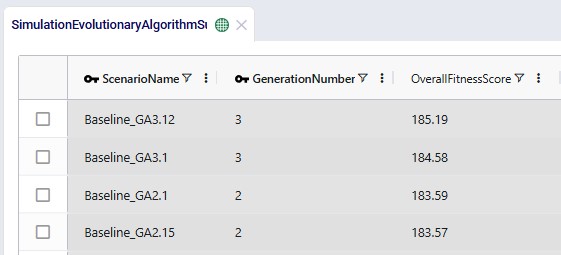
The Simulation Evolutionary Algorithm Summary table in the output tables section, sorted by the Overall Fitness Score Column, highlighting the top scenarios based on calculated fitness scores.
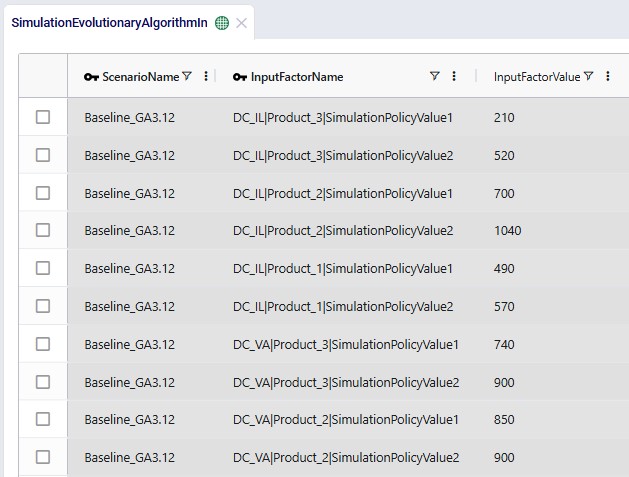
The Simulation Evolutionary Algorithm Input Factor Report output table for the 3rd Generation, 12th Scenario—a scenario noted for its high performance—provides detailed inventory policy configurations as illustrated in the table.
The Simulation Evolutionary Algorithm Output Factor Report output table for the same scenario displays the metrics associated with the output factors in the Value column, while the Weighted Score column shows their corresponding calculated scores.

Tips for Reviewing Results

  • Compare across generations: Check whether performance leveled off or improved across iterations.
  • Look for patterns: See if the top scenarios cluster around certain cost/service ranges.
  • Review more than just #1: If utility differences are small, multiple scenarios may be equally worth considering.
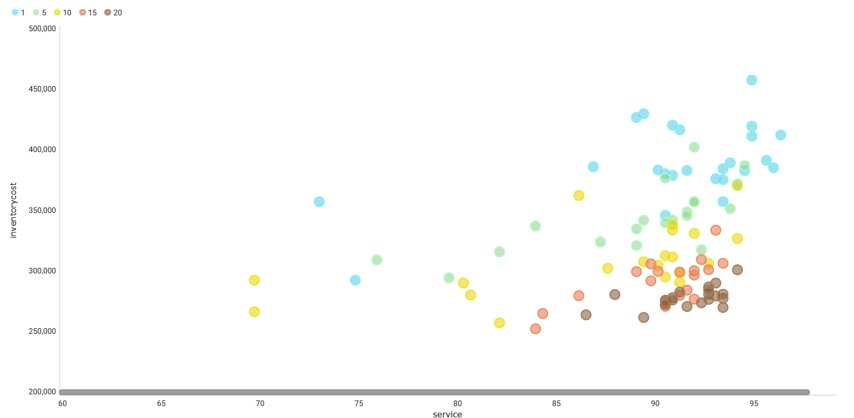
This plot presents service and inventory cost metrics for different Dendro generations, with each generation represented by a distinct color. The data indicate that results with lower costs and higher service levels are more frequently observed in later scenarios, reflecting changes across generations. Such a plot can be created from the Simulation Evolutionary Algorithm Output Factor Report output table.

Moving from Results to Recommendations

Dendro generates raw scenario outputs, but actionable recommendations come from your interpretation in the context of business goals.

  • Use input factors to see what changed
    • Identify which parameters (e.g., reorder points) consistently appear in high-performing scenarios.
    • Compare them against your baseline to spot meaningful differences.
  • Use output factor scores to see why
    • Understand what is driving high utility (e.g., improved service with only a marginal increase in cost).
    • Detect trade-offs and align them with business priorities.
  • Form recommendations
    • Update inventory policies based on scenario insights.
    • Re-run selected scenarios in Throg to get detailed, time-series-based outputs (e.g., daily inventory levels, work center queues).
    • Conduct “what-if” analysis on the most promising configurations.

In summary, Dendro does not hand you a single answer, it gives you a portfolio of high-performing options. By interpreting these scenarios in context, you can make informed decisions, balance trade-offs, and run deeper simulations where needed to guide your supply chain strategy.

Other Helpful Resources

You may find these links helpful, some of which have already been mentioned above:

As always, please feel free to reach out to the Optilogic Support team at support@optilogic.com in case of questions or feedback.

Introduction

Dendro is Optilogic's simulation-optimization engine. A prime use case for Dendro is inventory policy optimization.

Simulation-optimization is a method in which simulation is leveraged to intelligently explore alternative configurations of a system. Dendro accomplishes this data-driven search by layering a genetic algorithm on top of simulation; simulation is the core of a Dendro model. Before a Dendro study can begin, a simulation model (run with the Throg engine) must be built, verified, and validated.

Simulation-optimization enables us to ask and answer questions that we cannot address in traditional network optimization or simulation alone.

In this article, we will explore:

  • Dendro methodology, differentiators from other engines, best practices
  • Dendro modeling requirements, including notes on establishing a Baseline simulation model
  • Running a Dendro model
  • Dendro results interpretation

Dendro Capability

The modeling methods of network optimization (Neo), discrete event simulation (Throg), and simulation-optimization (Dendro) address different supply chain design use cases.

  • Network optimization leverages mixed integer linear programming to prescribe network changes that achieve an objective (e.g., maximizing total profit) while satisfying constraints. Network design decisions are made at an aggregated level: products and/or customers with similar characteristics may be grouped, demand and decisions occur on a periodic basis (e.g., annual customer assignments, monthly production and product flow). Temporal data (e.g., production rates) is often less impactful in these models. A single solution is provided. Because model inputs are aggregated into time buckets, evaluation of business rules and policies that drive events in the operation of the supply chain are difficult to evaluate (e.g., inventory reorder points and replenishment logic, daily or hourly processing capacity, mode selection and shipment-building logic, etc.).
  • Discrete event simulation describes network performance. Network structure and operating policies (business rules) are given as model inputs and the resulting supply chain events, each with an associated timestamp in the model horizon, are used to derive detailed insights. Network elements are not aggregated: customer demand occurs and is sourced/filled at an order-line level, individual shipments are built, replenishment orders are generated in response to inventory policies, stockouts and surplus inventory can be observed by site-product, bottlenecks and daily work center utilization can be studied, etc. Notably, simulation enables modelers to study customer service (on-time-in-full rates, quantity fill rates, backorders, lost sales, etc.). Temporal data is a key element of simulation modeling as it shapes the event progression and resulting performance metrics. Variability can be incorporated (demand, supply, travel times, etc.), enabling the study of network robustness subject to uncertainty and providing visibility into a variety of possible outcomes.
  • Simulation-optimization combines the unique value of simulation (granularity, temporal insights, performance evaluation under uncertainty) with prescriptive recommendations, marrying "what happens to my system's performance if...?" and "how can I improve the system?" Dendro accomplishes this by iteratively altering model inputs, simulating and evaluating the resulting network performance, and leveraging high-performing scenarios to generate new ones. The modeler tells Dendro which aspects of the supply chain are candidates for adjustment and defines a utility function by which Dendro evaluates scenario performance; often, this is a function of both cost and service. In contrast with the structural decisions made in a Neo model (customer assignments, facility location, production strategy, etc.), Dendro lends itself to improving business rules within an existing network structure. A single Dendro run explores hundreds of simulation scenarios and reports the resulting performance to the modeler, providing a range of solutions to consider. The ability to incorporate variability in Throg models extends to Dendro.

Use Case Comparison

A prime use case for Dendro is inventory policy optimization: right-sizing inventory levels by changing inventory policy parameters (reorder points, reorder quantities, etc.) with the goal of balancing cost and service. Dendro's foundation in simulation minimizes the abstraction of cost accounting, service metrics, and the business rules surrounding inventory management. Dendro provides actionable inventory policy recommendations and data-driven evidence to support those changes.

Neo (Network Optimization): Strategic Stocking Strategy Decisions

Primary Focus: Determining where inventory should be positioned across the network.

Use Case: Network design decisions that include high-level inventory considerations -- such as stocking locations, target turns, and working capital trade-offs.

How It Handles Inventory:

  • Uses abstracted inventory metrics (e.g., inventory turns, carrying cost assumptions) rather than time-based calculations.
  • Considers capacity and flow constraints at a strategic level.
  • Answers questions like:
    • Which facilities should stock which products?
    • What is the right balance between centralization and responsiveness?
    • How do inventory turns or holding cost assumptions affect network design?

Throg: Simulation of Inventory Policies

Primary Focus: Testing and observing how specific inventory policies perform under realistic operational dynamics.

Use Case: Evaluate inventory control logic (e.g., reorder point, order quantity, order-up-to level) in a time-based simulation environment.

How It Handles Inventory:

  • Simulates daily inventory behavior by site-product, capturing demand variability, lead times, and replenishment timing.
  • Measures performance in terms of costs, service levels, and on-hand inventory patterns.
  • Answers questions like:
    • How does a specific reorder policy perform under variable demand?
    • What are the service implications of adjusting the reorder point?
    • How does safety stock behave over time in different facilities?

Dendro: Optimization of Inventory Policies

Primary Focus: Finding better inventory policies that balance cost and service, combining Throg's simulation accuracy with an optimization engine.

Use Case: Adjust inventory policy parameters (e.g., reorder point, reorder quantity, policy type) to find configurations that deliver the best cost-service trade-offs.

How It Handles Inventory:

  • Uses genetic algorithm optimization to explore thousands of policy combinations.
  • Evaluates each configuration with Throg-based simulation to accurately capture costs and service levels.
  • Uses utility curves to quantify trade-offs between cost and service.
  • Answers questions like:
    • What inventory parameters yield the best cost-service balance?
    • Is there a better inventory policy type for certain products or facilities?
    • How much cost reduction is possible without service degradation?

While this comparison highlights how each engine contributes to inventory management decisions, the specific use case covered in this article is inventory policy optimization -- using Dendro to balance total inventory carrying cost and network-level customer service (measured as quantity fill rate).

That said, Dendro's capabilities extend far beyond inventory. The same framework of input factors, output factors, and utility functions can be applied to a wide range of optimization problems -- and its utility components are not limited to just cost and service. Dendro can optimize for any measurable performance metric that matters to your business.

Prerequisites

As stated above, a Dendro study cannot be initiated without first establishing a Throg simulation model; a Dendro project should be thought of as a simulation project with an added layer of analysis. Careful Throg model verification and validation are part of a simulation project and are therefore a prerequisite for a Dendro study. To learn how to set up a Throg simulation model, we recommend reviewing the following on-demand training content:

In addition, Throg-specific articles can be found here on the Help Center.

Throg scenario results serve as one piece of input for a Dendro run. Identification of the appropriate Throg scenario to apply Dendro to depends on the goal of the Dendro study. The network structure under which the modeler is seeking to optimize inventory policies must be represented in a Throg scenario.

Inventory policies are required to run a simulation scenario. In some cases, a modeler may not have existing inventory policies to utilize in a baseline scenario. Similarly, simulating a proposed network structure requires first setting inventory policies for new site-product combinations. To set policies, we recommend utilizing the Demand Classification utility in Cosmic Frog's Utilities module.

  • The utility uses the following modeling elements as inputs: simulation sites (Facilities, Customers), products, inventory policy structure (Inventory Policies entries for relevant site-product combinations), and customer orders.
  • The output of the utility is to populate the following 2 output tables:
    • Inventory Demand Classification Summary: demand classification results by scenario, site, product:
    • Inventory Policy Data Summary: suggested inventory policies by scenario, site, product:

Suggested inventory policies from the Inventory Policy Data Summary output table can then be employed in the Inventory Policies input table. For the sake of testing while the Throg model is being built and verified, users may find it helpful to initially leverage simple placeholder inventory policies where policies are unknown or not yet in existence (e.g., (s,S) = (0,0)).

Note: if the modeler's goal is to set policies for a proposed network structure, it is recommended to first optimize Baseline inventory policies. This enables the modeler to compare potential performance of the existing network structure (i.e., performance under optimized policies) with performance of the proposed network structure. This is especially encouraged if the Demand Classification utility was used to set Baseline inventory policies.

Before running Dendro to optimize inventory policies, the modeler must consider

  1. The scope of the optimization: which parameters are candidates for adjustment?
    1. Are the inventory policies for all site-products in the network open for optimization? If not, what subset is being targeted?
    2. What policy approaches or adjustments have already been tried in practice? Were these attempts successful or not? What lessons were learned and what new hypotheses arose?
  2. The objectives of the optimization: what tradeoffs are we seeking to balance?
    1. Example: balance inventory holding cost with customer service (e.g., quantity fill rate).

The answers to these questions will inform the design of Dendro model inputs.

Model Inputs and Configuration

Every Dendro optimization begins with a well-defined model foundation and input configuration.
This configuration tells Dendro three essential things:

  1. What it can change -- the input factors or decision levers.
  2. How it will measure success -- the output factors or KPIs.
  3. How it should explore possibilities -- the Dendro technology parameters or Genetic Algorithm (GA) settings.

Together, these define the search space and fitness criteria that drive optimization.

Start with Your Throg Model

Dendro builds directly on your validated Throg simulation model, which serves as the environment for its optimization runs.
All Throg input tables -- facilities, customers, products, and policies -- are carried into Dendro.

For inventory-focused optimizations, the Inventory Policies input table is most critical.
It defines policy types and parameters such as reorder points and order-up-to levels. These become natural candidates for Dendro input factors.

Screenshot of an Inventory Policies input table from a Throg model, highlighting the columns which are the potential Dendro input factors.

Input Factors - What Dendro Can Vary

The Input Factors input table tells Dendro which parameters it can adjust during optimization. Each input factor represents a decision lever -- for instance, a reorder point or a policy type -- that Dendro will tune to seek better outcomes.

Key Columns

Defining the Search Space

The search space defines both the breadth (how wide Dendro can explore) and the granularity (how detailed the exploration is).

  • If the range is too narrow, Dendro cannot escape local optima and will only make incremental improvements.
  • If it is too wide, runtime and noise increase, making convergence slow and less meaningful.

The goal is a "computationally tractable search space" -- broad enough for Dendro to discover impactful alternatives but focused enough to identify patterns efficiently.

Practical guidance:

  • Include only parameters that materially influence cost, service, or flow.
  • Aim for 5-10 discrete levels per numeric factor (or at least 3 options for enumerated factors).
  • Keep total possible combinations per generation within a practical bound (approx 10^5).
These 2 screenshots display two example rows and illustrate the input factors table used in Cosmic Frog. The input factors configure Dendro search parameters for DC_IL InventoryPolicies related to products 3 and 4. For product_3, the policy assigns a base value of 500, indicating that Dendro will use 500 as the starting point for this parameter. In contrast, product_4 does not specify a base value and will instead use the value found in the current inventory policies input for its initial search. Both parameters correspond to the second parameter in the simulation policies—if the inventory policy is (s, S), the parameters refer to S, the order-up-to quantity; if it is (R, Q), they refer to Q, the reorder quantity.

Learn all about input factors in the "Dendro: Input Factors Guide".

Output Factors - How Dendro Measures Success

Once Dendro knows what it can vary, it needs to know how to judge success. The Output Factors input table defines the KPIs Dendro will use to evaluate each scenario and how they are scored.

Core Concepts

  • Utility Curves: Map KPI values to a normalized 0-100 "utility" scale.
  • Weights: Determine the relative importance of each KPI in the total fitness score.

Key Columns

Designing Utility Curves

Utility curves express your business preferences:

  • Higher service -> higher utility.
  • Lower cost -> higher utility.
  • [Level, Utility] pairs form a piecewise linear relationship.

Examples:

  • OTIF (service): [0,0], [60,0], [98,100], [100,100]
  • Inventory Holding Cost: [0,100], [200000,100], [400000,0], [500000,0]
Two line charts are displayed -- a declining cost curve (left) and a rising OTIF utility curve (right). These visuals illustrate the curves referenced in the preceding examples.

Tip: Curves should span the expected simulation range (e.g., 5th-95th percentile of early results). Dendro will stretch the utility curves if results fall outside the range, which can distort scoring.

These 2 screenshots demonstrate the configuration of our examples within the Output Factors input table. The utility curves correspond directly to those presented above. Each row has been assigned a weight of 1, ensuring that Cost and Service utilities are evaluated with equal importance.

Balancing KPI Weights

Weights dictate how much influence each KPI has in Dendro's overall fitness score calculation.

  • Example: If maintaining service is twice as important as cost reduction, set Service (=OTIF) weight = 2, Cost weight = 1:
  • Review the utility contribution breakdown after each run (using the Simulation Evolutionary Algorithm Output Factor Report output table, see also further below) -- dominant KPIs may signal over-weighting.

Best Practices for Output Factors

  • Align with business goals: Start with KPIs that drive key outcomes --think of cost, service, and risk.
  • Shape curves with real data: Base curves on observed KPI ranges, not arbitrary targets.
  • Encourage exploration: Avoid steep cliffs or overly flat curves.
  • Check for balance: No single KPI should dominate the fitness score.

Learn more about output factors in the "Dendro: Output Factors Guide".

Quick Start Workflow

  1. Verify and validate your Throg model. Ensure that model logic aligns with business rules by reviewing transactional outputs; start with a small version of the model. Confirm baseline KPIs like OTIF and cost behave realistically.
  2. Define Input Factors. Identify parameters to vary, set ranges and filters.
  3. Define Output Factors. Choose KPIs, design utility curves, and apply weights.
  4. Tune Dendro technology parameters. Set number of generations, population size, and search settings.
  5. Run a small test. Use a few generations and narrow ranges to validate setup before scaling up.
  6. Review early results. Adjust utility curves, ranges, or weights as needed for next iteration.

A well-scoped input configuration defines the playing field for Dendro's optimization.
By combining realistic input ranges, balanced KPI scoring, and robust run settings, you enable Dendro to explore intelligently finding high-performing, data-backed configurations without unnecessary computation.

Running Dendro

Dendro is built to explore a wide range of supply chain configurations using your verified and validated Throg simulation scenario(s) as the base. Running a Dendro job is straightforward, but there are a few important steps and best practices to keep in mind to ensure smooth operation.

Launching a Dendro Run

To get started:

  1. Update the technology type of the target scenario from Throg to Dendro in the Scenario Manager. This tells Cosmic Frog to run the Dendro engine rather than the Throg engine (see also screenshot below).
  2. After clicking on the green Run button, on the Run Settings modal that comes up, select the Dendro scenario for which you would like to optimize inventory policies.
    The outputs of this scenario serve as the foundation for Dendro's genetic algorithm search.
  3. Use default Dendro Technology Parameters (also known as Model Run Options, MROs)
    For your first run, you do not need to modify the technology parameters (see also screenshot below). The default settings are typically sufficient. However, it is recommended to always set a Dendro Timeout value before running.
    • Dendro Timeout: This timeout defines the maximum simulation time allowed per scenario. If it is not set (or set too long), a single long-running or "stuck" scenario can prevent the entire genetic algorithm from progressing to the next generation, effectively halting your Dendro run.
    • Recommendation: Set the Dendro Timeout to a value longer than the runtime of your baseline Throg simulation. This ensures that all scenarios complete within reasonable limits while still allowing Dendro to fully explore the solution space.
    • How to set: this parameter currently needs to be set by using a SQL insert statement into the ModelRunOptions table of a Cosmic Frog model, which can be done using the SQL Editor application. You can use following as the SQL statement, where you can update the last value (3600 for 1 hour in the statement below) to your desired timeout time in seconds:
INSERT INTO anura_2_8.modelrunoptions (
  datatype, 
  description, 
  option, 
  status, 
  technology, 
  uidisplaycategory, 
  uidisplayname, 
  uidisplayorder, 
  uidisplaysubcategory, 
  value)
VALUES (
  'double', 
  'Time limit (seconds) on individual Dendro scenarios', 
  'DendroTimeout', 
  'Include', 
  '[DENDRO]', 
  'Basic', 
  'Dendro Timeout', 
  '', 
  '', 
  '3600');

  1. Let Dendro generate scenarios
    The engine will automatically generate and execute scenarios based on the input and output factors you configured.
This screenshot shows the Scenarios module in Cosmic Frog. 1) The Baseline scenario is selected, which is currently a simulation (Throg) scenario. 2) To switch to a Dendro scenario, click on the round checkbox here.
Run Settings screen showing all expanded Dendro technology parameters.

Configuring Dendro technology parameters

The technology parameters define how Dendro explores the solution space -- including how many scenarios to generate, how they evolve, and how long each simulation may run. As mentioned above, the default values are typically sufficient for a first run. The following are the main parameters that users may want to update in case their defaults are not suitable.

Key Settings

  • Number of Generations
    • Defines how many rounds of scenario evolution Dendro performs.
    • More generations = deeper search, longer runtime.
  • Number of Genes per Generation
    • The number of scenarios evaluated per generation (population size).
  • Number of Offspring
    • The number of new scenarios created through crossover and mutation.
    • The remainder of the population is filled by carrying over top performers.

See also more detailed explanations of all Dendro technology parameters here.

Tuning Guidance

Use these principles to fine-tune your technology parameters:

  • If results are not converging, increase Number of Generations or narrow input ranges.
  • If convergence happens too early, reduce generations or increase search diversity (via mutation probability).
  • If improvement stalls:
    • Add or refine Input Factors.
    • Adjust Output Factor Weights to reflect business priorities.
  • Remember: there may be features of the system that inherently constrain the optimization potential. If iterating on Dendro inputs is not leading to desired results, root cause analysis should be explored to identify limiting factors in the network design.

Monitoring Genetic Algorithm Progress

In the course of a Dendro run, the system launches many scenarios for each generation. This is the expected behavior for the genetic algorithm.

Key tips for tracking progress:
  • Run Manager application
    Monitor the run's progress in the Run Manager application on the Optilogic platform.
  • Scenario naming format
    Each job is automatically named using the pattern: <ThrogScenarioName>_GA<generation#>.<scenario#>
    • Example: 'Baseline_GA1.12' represents a variation of the Baseline scenario (scenario 12 in generation 1) created by Dendro.
  • Avoid editing input tables mid-run
    Do not make changes to model input tables while a Dendro run is in progress. Each generated scenario uses the most recent input data values at the time of generation, so mid-run edits may cause inconsistent results.
  • Canceling a run
    • To stop a Dendro run, cancel the parent job from the Run Manager (see below).
    • The current generation will finish unless you also cancel each scenario manually.
The Run Manager (1) immediately after initiating a Dendro run; the top row is the "Parent" Dendro run of the scenario named Baseline, and the bottom row is the general model run that starts the Dendro Parent Run job. The latter can be cancelled by selecting it (2), right-clicking on it, and then choosing "Cancel Job" (4).
This screenshots shows completed "Child" Dendro runs from generation 3, specifically runs 11 to 15, as indicated by their names.
Ongoing runs of the 1st Generation's 8th, 9th, and 10th scenarios.

Running Dendro is as simple as selecting the engine and starting from a validated Throg model. From there, you can monitor progress, let the algorithm evolve scenarios, and apply best practices for canceling or troubleshooting runs. By following these guidelines, you ensure that Dendro can efficiently search for high-performing supply chain configurations.

To understand how the Dendro genetic algorithm works in detail, please see "Dendro: Genetic Algorithm Guide".

Analyzing Dendro Outputs

When a Dendro run completes, it produces a rich set of outputs that capture the results of the genetic algorithm's search. These outputs represent the different supply chain configurations that were explored, along with how each one performed according to the objectives you defined (e.g., cost, service level, or a balance of both).

Rather than giving you a single "right" answer, Dendro presents a spectrum of high-performing options. As the modeler, you use these results to evaluate trade-offs and select the scenarios that best align with your business goals.

How Dendro Evaluates Scenarios

During a run, Dendro evaluates each candidate scenario by:

  • Recording input factors (e.g., inventory policies) that define the configuration.
  • Measuring output factors (e.g., total inventory cost, OTIF) and scoring them using your utility curves.
  • Combining scores into an overall fitness score, which represents how "fit" or desirable that scenario is according to your priorities.

Dendro records the input factors and output factors of every scenario it evaluates. However, only the top 20 highest-performing scenarios are saved as named scenarios in your model, making them easier to access and reuse.

Reviewing the Best Scenarios

After the run, the top 20 scenarios are automatically saved in your model. These represent the best balances of trade-offs Dendro discovered within your defined search space.

Each scenario has an overall fitness score, calculated as the weighted sum of its output factor utility values. A higher score means the scenario performed well according to the priorities you set (e.g., balancing low cost with high service).

Tip: The "best" scenario numerically may not always be the most practical operationally. Always interpret results in context.

Where to Find Key Results
  1. Simulation Evolutionary Algorithm Summary output table
    • Lists all evaluated scenarios, sorted by overall fitness score.
    • Provides summary stats such as overall fitness score, generation number, and scenario name.
    • The top scenarios are also promoted to your model's scenario list (with names like Baseline_GA20.19).
  2. Simulation Evolutionary Algorithm Input Factor Report output table
    • Shows which input factor values (e.g., reorder points, safety stock levels) were used in each scenario.
  3. Simulation Evolutionary Algorithm Output Factor Report output table
    • Breaks down utility contributions for each scenario by output factor.
    • Helps you see why a scenario performed well, and where trade-offs occurred.
The Simulation Evolutionary Algorithm Summary table in the output tables section, sorted by the Overall Fitness Score Column, highlighting the top scenarios based on calculated fitness scores.
The Simulation Evolutionary Algorithm Input Factor Report output table for the 3rd Generation, 12th Scenario—a scenario noted for its high performance—provides detailed inventory policy configurations as illustrated in the table.
The Simulation Evolutionary Algorithm Output Factor Report output table for the same scenario displays the metrics associated with the output factors in the Value column, while the Weighted Score column shows their corresponding calculated scores.

Tips for Reviewing Results

  • Compare across generations: Check whether performance leveled off or improved across iterations.
  • Look for patterns: See if the top scenarios cluster around certain cost/service ranges.
  • Review more than just #1: If utility differences are small, multiple scenarios may be equally worth considering.
This plot presents service and inventory cost metrics for different Dendro generations, with each generation represented by a distinct color. The data indicate that results with lower costs and higher service levels are more frequently observed in later scenarios, reflecting changes across generations. Such a plot can be created from the Simulation Evolutionary Algorithm Output Factor Report output table.

Moving from Results to Recommendations

Dendro generates raw scenario outputs, but actionable recommendations come from your interpretation in the context of business goals.

  • Use input factors to see what changed
    • Identify which parameters (e.g., reorder points) consistently appear in high-performing scenarios.
    • Compare them against your baseline to spot meaningful differences.
  • Use output factor scores to see why
    • Understand what is driving high utility (e.g., improved service with only a marginal increase in cost).
    • Detect trade-offs and align them with business priorities.
  • Form recommendations
    • Update inventory policies based on scenario insights.
    • Re-run selected scenarios in Throg to get detailed, time-series-based outputs (e.g., daily inventory levels, work center queues).
    • Conduct “what-if” analysis on the most promising configurations.

In summary, Dendro does not hand you a single answer, it gives you a portfolio of high-performing options. By interpreting these scenarios in context, you can make informed decisions, balance trade-offs, and run deeper simulations where needed to guide your supply chain strategy.

Other Helpful Resources

You may find these links helpful, some of which have already been mentioned above:

As always, please feel free to reach out to the Optilogic Support team at support@optilogic.com in case of questions or feedback.

Have More Questions?

Contact Support

Get in touch

Contact Sales

Get in touch

Visit Frogger Pond Community

Visit our Community