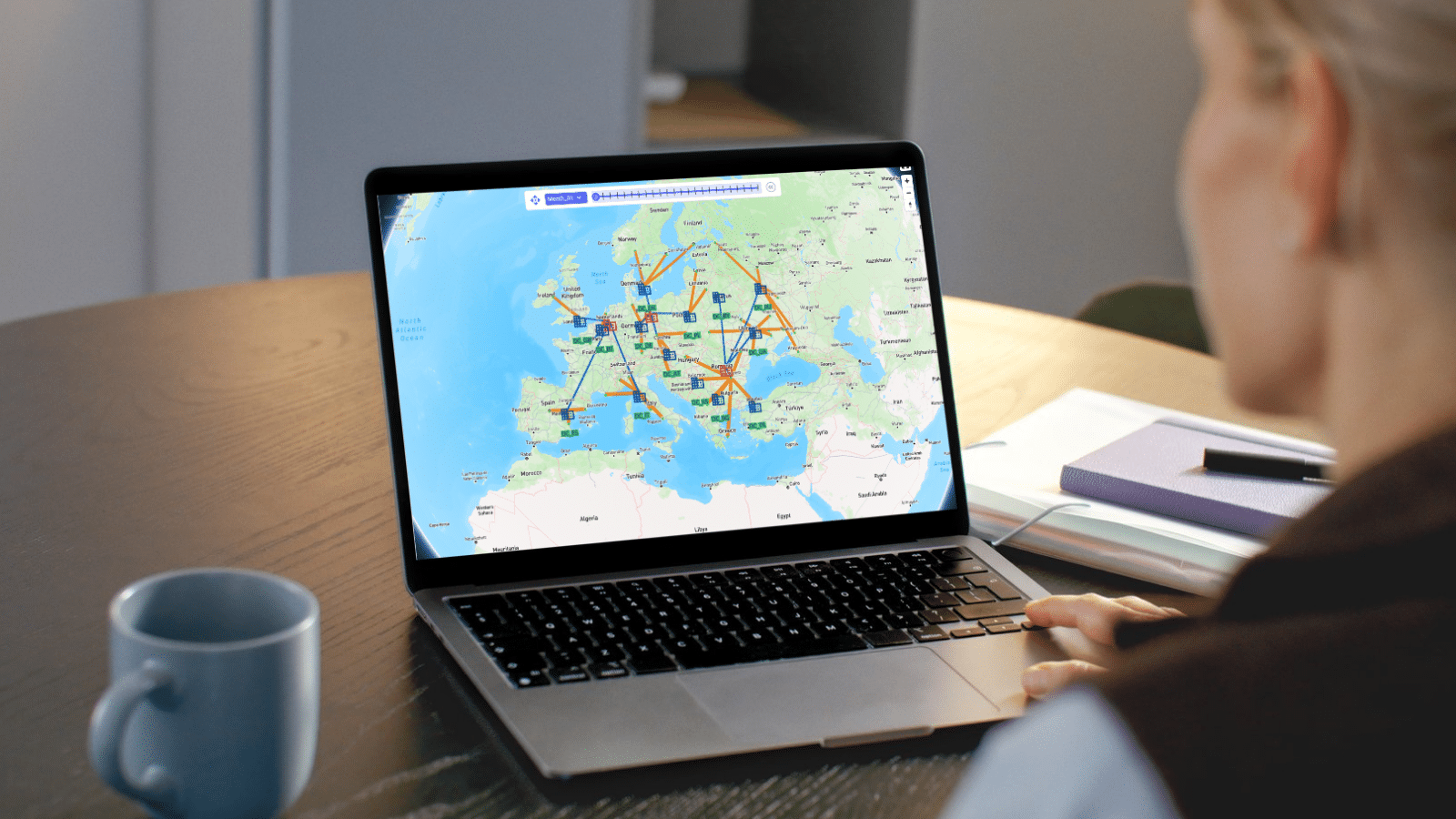

In this quick start guide we will walk through how you can build a DataStar macro for repeatable Cosmic Frog model building, where data needs to be refreshed periodically, through chatting with Ada.
When using Ada to have the Modeler Agent create a model, it is a non-deterministic process where you may not get the same results every time. Once you are happy with the model you have built using Ada, you want to be able to repeat those steps every time in a reliable, performant, deterministic fashion. That is the value of being able to persist the process in DataStar.
It is helpful to be familiar with the contents of the following Help Center articles prior to diving into this quick start:
This quick start guide uses a historical shipments file that was also used in the Importing a CSV File quick start guide. In addition, we will create a second data connection for a basic costs file and import that one into the Project Sandbox too. We then use the data in those 2 files to populate tables of an initially empty Cosmic Frog model with the aim to run a Neo solve. Finally, the steps to populate this model are automatically captured in a DataStar macro to create a repeatable model build workflow. In summary the steps are:
We will cover what is contained in the 2 CSV files and steps 1-3 in this section.
The next 2 screenshots show the structure of the data in the 2 CSV files used in this quick start.
Of the Historical_Shipments.csv file, the first 5 of a total of 42,656 records are shown. The Ship Dates range from May 2024 through August 2025:

The next 2 screenshots show all data contained in the Basic_Costs.csv file:

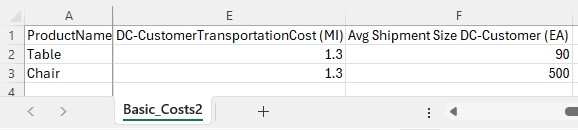
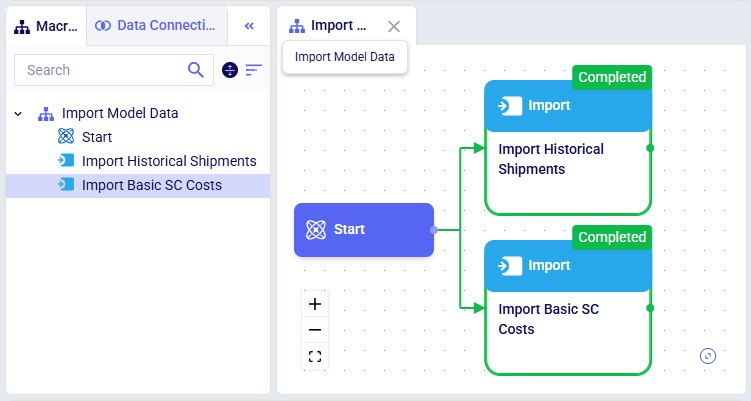
Now, we move on to chatting with Ada in the next generation Optilogic platform at https://ai.optilogic.app. Here, we will walk-through an initial prompt and the back and forth that follows. Note that you can get different responses and clarifying questions from Ada, even with the same starting data and initial prompt.
We first connect the DataStar project and empty Cosmic Frog model in the Databases drop-down selector, and then submit our prompt:
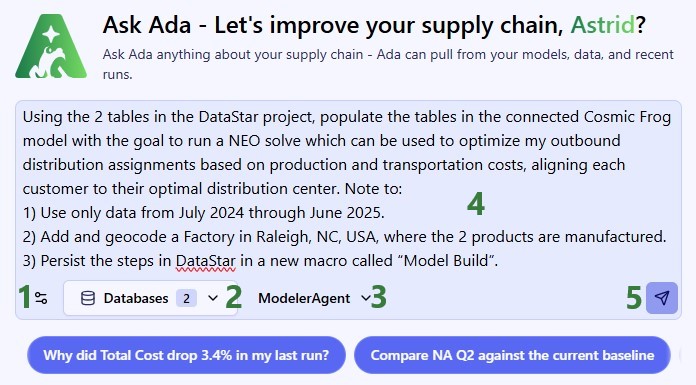
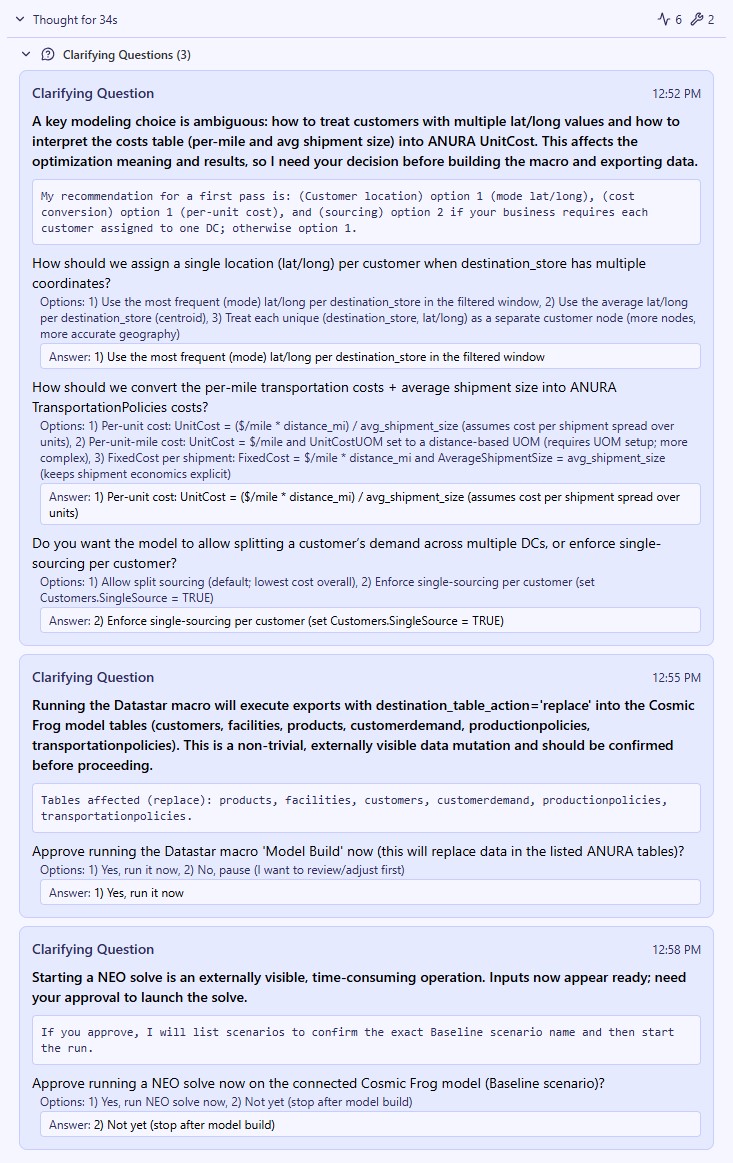
Ada comes back with three consecutive clarifying questions, 1 on model configuration decisions and 2 to approve running the DataStar macro and a Neo solve on the Cosmic Frog model. You can see the questions and the user’s responses in this screenshot:
Ada’s response is then as follows:
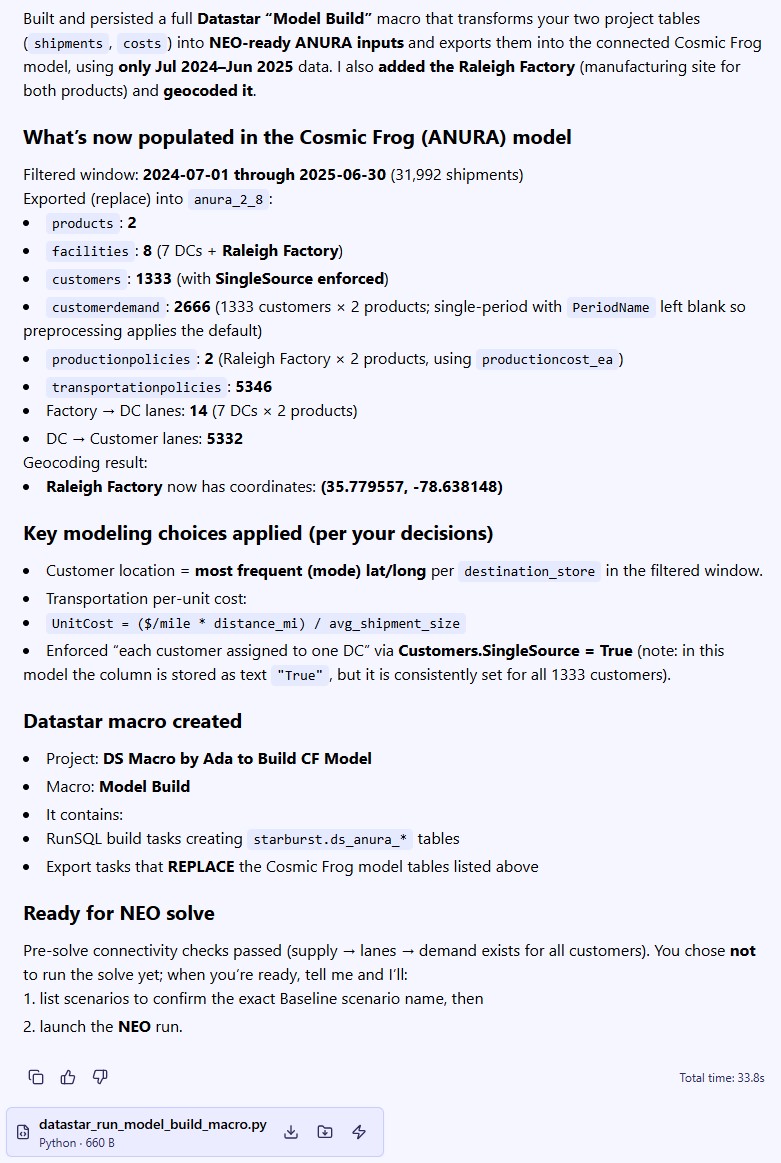
So, this achieved what we set out to do in the prompt. We did not yet run the Neo solve as we first want to examine the Cosmic Frog model and DataStar macro.
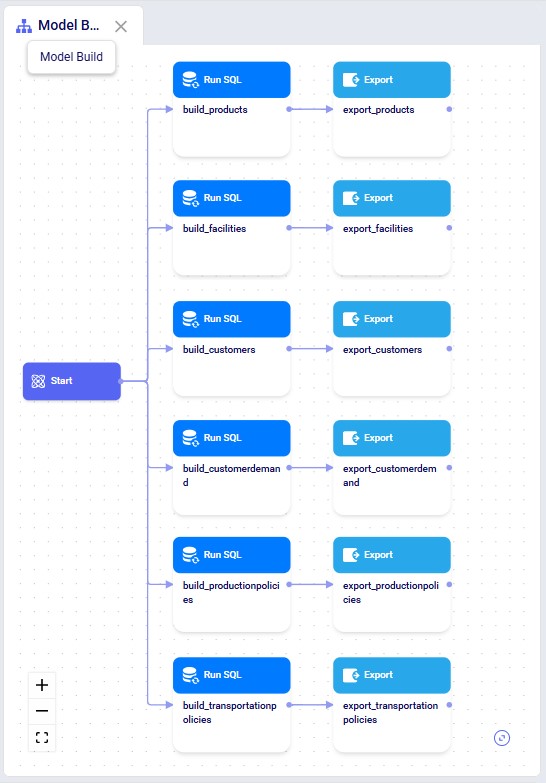
In DataStar, we see that in addition to the macro that imports the data from the 2 CSV files, there is now a Model Build macro present too. Note that you may need to refresh your browser to see the new macro in case the project was still open from before. You can click on any task to select it and inspect its configuration which comes up on the right-hand side.
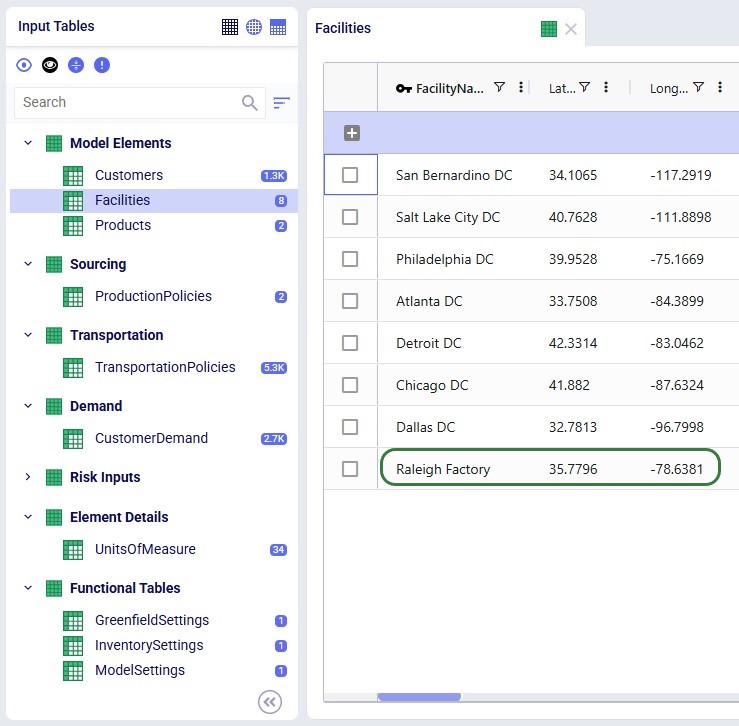
Opening the model in Cosmic Frog, we see that the expected tables are populated. Here, the Facilities table is shown with the 7 DCs and 1 (geocoded) Factory, as we requested:
All tables look good, except:
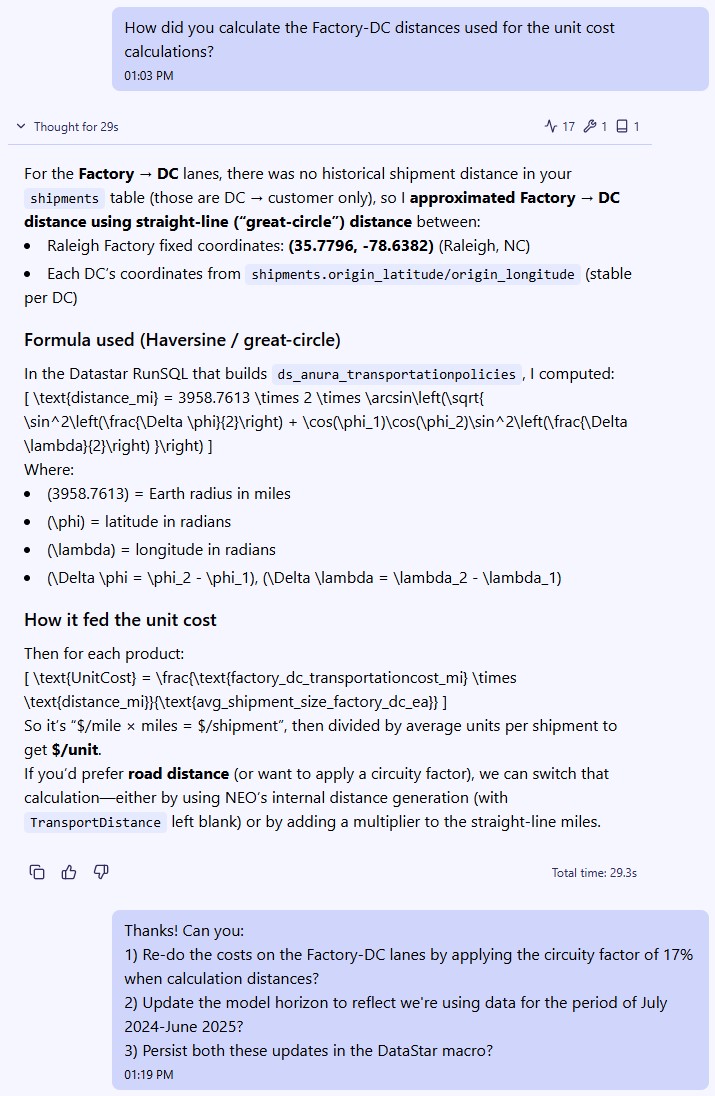
To understand the distance calculation and correct the model horizon, we continue our conversation with Ada:
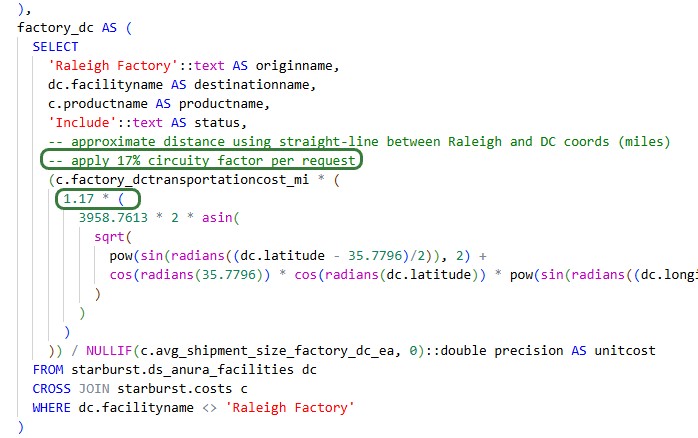
As a result of the last prompt Ada updates the build_transportationpolicies Run SQL task in the Model Build macro, which we can see by opening its SQL Script:
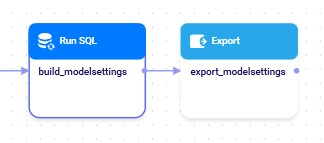
In addition, she adds 2 tasks to the Model Build macro to take care of setting the model start and end date in the Model Settings table:
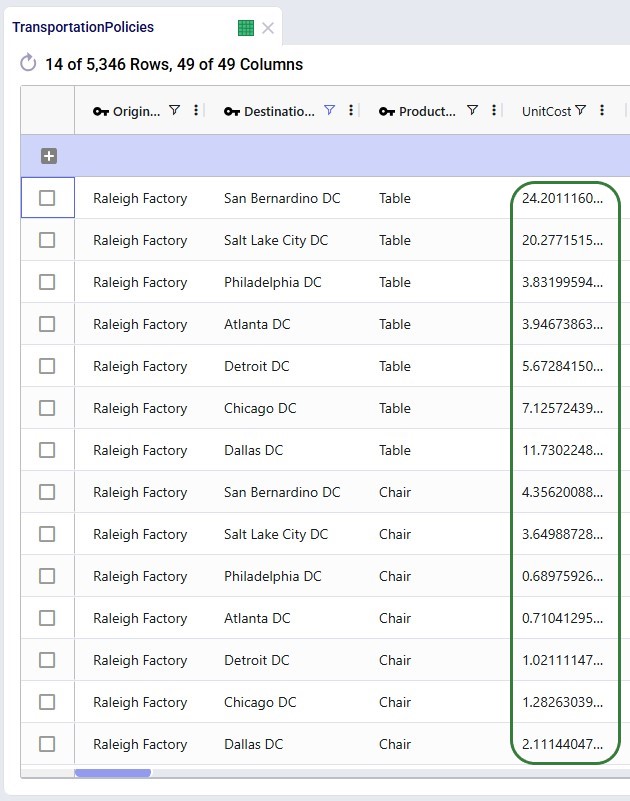
Double-checking the Cosmic Frog model to ensure the updated macro was run and results in the desired changes, we can see that the Unit Costs on the Factory-DC lanes have increased by 17% and that the Model Settings table now has Model Start Date and Model End Date set correctly.
Now we have created a repeatable, deterministic workflow in DataStar to build a basic Neo model from the 2 input files, which may be refreshed with newer data regularly.
To get an idea of the types of interactions you can have with Ada while working on DataStar projects, here are some example prompts to get you started:
As always, please do not hesitate to reach out to our Support team via support@optilogic.com in case of questions or feedback.

In this quick start guide we will walk through how you can build a DataStar macro for repeatable Cosmic Frog model building, where data needs to be refreshed periodically, through chatting with Ada.
When using Ada to have the Modeler Agent create a model, it is a non-deterministic process where you may not get the same results every time. Once you are happy with the model you have built using Ada, you want to be able to repeat those steps every time in a reliable, performant, deterministic fashion. That is the value of being able to persist the process in DataStar.
It is helpful to be familiar with the contents of the following Help Center articles prior to diving into this quick start:
This quick start guide uses a historical shipments file that was also used in the Importing a CSV File quick start guide. In addition, we will create a second data connection for a basic costs file and import that one into the Project Sandbox too. We then use the data in those 2 files to populate tables of an initially empty Cosmic Frog model with the aim to run a Neo solve. Finally, the steps to populate this model are automatically captured in a DataStar macro to create a repeatable model build workflow. In summary the steps are:
We will cover what is contained in the 2 CSV files and steps 1-3 in this section.
The next 2 screenshots show the structure of the data in the 2 CSV files used in this quick start.
Of the Historical_Shipments.csv file, the first 5 of a total of 42,656 records are shown. The Ship Dates range from May 2024 through August 2025:
The next 2 screenshots show all data contained in the Basic_Costs.csv file:
Now, we move on to chatting with Ada in the next generation Optilogic platform at https://ai.optilogic.app. Here, we will walk-through an initial prompt and the back and forth that follows. Note that you can get different responses and clarifying questions from Ada, even with the same starting data and initial prompt.
We first connect the DataStar project and empty Cosmic Frog model in the Databases drop-down selector, and then submit our prompt:
Ada comes back with three consecutive clarifying questions, 1 on model configuration decisions and 2 to approve running the DataStar macro and a Neo solve on the Cosmic Frog model. You can see the questions and the user’s responses in this screenshot:
Ada’s response is then as follows:
So, this achieved what we set out to do in the prompt. We did not yet run the Neo solve as we first want to examine the Cosmic Frog model and DataStar macro.
In DataStar, we see that in addition to the macro that imports the data from the 2 CSV files, there is now a Model Build macro present too. Note that you may need to refresh your browser to see the new macro in case the project was still open from before. You can click on any task to select it and inspect its configuration which comes up on the right-hand side.
Opening the model in Cosmic Frog, we see that the expected tables are populated. Here, the Facilities table is shown with the 7 DCs and 1 (geocoded) Factory, as we requested:
All tables look good, except:
To understand the distance calculation and correct the model horizon, we continue our conversation with Ada:
As a result of the last prompt Ada updates the build_transportationpolicies Run SQL task in the Model Build macro, which we can see by opening its SQL Script:
In addition, she adds 2 tasks to the Model Build macro to take care of setting the model start and end date in the Model Settings table:
Double-checking the Cosmic Frog model to ensure the updated macro was run and results in the desired changes, we can see that the Unit Costs on the Factory-DC lanes have increased by 17% and that the Model Settings table now has Model Start Date and Model End Date set correctly.
Now we have created a repeatable, deterministic workflow in DataStar to build a basic Neo model from the 2 input files, which may be refreshed with newer data regularly.
To get an idea of the types of interactions you can have with Ada while working on DataStar projects, here are some example prompts to get you started:
As always, please do not hesitate to reach out to our Support team via support@optilogic.com in case of questions or feedback.