
Shelf Life and Maturation Time (Network Optimization)

Shelf Life and Maturation Time (Network Optimization)

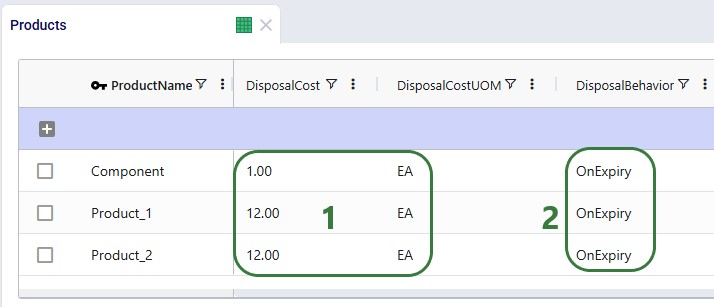
Cosmic Frog’s network optimization engine (Neo) can now account for shelf life and maturation time of products out of the box with the addition of several fields to the Products input table. The age of product that is used in production, product which flows between locations, and product sitting in inventory is now also reported in 3 new output tables, so users have 100% visibility into the age of their products across the operations.

In this documentation, we will give a brief overview of the new features first and then walk through a small demo model, which users can copy from the Resource Library, showing both shelf life and maturation time using 3 scenarios.

Shelf Life and Maturation Time – Overview

The new feature set consists of:

  1. Two new fields (and their accompanying UoM fields) on the Products input table:
    • Shelf Life – use this field to model product expiry. The value entered indicates how long from when the product is produced it is available to fulfill demand. A product will expire once its shelf life runs out. Setting a shelf life will essentially add a constraint to the model on how long a product can be produced in advance of when it is served to the end-customer.
    • Maturation Time – use this field to set how long it takes from when the product is produced before it can be used to fulfill demand. Think for example of cheese that will take up space in inventory while ripening and cannot be sold before it has reached a certain age. Setting a maturation time also adds a constraint to the model of how long it needs to be in the network before it can be consumed.
  2. Three new output tables:
    1. Optimization Production Age Summary – reports the age of product consumed by a BOM during production.
    2. Optimization Flow Age Summary – details the age of product of each flow.
    3. Optimization Inventory Age Summary – shows the age of product kept in inventory.

Please note that:

  1. Shelf Life and Maturation Time will only have an impact in multi-period models; if set in a single-period model, they will be ignored. If periods of different lengths are used in a model, the most frequently occurring period length will be used for shelf life and maturation time calculations.
  2. Users can enter Shelf Life and Maturation Time using any time-based unit of measure, e.g. days, weeks, months, etc. Based on the length of the periods in the model, shelf life and maturation time are converted to an integer multiple of periods. Fractional numbers are rounded to the nearest integer. For example:
    1. The length of the periods in a model is weeks, and shelf life is set to 33 days. This results in a shelf life of 33/7 = 4.71 weeks, which will be rounded to 5 weeks (= 5 periods).
    2. The length of the periods in a model is months, and maturation time is set to 9 weeks. This results in a shelf life of 9*7 days / 30 days = 2.1 months, which will be rounded to 2 months (= 2 periods).
  3. The period in which a product is produced counts towards both the shelf life and maturation. For example:
    1. In a weekly model, a product’s shelf life is set to 4 weeks. If it is produced in period #3, its age will be 1 in period #3 and it can be consumed in periods 3 (age = 1), 4 (age = 2), 5 (age =3), and 6 (age= 4). If not consumed, it will have status = expired from period 7 onwards.
    2. In a monthly model, a product’s maturation time is set to 5 months. If it is produced in period #2, it needs to mature during periods 2, 3, 4, 5, and 6. As it becomes mature in period 6, it can be consumed (in a BOM or to fulfill demand) from period 6 onwards.
  4. Products can have both shelf life and maturation time set. If this is the case, then shelf life has to be greater than or equal to the maturation time, otherwise the product expires before it is mature and cannot be consumed, resulting in an infeasible model run.
  5. If there is initial inventory > 0 for any product-facility combination entered on the Inventory Policies table, the age of this product will be 1 in the first period of the model. If it has a shelf life of 5 days in a model with daily periods it can be consumed in periods 1,2, 3, 4, and 5; it will expire from period 6 onwards.
  6. For products with a maturation time specified, they need to have at least 1 inventory policy with Stocking Site = True set up, either at the facility they are produced at or at a down-stream location it can be moved to (appropriate transportation policies need to be in place), so they can stay in stock until they are mature (or longer, shelf life allowing).
  7. Products with a shelf life also need to have at least 1 inventory policy with Stocking Site = True set up in order for the product to be allowed to be consumed later than the period it has been produced in (from production until before its expiry).
  8. Expired product can stay in inventory at the location it expired at if there is an inventory policy with Stocking Site =True set up for the product at this facility. It could also be moved elsewhere, if optimal to do so and the correct model structure is in place. This model structure would need to consist of:
    1. Transportation policies from this location to other facilities.
    2. Inventory policies with Stocking Site = True at the destination facility/facilities if the expired product is to stay there.
  9. If Bills of Materials are used in the modelling and components have shelf life and / or maturation time set, these need to be respected before being used in the BOM: a component cannot be consumed by a BOM before it is mature, and it also cannot be used by a BOM after it has expired.
  10. Customers often require that there is a certain minimum period of shelf life left on a product when it is delivered to them. For example, say that a specific beverage has a shelf life of 6 months, and the customer requires that when this beverage is delivered to them it still has at least 4 months of shelf life left. In this case, the shelf life to be entered into the model should be 6 – 4 = 2 months, to ensure that the product is used to fulfill the customer’s demand no longer than 2 months after it is produced.

Demo Model – Inputs

We will now showcase the use of both Shelf Life and Maturation Time in a small demo model. This model can be copied to your own Optilogic account from the Resource Library (see also the “How to use the Resource Library” Help Center article). This model has 3 locations which are shown on the map below:
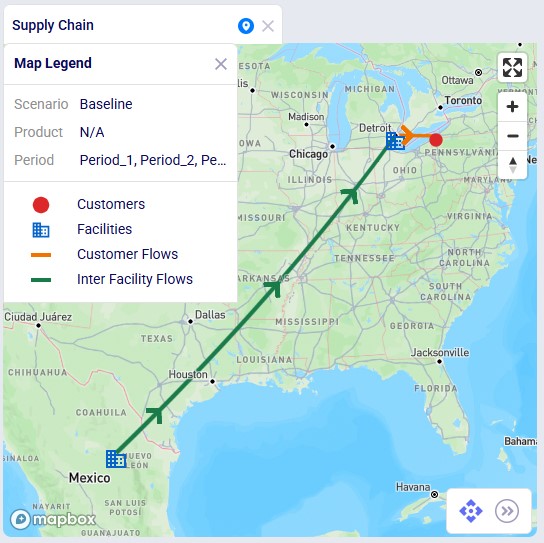
  1. A manufacturing facility, Plant_1, in Saltillo, Mexico. The 2 finished goods and 1 component included in the model are produced here.
  2. A distribution center, DC_1, in Detroit, MI,USA. The plant ships the finished goods to this DC.
  3. One customer, located in Erie, PA, USA. The customer has demand for both finished goods.

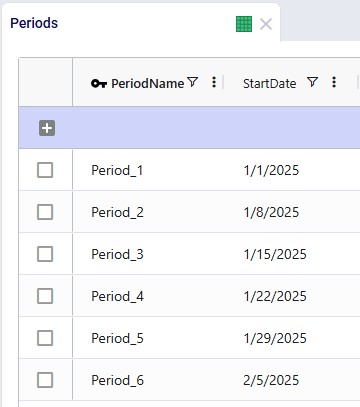
It is a multi-period model with 6 periods, which are each 1 week long (the Model End Date is set to February 12, 2025, on the Model Settings input table, not shown):
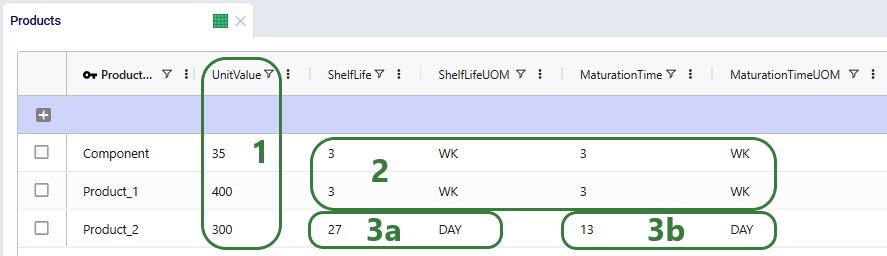
There are 3 products included the model: 2 finished goods, Product_1 and Product_2, and 1 raw material, named Component. The component is used in a bill of materials to produce Product_1, as we will see in the screenshots after this one.

  1. Each product has a unit value set for inventory holding calculation purposes (= # units in inventory * product unit value * carrying cost percentage * period length / 365 days).
  2. Both the Component and Product_1 have Shelf Life and Maturation Time set, and the values are all set as 3 weeks. Since Shelf Life = Maturation Time for both, it means that both need to be consumed when their age is 3: it cannot be sooner since they are not mature then, and it cannot be later as they will have expired.
    1. WK in the UOM fields is the symbol used for the unit of measure with Type = Time to indicate a week. See the Units of Measure input table for other units of measure of Type = Time and their Symbols.
  3. For Product_2:
    1. Shelf Life = 27 days. Since it is a model with weekly periods, this means that the shelf life equates to 4 periods (rounding of 27 / 7 = 3.86 to the nearest integer).
    2. Maturation Time = 13 days, which equals 2 periods (rounding of 13 / 7 = 1.86 to the nearest integer).
    3. If Product_2 is for example produced in period #3, it will be mature in period #4, and it can be consumed in periods 4, 5, 6, and 7. It will be expired from period 8 onwards.

As mentioned above, a bill of materials is used to produce finished good Product_1:
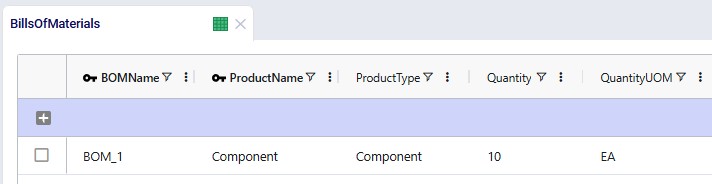
This bill of materials is named BOM_1 and it specifies that 10 units of the product named Component are used as an input (product type = Component) of this bill of materials. Note that the bill of materials does not indicate the end product that is produced with it. This is specified by associating production policies with a BOM. To learn more about detailed production modelling using the Neo engine, please see this Help Center article.

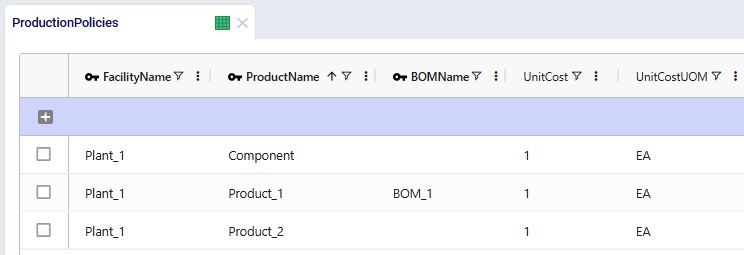
In the next screenshot of the production policies table, we see that the plant can produce all 3 products, and that for the production of Product_1, the bill of materials shown in the previous screenshot, BOM_1, is used. The cost per unit is set to 1 here for each product:
For purposes of showing how Shelf Life and Maturation Time work, we will use the Production Policies Multi-Time Period input table too. In here we override the production cost per unit that we just saw in the above screenshot to become increasingly expensive in later periods for all products, adding $1 per unit for each next period. So, to produce a unit of Product_1 in Period_1 costs $1, in Period_2 it costs $2, in Period_3 $3, etc. Same for Component and Product_2:
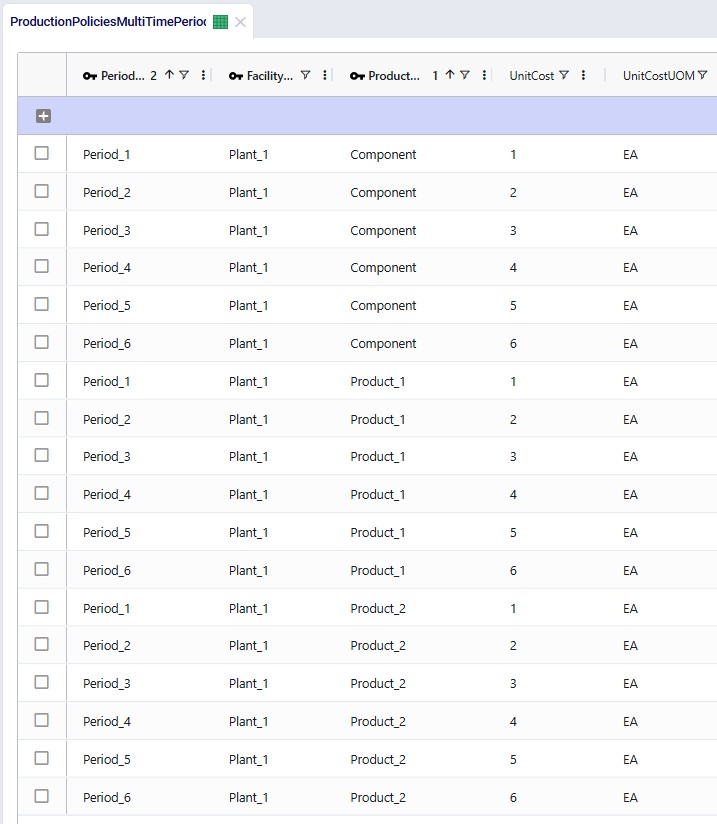
The production cost is increased here to encourage the model to produce product as early as possible, so that it incurs the lowest possible production cost. It will also still need to respect the shelf life and maturation time requirements. Note that this is also weighed against the increased inventory holding costs for producing earlier than possibly needed, as product will sit in inventory longer if produced earlier. So, the cost differential for production in different periods needs to be sufficiently big as compared to the increased inventory holding cost to see this behavior. We will explore this more through the scenarios that are run in this demo model.

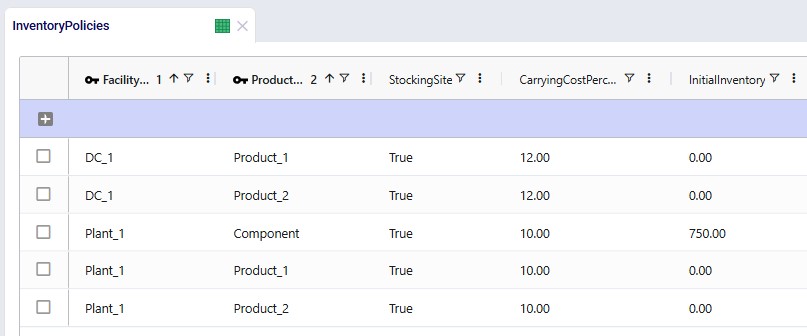
Since products will be spending some time in inventory, we need to have at least 1 inventory policy per product with Stocking Site = True. At the plant, all 3 products can be held in inventory, and there is an initial inventory of 750 units of the Component. At the DC, both finished goods can be held in inventory. The carrying cost percentage to calculate the inventory holding costs is set to 10% for all policies:

Lastly, we will show the demand that has been entered into the Customer Demand table. The customer demands 1,000 units each of the finished goods in period #6:
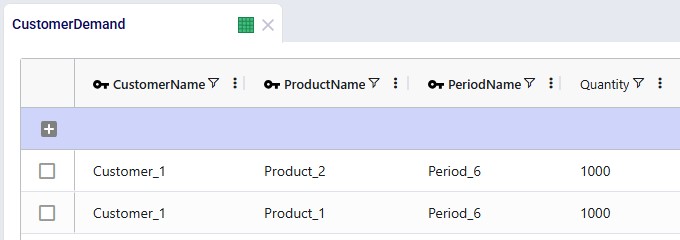
Other input tables that have populated records which have not been shown in a screenshot above are: Customers, Facilities, and Transportation Policies. The latter specifies that the plant can ship both finished goods to the DC, and the DC can ship both to the customer. The cost of transportation is set to 0.01 per unit per mile on both lanes.

The 3 costs that are modelled are therefore:

  1. Production cost – Unit Cost field on the Production Policies Multi-Time Period table.
  2. Transportation cost – Unit Cost field on the Transportation Policies table.
  3. Inventory Holding cost – calculated based on the Unit Value field on the Products table and the Carrying Cost Percentage field on the Inventory Policies table.

Demo Model – Scenarios

There are 3 scenarios run in this model, see also the screenshot below:
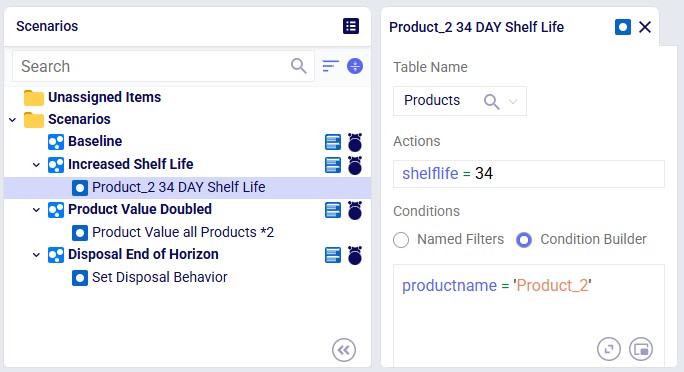
  1. Baseline – this scenario uses the inputs as they are in the input tables without any changes. See the screenshots above in the “Demo Model – Inputs” section. We will examine when the Component and Product_1 are produced so that their Shelf Life = Maturation Time = 3 weeks constraints are adhered to and explore how far in advance Product_2 is produced, weighing higher inventory carrying cost versus lower production cost when producing early.
  2. Increased Shelf Life – in this scenario we make one change as compared to the Baseline: increase the Shelf Life of Product_2 to 34 days (from 30 days), which means it goes from 4 weeks to 5 weeks. The results will tell us if it is indeed beneficial to produce even earlier (lower production cost) as compared to the Baseline now that Product_2 can be available for consumption 1 period longer than before.
  3. Product Value Doubled – this scenario also has 1 change as compared to the Baseline: the product value of all products is doubled. Now producing Product_2 as far in advance as possible will be less desirable as the inventory carrying cost will be double as compared to before, which may not outweigh the lower production cost in earlier periods anymore.

The screenshot shows the 3 scenarios on the left, where we see that the Increased Shelf Life and Product Value Doubled scenarios both contain 1 scenario item, whereas the Baseline does not contain any. On the right-hand side, the scenario item of the Increased Shelf Life scenario is shown where we can see that the Shelf Life value of Product_2 is set to 34. See the following Help Center articles for more details on Scenario building and syntax:

Demo Model – Outputs

Two notes upfront about the outputs before we dive into details as follows:

  1. Since the transportation lanes and their costs are fixed, and we keep demand the same across the 3 scenarios, transportation costs play no factor in the optimization of  these scenarios and are the same for all 3 scenarios.
  2. Both finished goods can be held in inventory at both Plant_1 and DC_1. Since this would incur the same cost (same product unit value and carrying cost percentage), we can see that sometimes a product is held in inventory at the plant whereas at other times it is held at the DC, these are equivalent solutions as the costs are the same.

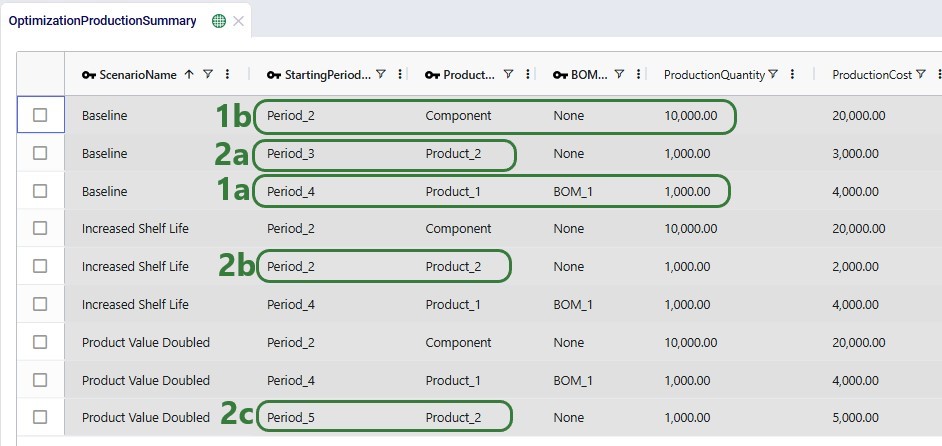
Now let us first look at when which product is produced through the Optimization Production Summary output table:

  1. Looking at the Component and Product_1 (remember 10 units of Component are used to make 1 unit of Product_1), we see that in all 3 scenarios, 10,000 units of Component are produced in Period_2 and 1,000 units of Product_1 are produced in Period_4. Since the demand for Product_1 occurs in Period_6 and the Component and Product_1 both have their shelf life and maturation time both set to 3 weeks, this is the only option for the model. Component and Product_1 both need to be 3 periods old when they are consumed: it cannot be later because they will have expired by then, and it cannot be sooner as they will not be mature yet. Working backwards:
    1. Needing Product_1 to be delivered to the customer in Period_6 means it needs to be produced in Period_4, so that its age is 3 in Period_6. 1,000 units are therefore produced in Period_4, using BOM_1.
    2. Because Product_1 needs to be produced in  Period_4 and the Component needs to be consumed for this production process (as specified by BOM_1 and connected to Product_1 in the Production Policies table), the Component needs to be 3 periods old in Period_4. Therefore, it must be produced in Period_2. 10,000 units are produced, since 1,000 units of Product_1 are demanded and 10 units of Component are used to produce 1 unit of Product_1.
  2. For Product_2, we see that it is produced indifferent periods for all 3 scenarios:
    1. Baseline – produced in Period_3. Since Product_2’s maturation time is 2 weeks and it is demanded in Period_6, it can be produced in Period_5 at the latest. As its shelf life is 4 weeks, it can be produced in Period_3 at the earliest; its age will be 4 in Period_6 in that case. The model chooses to produce the product in Period_3 indicating that the lower production cost of producing earlier outweighs the increased inventory holding cost for holding the product in stock for longer than strictly needed based on shelf life and maturation time. As also noted above, the transportation costs are always the same in this demo model, so they do not figure into this equation.
    2. Increased Shelf Life – produced in Period_2. Product_2’s shelf life was increased from 4 to 5 weeks in this scenario and as a result the earliest it can be produced is now Period_2. The model does choose to produce it in Period_2, so again the lower production cost (from $3,000 to$2,000) outweighs the increase in inventory holding costs for holding 1,000 units of Product_2 in stock for 1 week longer.
    3. Product Value Doubled – produced in Period_5. Based on the shelf life (4 weeks) and maturation time (2 weeks), same as in the Baseline, Product_2 could have been produced in periods 3, 4, or 5. The model now chooses to produce it as late as possible, adding $2,000 to the production costs as compared to the Baseline. Because the doubled product value doubles the inventory holding costs for Product_2, the increase in production costs due to producing it later must be less than the increase in inventory holding costs would have been had Product_2 still been produced in Period_3, which we will see in the next screenshot.

The next screenshot shows the Optimization Inventory Summary filtered for Product_2. Since we know it is produced in different periods for each of the 3 scenarios and that the demand occurs in Period_6, we expect to see the product sitting in inventory for a different number of periods in the different scenarios:
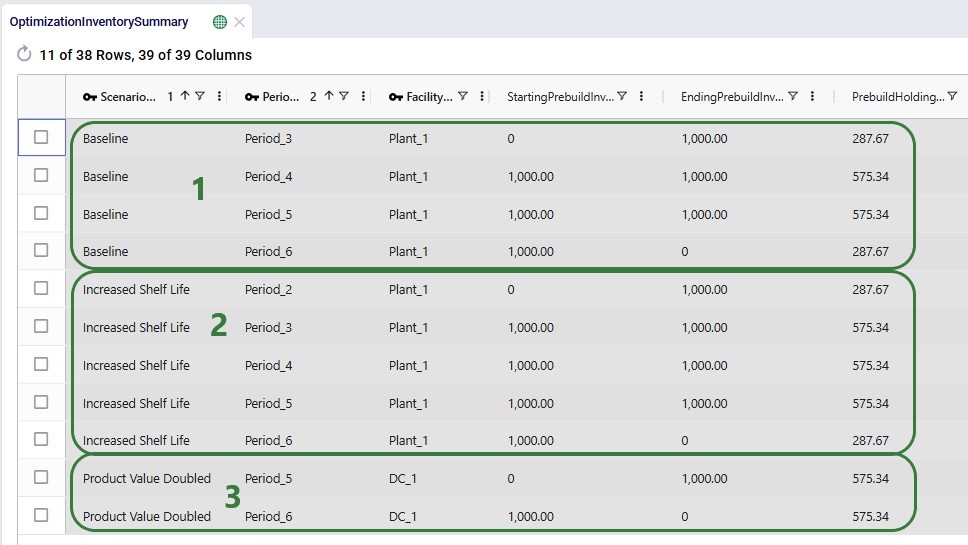
  1. In the Baseline, Product_2 is produced in Period_3, so the prebuild inventory in that period increases from 0 to 1,000. Therefore, the average prebuild inventory is calculated as (0 + 1,000) / 2 =500 for Period_3 (not shown in the screenshot). The prebuild holding cost for Period_3 is then calculated as follows: 500 units * 10% carrying cost percentage* $300 product unit value * 7 days (period length) / 365 days = $287.67. Since the product stays in inventory until it is sold in Period_6, the average prebuild inventory in periods 4 and 5 is 1,000 and the prebuild holding cost is double as compared to Period_3. In Period_6 the average prebuild inventory is again 500 since the starting prebuild inventory is 1,000 and the ending prebuild inventory 0, so the prebuild holding costs in this period are the same as in Period_3.
  2. In the Increased Shelf Life scenario, Product_2is produced 1 period earlier (in Period_2) as compared to the Baseline, so it sits in inventory for 1 more period. This adds $575.34 to the overall prebuild holding cost. We saw however that producing 1 period earlier reduced the production cost by $1,000, so the total cost is decreased by $425.
  3. In the Product Value Doubled scenario, Product_2is produced in Period_5 and sold in Period_6, leading to prebuild holding costs for 2 periods that both have average prebuild inventory of 500 units. Since the product value is doubled, this leads to a total of 2 * $ 575.34 = $1,150.68 prebuild inventory holding cost. Comparing to the Baseline where Product_2 was produced in Period_3:
    1. Producing in Period_5 instead increases the production cost by $2,000 ($5,000 vs $3,000).
    2. Had Product_2 been produced in Period_3 in the Product Value Doubled scenario too, the doubled prebuild holding costs (due to the double product value) would have resulted in a total prebuild holding cost of 2 * 2 * $287.67 + 2 * 2 * $575.34 = $3,452.04, which is more than $2,000 higher than the total prebuild holding cost for producing in Period_5: $3,452.04 - $1,150.68 = $2,301.36. Therefore, producing Product_2 in Period_5 rather than in Period_3 keeps the increase in total cost as small as possible.

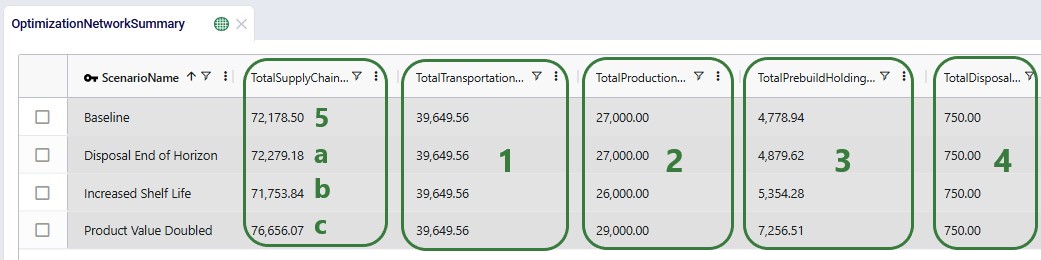
In the Optimization Network Summary output table, we can check the total cost by scenario and how the 3 costs modelled contribute to this total cost:

  1. As mentioned before, the transportation costs are constant across all 3 scenarios: the same amount is moved from Plant_1 toDC_1 and from DC_1 to Customer_1 at the same cost.
  2. The differences we see in the production costs are due to producing Product_2 in different periods in all 3 scenarios.
  3. The different prebuild holding costs for all 3 scenarios are due to:
    • Holding Product_2 in inventory for a different number of periods.
    • The doubled product value for all products in the last scenario increasing the prebuild holding cost of all 3 products.
  4. If the shelf life of Product_2 could be increased from 4 weeks to 5 weeks, this would lead to an overall reduction in costs by about $425.
  5. If the product value of all products was doubled, this would lead to an increase in total costs of about $4.6k.

Next, we will take a look at the 3 new output tables, which detail the age of products that are used in production, of products that are transported, and of products that are sitting in inventory. We will start with the Optimization Production Age Summary output table:
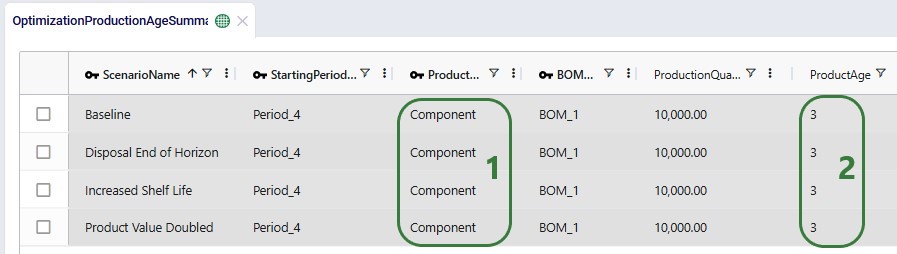
  1. This table will only contain data if BOMs are used where products that are used as inputs (components) can have different ages. In our small demo model, only the Component product is used as an input into BOM_1 to produce Product_1, so we only see records for the Component product in this table.
  2. As explained above, the model had no choice for when to produce Product_1 due to the shelf life and maturation time values of Product_1 and Component it had to be during Period_4 when the age of the Component was 3 weeks.

Next, we will look at the age of Product_2 when it is shipped between locations:
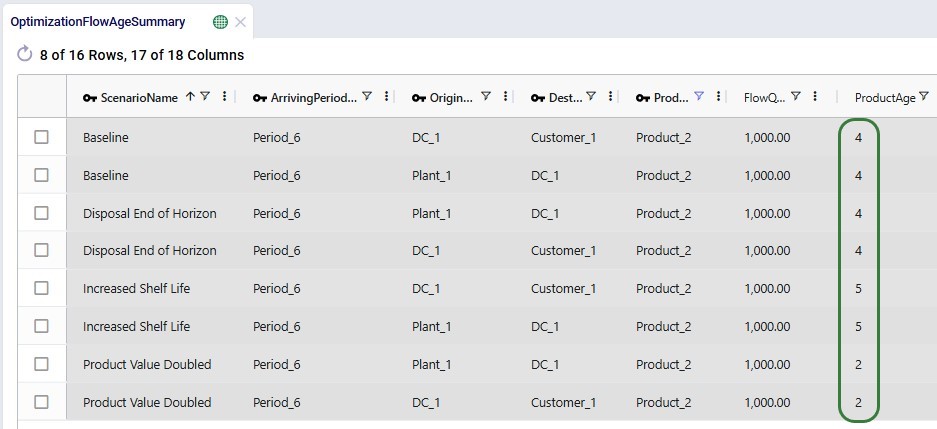
  1. In the Baseline scenario, Product_2 is produced as early as possible due to the lower production cost outweighing higher inventory holding costs, and therefore its age when it is shipped to the customer is the maximum shelf life of 4 weeks.
  2. Similarly, in the Increased Shelf Life scenario, where Product_2 now has a shelf life of 5 weeks, it is still produced as early as possible. Again, its age is the maximum shelf life of 5 weeks when shipped to the customer to fulfill its demand in Period_6.
  3. Finally, in the Product Value Doubled scenario, Product_2’s shelf life is 4 weeks (same as in the Baseline). Because the prebuild holding costs would increase more when producing the product as early as possible in Period_3 as compared to the increase in production costs when producing it as late as possible in Period_5, it is produced in Period_5. This leads to an age of 2 weeks when fulfilling the customer demand in Period_6.
  4. You may notice that in the first 2 scenarios Plant_1 ships to DC_1 in the same period as the DC ships to the customer, whereas in the last scenario Plant_1 ships to DC_1 in the period prior to the DC shipping to the customer. Since the transportation costs are the same regardless of when a product is shipped between these locations, and because the inventory holding costs at Plant_1 and DC_1 are the same, Product_2 could be shipped from the plant anytime from when it was produced up until Period_6 when it needs to be used to fulfill the customer’s demand; those solutions would all lead to the same total cost and are considered equivalent solutions.

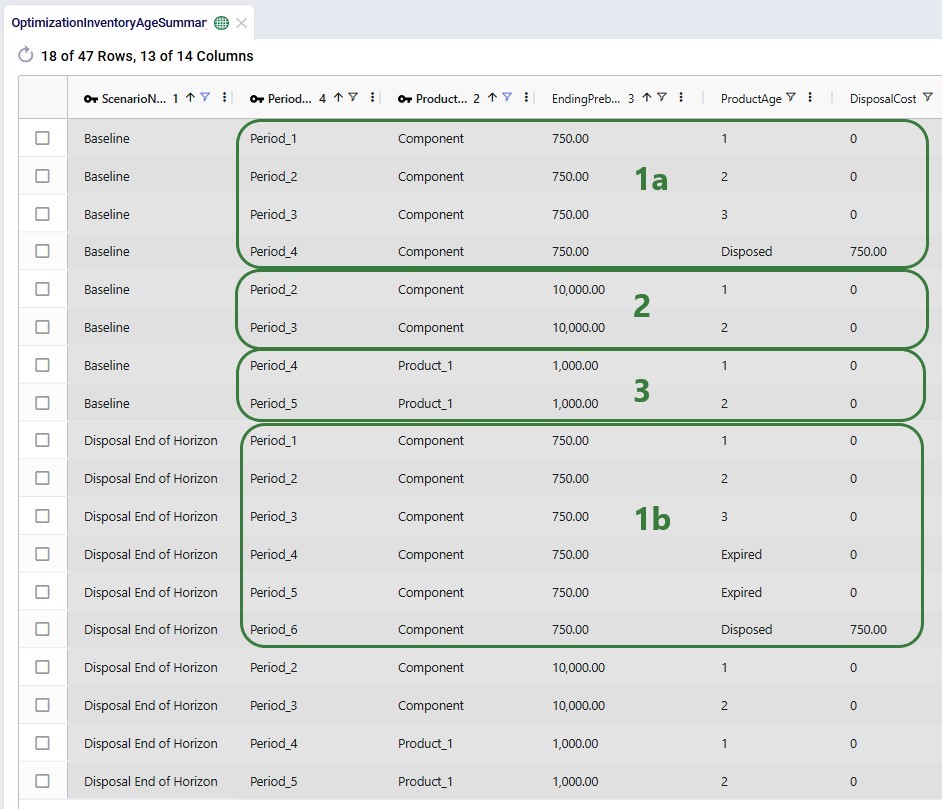
Lastly, we will look at 2 screenshots of the new Optimization Inventory Age Summary output table. This first one only looks at the ages of Product_1 and Component at Plant_1 in the Baseline scenario. The values for their inventory levels and ages are the same in the other 2 scenarios as the production of these 2 products occurs during the same periods for all 3 scenarios:

  1. Remember that Plant_1 had an initial inventory of 750 units of the Component. The age of these units will be 1 during the first period of the model, 2 in Period_2, and 3 in Period_3. Since its shelf life is 3 weeks, it is expired in Period_4 and cannot be used for producing Product_1 in Period_4. It then stays in inventory as expired product for the rest of the model horizon.
  2. In addition to the 750 units of Component in all periods of the model, we also see entries for Component in Period_2 and Period_3 for 10,000 units. These are the units that are produced in Period_2 to be used to produce 1,000 units of Product_1 in Period_4. Since they are produced in Period_2, their age is 1 in Period_2, and 2 in Period_3. There is no record for Period_4 as the inventory has gone down to 0 due to consuming all units in Period_4.
  3. As 1,000 units of Product_1 are produced in Period_4, their age is 1 during this period, and 2 in Period_5. When their age is 3 in Period_6, they are used to fulfill demand at the customer, and therefore there is no entry in this table for them in Period_6, since the inventory has gone down to 0.

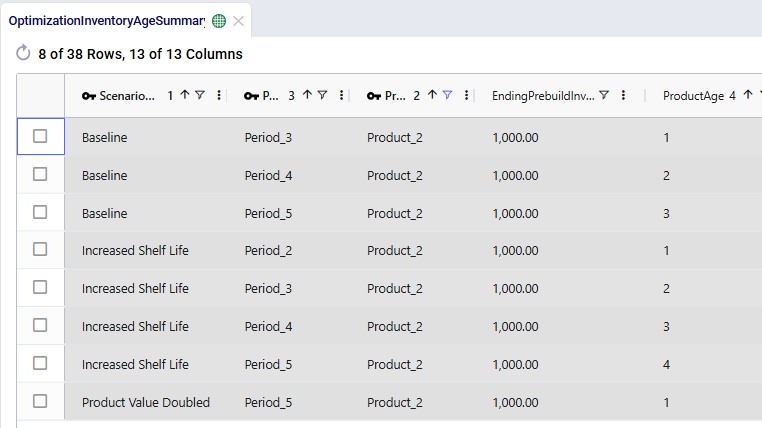
In the next screenshot, we look at the same output table, Optimization Inventory Age Summary, but now filtered for Product_2 and for all 3 scenarios:

  1. As we have mentioned several times before, Product_2 is produced in different periods in the 3 scenarios but always used to fulfill demand in Period_6. We see the age increasing from 1 in the period when it is produced, and no entries for Period_6 as it is used to fulfill demand in that period.
  2. In the Baseline and Increased Shelf Life scenarios, the age of Product_2 when delivered to the customer in Period_6 is at its maximum shelf life (4 in Baseline and 5 in Increased Shelf Life).
  3. In contrast, in the Product Value Doubled scenario, the age of Product_2 when fulfilling demand in Period_6 is 2, which is the minimum it needs to be due to its maturation time.

For any questions on these new features, please do not hesitate to contact Optilogic support on support@optilogic.com.

Shelf Life and Maturation Time (Network Optimization)

Cosmic Frog’s network optimization engine (Neo) can now account for shelf life and maturation time of products out of the box with the addition of several fields to the Products input table. The age of product that is used in production, product which flows between locations, and product sitting in inventory is now also reported in 3 new output tables, so users have 100% visibility into the age of their products across the operations.

In this documentation, we will give a brief overview of the new features first and then walk through a small demo model, which users can copy from the Resource Library, showing both shelf life and maturation time using 3 scenarios.

Shelf Life and Maturation Time – Overview

The new feature set consists of:

  1. Two new fields (and their accompanying UoM fields) on the Products input table:
    • Shelf Life – use this field to model product expiry. The value entered indicates how long from when the product is produced it is available to fulfill demand. A product will expire once its shelf life runs out. Setting a shelf life will essentially add a constraint to the model on how long a product can be produced in advance of when it is served to the end-customer.
    • Maturation Time – use this field to set how long it takes from when the product is produced before it can be used to fulfill demand. Think for example of cheese that will take up space in inventory while ripening and cannot be sold before it has reached a certain age. Setting a maturation time also adds a constraint to the model of how long it needs to be in the network before it can be consumed.
  2. Three new output tables:
    1. Optimization Production Age Summary – reports the age of product consumed by a BOM during production.
    2. Optimization Flow Age Summary – details the age of product of each flow.
    3. Optimization Inventory Age Summary – shows the age of product kept in inventory.

Please note that:

  1. Shelf Life and Maturation Time will only have an impact in multi-period models; if set in a single-period model, they will be ignored. If periods of different lengths are used in a model, the most frequently occurring period length will be used for shelf life and maturation time calculations.
  2. Users can enter Shelf Life and Maturation Time using any time-based unit of measure, e.g. days, weeks, months, etc. Based on the length of the periods in the model, shelf life and maturation time are converted to an integer multiple of periods. Fractional numbers are rounded to the nearest integer. For example:
    1. The length of the periods in a model is weeks, and shelf life is set to 33 days. This results in a shelf life of 33/7 = 4.71 weeks, which will be rounded to 5 weeks (= 5 periods).
    2. The length of the periods in a model is months, and maturation time is set to 9 weeks. This results in a shelf life of 9*7 days / 30 days = 2.1 months, which will be rounded to 2 months (= 2 periods).
  3. The period in which a product is produced counts towards both the shelf life and maturation. For example:
    1. In a weekly model, a product’s shelf life is set to 4 weeks. If it is produced in period #3, its age will be 1 in period #3 and it can be consumed in periods 3 (age = 1), 4 (age = 2), 5 (age =3), and 6 (age= 4). If not consumed, it will have status = expired from period 7 onwards.
    2. In a monthly model, a product’s maturation time is set to 5 months. If it is produced in period #2, it needs to mature during periods 2, 3, 4, 5, and 6. As it becomes mature in period 6, it can be consumed (in a BOM or to fulfill demand) from period 6 onwards.
  4. Products can have both shelf life and maturation time set. If this is the case, then shelf life has to be greater than or equal to the maturation time, otherwise the product expires before it is mature and cannot be consumed, resulting in an infeasible model run.
  5. If there is initial inventory > 0 for any product-facility combination entered on the Inventory Policies table, the age of this product will be 1 in the first period of the model. If it has a shelf life of 5 days in a model with daily periods it can be consumed in periods 1,2, 3, 4, and 5; it will expire from period 6 onwards.
  6. For products with a maturation time specified, they need to have at least 1 inventory policy with Stocking Site = True set up, either at the facility they are produced at or at a down-stream location it can be moved to (appropriate transportation policies need to be in place), so they can stay in stock until they are mature (or longer, shelf life allowing).
  7. Products with a shelf life also need to have at least 1 inventory policy with Stocking Site = True set up in order for the product to be allowed to be consumed later than the period it has been produced in (from production until before its expiry).
  8. Expired product can stay in inventory at the location it expired at if there is an inventory policy with Stocking Site =True set up for the product at this facility. It could also be moved elsewhere, if optimal to do so and the correct model structure is in place. This model structure would need to consist of:
    1. Transportation policies from this location to other facilities.
    2. Inventory policies with Stocking Site = True at the destination facility/facilities if the expired product is to stay there.
  9. If Bills of Materials are used in the modelling and components have shelf life and / or maturation time set, these need to be respected before being used in the BOM: a component cannot be consumed by a BOM before it is mature, and it also cannot be used by a BOM after it has expired.
  10. Customers often require that there is a certain minimum period of shelf life left on a product when it is delivered to them. For example, say that a specific beverage has a shelf life of 6 months, and the customer requires that when this beverage is delivered to them it still has at least 4 months of shelf life left. In this case, the shelf life to be entered into the model should be 6 – 4 = 2 months, to ensure that the product is used to fulfill the customer’s demand no longer than 2 months after it is produced.

Demo Model – Inputs

We will now showcase the use of both Shelf Life and Maturation Time in a small demo model. This model can be copied to your own Optilogic account from the Resource Library (see also the “How to use the Resource Library” Help Center article). This model has 3 locations which are shown on the map below:

  1. A manufacturing facility, Plant_1, in Saltillo, Mexico. The 2 finished goods and 1 component included in the model are produced here.
  2. A distribution center, DC_1, in Detroit, MI,USA. The plant ships the finished goods to this DC.
  3. One customer, located in Erie, PA, USA. The customer has demand for both finished goods.

It is a multi-period model with 6 periods, which are each 1 week long (the Model End Date is set to February 12, 2025, on the Model Settings input table, not shown):

There are 3 products included the model: 2 finished goods, Product_1 and Product_2, and 1 raw material, named Component. The component is used in a bill of materials to produce Product_1, as we will see in the screenshots after this one.

  1. Each product has a unit value set for inventory holding calculation purposes (= # units in inventory * product unit value * carrying cost percentage * period length / 365 days).
  2. Both the Component and Product_1 have Shelf Life and Maturation Time set, and the values are all set as 3 weeks. Since Shelf Life = Maturation Time for both, it means that both need to be consumed when their age is 3: it cannot be sooner since they are not mature then, and it cannot be later as they will have expired.
    1. WK in the UOM fields is the symbol used for the unit of measure with Type = Time to indicate a week. See the Units of Measure input table for other units of measure of Type = Time and their Symbols.
  3. For Product_2:
    1. Shelf Life = 27 days. Since it is a model with weekly periods, this means that the shelf life equates to 4 periods (rounding of 27 / 7 = 3.86 to the nearest integer).
    2. Maturation Time = 13 days, which equals 2 periods (rounding of 13 / 7 = 1.86 to the nearest integer).
    3. If Product_2 is for example produced in period #3, it will be mature in period #4, and it can be consumed in periods 4, 5, 6, and 7. It will be expired from period 8 onwards.

As mentioned above, a bill of materials is used to produce finished good Product_1:

This bill of materials is named BOM_1 and it specifies that 10 units of the product named Component are used as an input (product type = Component) of this bill of materials. Note that the bill of materials does not indicate the end product that is produced with it. This is specified by associating production policies with a BOM. To learn more about detailed production modelling using the Neo engine, please see this Help Center article.

In the next screenshot of the production policies table, we see that the plant can produce all 3 products, and that for the production of Product_1, the bill of materials shown in the previous screenshot, BOM_1, is used. The cost per unit is set to 1 here for each product:

For purposes of showing how Shelf Life and Maturation Time work, we will use the Production Policies Multi-Time Period input table too. In here we override the production cost per unit that we just saw in the above screenshot to become increasingly expensive in later periods for all products, adding $1 per unit for each next period. So, to produce a unit of Product_1 in Period_1 costs $1, in Period_2 it costs $2, in Period_3 $3, etc. Same for Component and Product_2:

The production cost is increased here to encourage the model to produce product as early as possible, so that it incurs the lowest possible production cost. It will also still need to respect the shelf life and maturation time requirements. Note that this is also weighed against the increased inventory holding costs for producing earlier than possibly needed, as product will sit in inventory longer if produced earlier. So, the cost differential for production in different periods needs to be sufficiently big as compared to the increased inventory holding cost to see this behavior. We will explore this more through the scenarios that are run in this demo model.

Since products will be spending some time in inventory, we need to have at least 1 inventory policy per product with Stocking Site = True. At the plant, all 3 products can be held in inventory, and there is an initial inventory of 750 units of the Component. At the DC, both finished goods can be held in inventory. The carrying cost percentage to calculate the inventory holding costs is set to 10% for all policies:

Lastly, we will show the demand that has been entered into the Customer Demand table. The customer demands 1,000 units each of the finished goods in period #6:

Other input tables that have populated records which have not been shown in a screenshot above are: Customers, Facilities, and Transportation Policies. The latter specifies that the plant can ship both finished goods to the DC, and the DC can ship both to the customer. The cost of transportation is set to 0.01 per unit per mile on both lanes.

The 3 costs that are modelled are therefore:

  1. Production cost – Unit Cost field on the Production Policies Multi-Time Period table.
  2. Transportation cost – Unit Cost field on the Transportation Policies table.
  3. Inventory Holding cost – calculated based on the Unit Value field on the Products table and the Carrying Cost Percentage field on the Inventory Policies table.

Demo Model – Scenarios

There are 3 scenarios run in this model, see also the screenshot below:

  1. Baseline – this scenario uses the inputs as they are in the input tables without any changes. See the screenshots above in the “Demo Model – Inputs” section. We will examine when the Component and Product_1 are produced so that their Shelf Life = Maturation Time = 3 weeks constraints are adhered to and explore how far in advance Product_2 is produced, weighing higher inventory carrying cost versus lower production cost when producing early.
  2. Increased Shelf Life – in this scenario we make one change as compared to the Baseline: increase the Shelf Life of Product_2 to 34 days (from 30 days), which means it goes from 4 weeks to 5 weeks. The results will tell us if it is indeed beneficial to produce even earlier (lower production cost) as compared to the Baseline now that Product_2 can be available for consumption 1 period longer than before.
  3. Product Value Doubled – this scenario also has 1 change as compared to the Baseline: the product value of all products is doubled. Now producing Product_2 as far in advance as possible will be less desirable as the inventory carrying cost will be double as compared to before, which may not outweigh the lower production cost in earlier periods anymore.

The screenshot shows the 3 scenarios on the left, where we see that the Increased Shelf Life and Product Value Doubled scenarios both contain 1 scenario item, whereas the Baseline does not contain any. On the right-hand side, the scenario item of the Increased Shelf Life scenario is shown where we can see that the Shelf Life value of Product_2 is set to 34. See the following Help Center articles for more details on Scenario building and syntax:

Demo Model – Outputs

Two notes upfront about the outputs before we dive into details as follows:

  1. Since the transportation lanes and their costs are fixed, and we keep demand the same across the 3 scenarios, transportation costs play no factor in the optimization of  these scenarios and are the same for all 3 scenarios.
  2. Both finished goods can be held in inventory at both Plant_1 and DC_1. Since this would incur the same cost (same product unit value and carrying cost percentage), we can see that sometimes a product is held in inventory at the plant whereas at other times it is held at the DC, these are equivalent solutions as the costs are the same.

Now let us first look at when which product is produced through the Optimization Production Summary output table:

  1. Looking at the Component and Product_1 (remember 10 units of Component are used to make 1 unit of Product_1), we see that in all 3 scenarios, 10,000 units of Component are produced in Period_2 and 1,000 units of Product_1 are produced in Period_4. Since the demand for Product_1 occurs in Period_6 and the Component and Product_1 both have their shelf life and maturation time both set to 3 weeks, this is the only option for the model. Component and Product_1 both need to be 3 periods old when they are consumed: it cannot be later because they will have expired by then, and it cannot be sooner as they will not be mature yet. Working backwards:
    1. Needing Product_1 to be delivered to the customer in Period_6 means it needs to be produced in Period_4, so that its age is 3 in Period_6. 1,000 units are therefore produced in Period_4, using BOM_1.
    2. Because Product_1 needs to be produced in  Period_4 and the Component needs to be consumed for this production process (as specified by BOM_1 and connected to Product_1 in the Production Policies table), the Component needs to be 3 periods old in Period_4. Therefore, it must be produced in Period_2. 10,000 units are produced, since 1,000 units of Product_1 are demanded and 10 units of Component are used to produce 1 unit of Product_1.
  2. For Product_2, we see that it is produced indifferent periods for all 3 scenarios:
    1. Baseline – produced in Period_3. Since Product_2’s maturation time is 2 weeks and it is demanded in Period_6, it can be produced in Period_5 at the latest. As its shelf life is 4 weeks, it can be produced in Period_3 at the earliest; its age will be 4 in Period_6 in that case. The model chooses to produce the product in Period_3 indicating that the lower production cost of producing earlier outweighs the increased inventory holding cost for holding the product in stock for longer than strictly needed based on shelf life and maturation time. As also noted above, the transportation costs are always the same in this demo model, so they do not figure into this equation.
    2. Increased Shelf Life – produced in Period_2. Product_2’s shelf life was increased from 4 to 5 weeks in this scenario and as a result the earliest it can be produced is now Period_2. The model does choose to produce it in Period_2, so again the lower production cost (from $3,000 to$2,000) outweighs the increase in inventory holding costs for holding 1,000 units of Product_2 in stock for 1 week longer.
    3. Product Value Doubled – produced in Period_5. Based on the shelf life (4 weeks) and maturation time (2 weeks), same as in the Baseline, Product_2 could have been produced in periods 3, 4, or 5. The model now chooses to produce it as late as possible, adding $2,000 to the production costs as compared to the Baseline. Because the doubled product value doubles the inventory holding costs for Product_2, the increase in production costs due to producing it later must be less than the increase in inventory holding costs would have been had Product_2 still been produced in Period_3, which we will see in the next screenshot.

The next screenshot shows the Optimization Inventory Summary filtered for Product_2. Since we know it is produced in different periods for each of the 3 scenarios and that the demand occurs in Period_6, we expect to see the product sitting in inventory for a different number of periods in the different scenarios:

  1. In the Baseline, Product_2 is produced in Period_3, so the prebuild inventory in that period increases from 0 to 1,000. Therefore, the average prebuild inventory is calculated as (0 + 1,000) / 2 =500 for Period_3 (not shown in the screenshot). The prebuild holding cost for Period_3 is then calculated as follows: 500 units * 10% carrying cost percentage* $300 product unit value * 7 days (period length) / 365 days = $287.67. Since the product stays in inventory until it is sold in Period_6, the average prebuild inventory in periods 4 and 5 is 1,000 and the prebuild holding cost is double as compared to Period_3. In Period_6 the average prebuild inventory is again 500 since the starting prebuild inventory is 1,000 and the ending prebuild inventory 0, so the prebuild holding costs in this period are the same as in Period_3.
  2. In the Increased Shelf Life scenario, Product_2is produced 1 period earlier (in Period_2) as compared to the Baseline, so it sits in inventory for 1 more period. This adds $575.34 to the overall prebuild holding cost. We saw however that producing 1 period earlier reduced the production cost by $1,000, so the total cost is decreased by $425.
  3. In the Product Value Doubled scenario, Product_2is produced in Period_5 and sold in Period_6, leading to prebuild holding costs for 2 periods that both have average prebuild inventory of 500 units. Since the product value is doubled, this leads to a total of 2 * $ 575.34 = $1,150.68 prebuild inventory holding cost. Comparing to the Baseline where Product_2 was produced in Period_3:
    1. Producing in Period_5 instead increases the production cost by $2,000 ($5,000 vs $3,000).
    2. Had Product_2 been produced in Period_3 in the Product Value Doubled scenario too, the doubled prebuild holding costs (due to the double product value) would have resulted in a total prebuild holding cost of 2 * 2 * $287.67 + 2 * 2 * $575.34 = $3,452.04, which is more than $2,000 higher than the total prebuild holding cost for producing in Period_5: $3,452.04 - $1,150.68 = $2,301.36. Therefore, producing Product_2 in Period_5 rather than in Period_3 keeps the increase in total cost as small as possible.

In the Optimization Network Summary output table, we can check the total cost by scenario and how the 3 costs modelled contribute to this total cost:

  1. As mentioned before, the transportation costs are constant across all 3 scenarios: the same amount is moved from Plant_1 toDC_1 and from DC_1 to Customer_1 at the same cost.
  2. The differences we see in the production costs are due to producing Product_2 in different periods in all 3 scenarios.
  3. The different prebuild holding costs for all 3 scenarios are due to:
    • Holding Product_2 in inventory for a different number of periods.
    • The doubled product value for all products in the last scenario increasing the prebuild holding cost of all 3 products.
  4. If the shelf life of Product_2 could be increased from 4 weeks to 5 weeks, this would lead to an overall reduction in costs by about $425.
  5. If the product value of all products was doubled, this would lead to an increase in total costs of about $4.6k.

Next, we will take a look at the 3 new output tables, which detail the age of products that are used in production, of products that are transported, and of products that are sitting in inventory. We will start with the Optimization Production Age Summary output table:

  1. This table will only contain data if BOMs are used where products that are used as inputs (components) can have different ages. In our small demo model, only the Component product is used as an input into BOM_1 to produce Product_1, so we only see records for the Component product in this table.
  2. As explained above, the model had no choice for when to produce Product_1 due to the shelf life and maturation time values of Product_1 and Component it had to be during Period_4 when the age of the Component was 3 weeks.

Next, we will look at the age of Product_2 when it is shipped between locations:

  1. In the Baseline scenario, Product_2 is produced as early as possible due to the lower production cost outweighing higher inventory holding costs, and therefore its age when it is shipped to the customer is the maximum shelf life of 4 weeks.
  2. Similarly, in the Increased Shelf Life scenario, where Product_2 now has a shelf life of 5 weeks, it is still produced as early as possible. Again, its age is the maximum shelf life of 5 weeks when shipped to the customer to fulfill its demand in Period_6.
  3. Finally, in the Product Value Doubled scenario, Product_2’s shelf life is 4 weeks (same as in the Baseline). Because the prebuild holding costs would increase more when producing the product as early as possible in Period_3 as compared to the increase in production costs when producing it as late as possible in Period_5, it is produced in Period_5. This leads to an age of 2 weeks when fulfilling the customer demand in Period_6.
  4. You may notice that in the first 2 scenarios Plant_1 ships to DC_1 in the same period as the DC ships to the customer, whereas in the last scenario Plant_1 ships to DC_1 in the period prior to the DC shipping to the customer. Since the transportation costs are the same regardless of when a product is shipped between these locations, and because the inventory holding costs at Plant_1 and DC_1 are the same, Product_2 could be shipped from the plant anytime from when it was produced up until Period_6 when it needs to be used to fulfill the customer’s demand; those solutions would all lead to the same total cost and are considered equivalent solutions.

Lastly, we will look at 2 screenshots of the new Optimization Inventory Age Summary output table. This first one only looks at the ages of Product_1 and Component at Plant_1 in the Baseline scenario. The values for their inventory levels and ages are the same in the other 2 scenarios as the production of these 2 products occurs during the same periods for all 3 scenarios:

  1. Remember that Plant_1 had an initial inventory of 750 units of the Component. The age of these units will be 1 during the first period of the model, 2 in Period_2, and 3 in Period_3. Since its shelf life is 3 weeks, it is expired in Period_4 and cannot be used for producing Product_1 in Period_4. It then stays in inventory as expired product for the rest of the model horizon.
  2. In addition to the 750 units of Component in all periods of the model, we also see entries for Component in Period_2 and Period_3 for 10,000 units. These are the units that are produced in Period_2 to be used to produce 1,000 units of Product_1 in Period_4. Since they are produced in Period_2, their age is 1 in Period_2, and 2 in Period_3. There is no record for Period_4 as the inventory has gone down to 0 due to consuming all units in Period_4.
  3. As 1,000 units of Product_1 are produced in Period_4, their age is 1 during this period, and 2 in Period_5. When their age is 3 in Period_6, they are used to fulfill demand at the customer, and therefore there is no entry in this table for them in Period_6, since the inventory has gone down to 0.

In the next screenshot, we look at the same output table, Optimization Inventory Age Summary, but now filtered for Product_2 and for all 3 scenarios:

  1. As we have mentioned several times before, Product_2 is produced in different periods in the 3 scenarios but always used to fulfill demand in Period_6. We see the age increasing from 1 in the period when it is produced, and no entries for Period_6 as it is used to fulfill demand in that period.
  2. In the Baseline and Increased Shelf Life scenarios, the age of Product_2 when delivered to the customer in Period_6 is at its maximum shelf life (4 in Baseline and 5 in Increased Shelf Life).
  3. In contrast, in the Product Value Doubled scenario, the age of Product_2 when fulfilling demand in Period_6 is 2, which is the minimum it needs to be due to its maturation time.

For any questions on these new features, please do not hesitate to contact Optilogic support on support@optilogic.com.

Have More Questions?

Contact Support

Get in touch

Contact Sales

Get in touch

Visit Frogger Pond Community

Visit our Community