

When a scenario run is infeasible, it means that the solver cannot find any solutions that satisfy all the specified constraints simultaneously. In other words, the defined constraints are too restrictive or they contradict each other, making it impossible to satisfy all of them at once. Examples are:
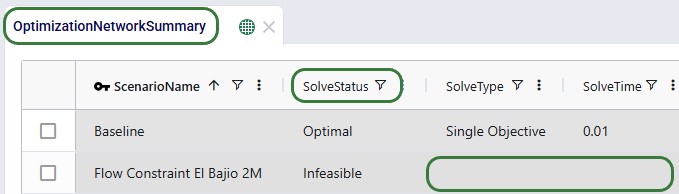
If a Neo (network optimization) scenario run is infeasible, a user can tell from within Cosmic Frog and also by looking at the run's logs in the Run Manager application. Within Cosmic Frog, the Optimization Network Summary output table will show Solve Status = Infeasible and many other output columns, such as Solve Type and Solve Time, will be blank:
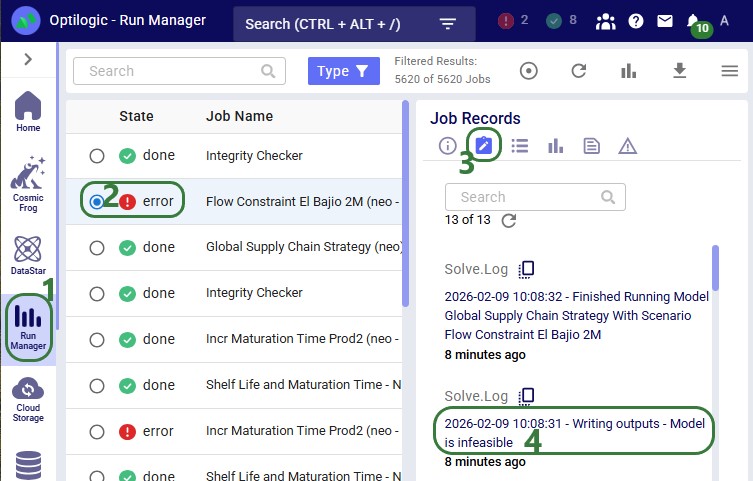
In the Run Manager application, also on the Optilogic Platform, users can select the scenario run, which will have Status = Error, and look at the run's logs on the right-hand side:
Running the check infeasibility tool is a great first step in identifying why a scenario is infeasible. It can allow the scenario to optimize even if the current constraints cause infeasibility. Generally, the tool will loosen constraints in the scenario, which allow it to solve. This means that the check infeasibility tool is solving an optimization problem focused on feasibility, not cost. The goal of this augmented model is to minimize how much the constraints are loosened, and therefore the tool can often find:
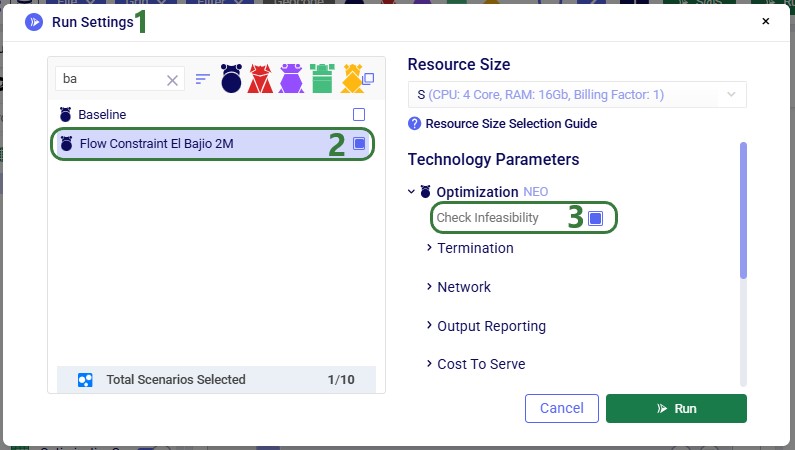
The Check Infeasibility tool is accessed via the model run options on the Run Settings screen:
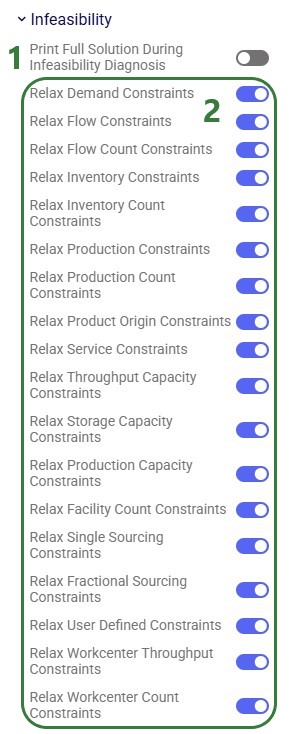
When running the Check Infeasibility tool in this default manner, all constraints will be relaxed. Additional run parameters can be used to selectively choose which constraints can be relaxed during a Check Infeasibility run and which need to be enforced, see the "Infeasibility Parameters" section in the "Running Models & Scenarios" help center article. Especially in models where many different types of constraints are applied, this can help in determining which constraint(s) cause the infeasibility and how constraints interact with each other. An approach can be to run the Check Infeasibility tool a few times with different constraints enforced and then compare the results. It also lets users indicate to the solver which constraints are most important to satisfy by keeping those enforced, while others are allowed to be relaxed.
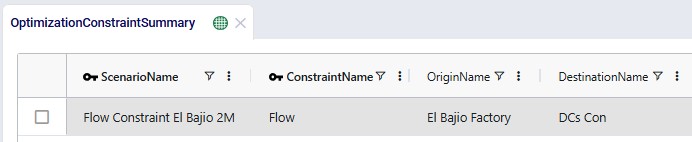
Once a Check Infeasibility run completes successfully, the results that are likely most helpful for identifying the infeasibility are found in the Optimization Constraint Summary output table. Users may need to filter for the scenario name in case this table contains results of multiple check infeasibility scenario runs. The following 2 screenshots show the 1 record in this table for the scenario called "Flow Constraint El Bajio 2M" scenario that returns infeasible as shown above. This first screenshot shows that the constraint in question is a Flow constraint that is applied on the lanes from the El Bajio Factory to a group of DCs named DCs Con:
Scrolling right in the table, we can see additional fields which indicate why this constraint leads to infeasibility in the scenario:

In this example, the check infeasibility tool can pinpoint the infeasibility exactly. At other times, the outcomes will be more general, see for example the following screenshots of results of a check infeasibility run on a different scenario:


Here the constraint that cannot be fulfilled is the demand for 1,000 units of Product_2 in Period_6. The output in the Constraint Summary output table is telling us that a way to make this feasible is to change the demand quantity to be 0. We will need to investigate the model inputs further to understand why this is. On further inspection, the infeasibility cause is found to be that the maturation time of Product_2 is set to 50 days. This is longer than the model horizon of 42 days (6 weekly periods). So, if no or not enough initial inventory is present in the model, Product_ 2 cannot be made and mature in time to fulfill demand in Period_ 6.
If the user has turned on the "Print Full Solution During Infeasibility Diagnosis" option, see above, the outputs in the other output tables can possibly also help to determine the cause of the infeasibility.

When a scenario run is infeasible, it means that the solver cannot find any solutions that satisfy all the specified constraints simultaneously. In other words, the defined constraints are too restrictive or they contradict each other, making it impossible to satisfy all of them at once. Examples are:
If a Neo (network optimization) scenario run is infeasible, a user can tell from within Cosmic Frog and also by looking at the run's logs in the Run Manager application. Within Cosmic Frog, the Optimization Network Summary output table will show Solve Status = Infeasible and many other output columns, such as Solve Type and Solve Time, will be blank:
In the Run Manager application, also on the Optilogic Platform, users can select the scenario run, which will have Status = Error, and look at the run's logs on the right-hand side:
Running the check infeasibility tool is a great first step in identifying why a scenario is infeasible. It can allow the scenario to optimize even if the current constraints cause infeasibility. Generally, the tool will loosen constraints in the scenario, which allow it to solve. This means that the check infeasibility tool is solving an optimization problem focused on feasibility, not cost. The goal of this augmented model is to minimize how much the constraints are loosened, and therefore the tool can often find:
The Check Infeasibility tool is accessed via the model run options on the Run Settings screen:
When running the Check Infeasibility tool in this default manner, all constraints will be relaxed. Additional run parameters can be used to selectively choose which constraints can be relaxed during a Check Infeasibility run and which need to be enforced, see the "Infeasibility Parameters" section in the "Running Models & Scenarios" help center article. Especially in models where many different types of constraints are applied, this can help in determining which constraint(s) cause the infeasibility and how constraints interact with each other. An approach can be to run the Check Infeasibility tool a few times with different constraints enforced and then compare the results. It also lets users indicate to the solver which constraints are most important to satisfy by keeping those enforced, while others are allowed to be relaxed.
Once a Check Infeasibility run completes successfully, the results that are likely most helpful for identifying the infeasibility are found in the Optimization Constraint Summary output table. Users may need to filter for the scenario name in case this table contains results of multiple check infeasibility scenario runs. The following 2 screenshots show the 1 record in this table for the scenario called "Flow Constraint El Bajio 2M" scenario that returns infeasible as shown above. This first screenshot shows that the constraint in question is a Flow constraint that is applied on the lanes from the El Bajio Factory to a group of DCs named DCs Con:
Scrolling right in the table, we can see additional fields which indicate why this constraint leads to infeasibility in the scenario:
In this example, the check infeasibility tool can pinpoint the infeasibility exactly. At other times, the outcomes will be more general, see for example the following screenshots of results of a check infeasibility run on a different scenario:
Here the constraint that cannot be fulfilled is the demand for 1,000 units of Product_2 in Period_6. The output in the Constraint Summary output table is telling us that a way to make this feasible is to change the demand quantity to be 0. We will need to investigate the model inputs further to understand why this is. On further inspection, the infeasibility cause is found to be that the maturation time of Product_2 is set to 50 days. This is longer than the model horizon of 42 days (6 weekly periods). So, if no or not enough initial inventory is present in the model, Product_ 2 cannot be made and mature in time to fulfill demand in Period_ 6.
If the user has turned on the "Print Full Solution During Infeasibility Diagnosis" option, see above, the outputs in the other output tables can possibly also help to determine the cause of the infeasibility.