
Incremental Change (Network Optimization)

Overview

Incremental Change is a powerful new capability in Cosmic Frog’s NEO engine (Network Optimization) that helps you manage the transition between two network states – such as moving from your current baseline network to an optimized future state. Rather than implementing all changes at once, Incremental Change allows you to control the pace and sequence of changes over time, making network transformations more practical and manageable.

This feature bridges the gap between theoretical optimization results and realistic implementation plans by generating a sequenced roadmap of network changes.

In this documentation, we will discuss the impact of Incremental Change, explain how to use it, and then walk through 2 demo models showing examples of the new capabilities.

Please also see the following brief video for an introduction to Incremental Change and an overview of the second demo model, Incremental Change - Supplier Base Transition:

Why It Matters

Supply chain networks rarely change overnight. Whether you are opening new distribution centers, shifting supplier bases, or adapting to seasonal demand fluctuations, real-world constraints limit how quickly you can implement changes. Organizations face practical limitations including:

  • Operational capacity - You can only onboard a limited number of new customers or suppliers per month
  • Financial constraints - Capital investments must be spread across budget cycles
  • Risk management - Gradual transitions reduce disruption and allow for course corrections
  • Seasonal variability - Production and demand patterns require stability within acceptable ranges

Incremental Change addresses these realities by helping you answer critical questions: What is the best order of changes? What is the optimal rate of change? What tolerance levels are appropriate for different types of modifications?

Key Benefits

1. Identify High-Impact Changes

Understand which network modifications deliver the greatest value earliest in your transition. Incremental Change provides clear visibility into expected savings versus the number of changes required, along with detailed change checklists for each scenario.

2. Build Practical Transition Plans

Create realistic, step-by-step roadmaps for moving from your current network to your target network. You will receive:

  • Period-by-period change checklists
  • Expected transition timelines
  • Monthly cost projections throughout the transition window

3. Adapt Smoothly to Dynamic Environments

Manage network evolution in response to changing business conditions while respecting operational constraints. Balance total cost optimization against your tolerance for change, with detailed monthly implementation plans.

Supported Change Types

Cosmic Frog's Incremental Change currently supports the following network changes:

  • Facilities Opened – Number of new facilities added
  • Facilities Closed – Number of existing facilities removed
  • Suppliers Added – Number of new suppliers introduced
  • Suppliers Removed – Number of existing suppliers discontinued
  • Production Increase – Total production increase across all products and facilities
  • Production Decrease – Total production decrease across all products and facilities
  • Lanes Added – Number of new transportation lanes utilized

Practical Applications

Progressive Facility Expansion: When opening a new distribution center, specify that you want to reassign up to 10 customers per month, and the system determines which customers to transition each month to maximize savings.

Seasonal Production Smoothing: For products with seasonal demand patterns, set constraints to ensure facility production never varies by more than 10% month-over-month, maintaining operational stability.

Multi-Year Facility Rollouts: Plan the optimal sequence for opening 10 facilities over five years including a detailed 2-year implementation roadmap.

Strategic Supplier Transitions: Systematically shift your supplier base. For example, progressively move sourcing out of or into a particular region – with Incremental Change determining the optimal sequence of supplier changes.

How to Use

Incremental Change uses a new input table and generates 2 new output tables with different levels of detail:

Input: Use the Incremental Change Constraints table to set the change type(s) being included and your change budget for each period.

Outputs:

  • Optimization Incremental Change Summary - Overview of the amount of change occurring in each period
  • Optimization Incremental Change Report - Detailed information about each specific change taking place

By leveraging Incremental Change, you can transform theoretical network optimization results into actionable, phased implementation plans that respect real-world operational constraints while maximizing value delivery.

Tips & Tricks

Some additional pointers that may prove helpful are as follows:

  • You can initially setup any Incremental Change Constraints with a large budget. This may not impose any actual limits, but it will show you the Incremental Change Outputs and can give additional direction on how to limit the changes.
  • Different change types can be used in the same model / scenario.
  • If no change has happened, the Optimization Incremental Change Report output table will be empty, but the Optimization Incremental Change Summary output table will show the zero change amount(s)/count(s).
  • Users are encouraged to check outputs to ensure the desired behavior is achieved. If not, the most common solution is to add additional constraints to eliminate any undesired behavior.
    • For example, requiring at least 2 suppliers for 1 product can lead to the cheapest supplier being used for almost all units and only using the second cheapest supplier for a few units. Adding (conditional) minimum flow constraints can resolve this.
  • Important: the Period Name Group Behavior field on the Incremental Change Constraints table always uses the Enumerate value, regardless of the value it is set to.

Example Model 1 – Production Smoothing

In this example model, "Incremental Change - Production Smoothing", we will see how we can ensure that increases in production from one month to the next are limited to a certain percentage using the Incremental Change feature. This model can be copied from the Resource Library to your own account in case you want to follow along.

Production Smoothing – Inputs

The following screenshot shows which input tables are populated in this example model:
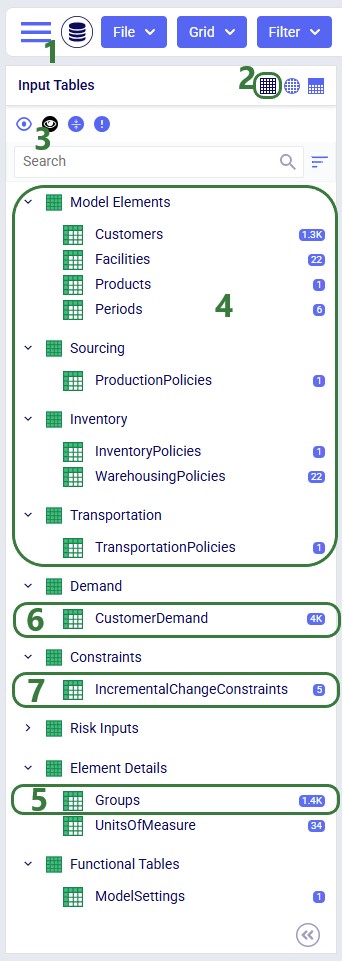
  1. We have used the Module menu to open the Data module.
  2. Input tables are being shown in the list; use the left most of the 3 icons to show input tables. Clicking on the middle icon will show output tables, and clicking on the icon on the right will show custom tables if any are present.
  3. We have turned on the option to only show tables that are populated in the list, which you can do by clicking on the second of the 4 icons here.
  4. These are the standard tables which are populated in this model:
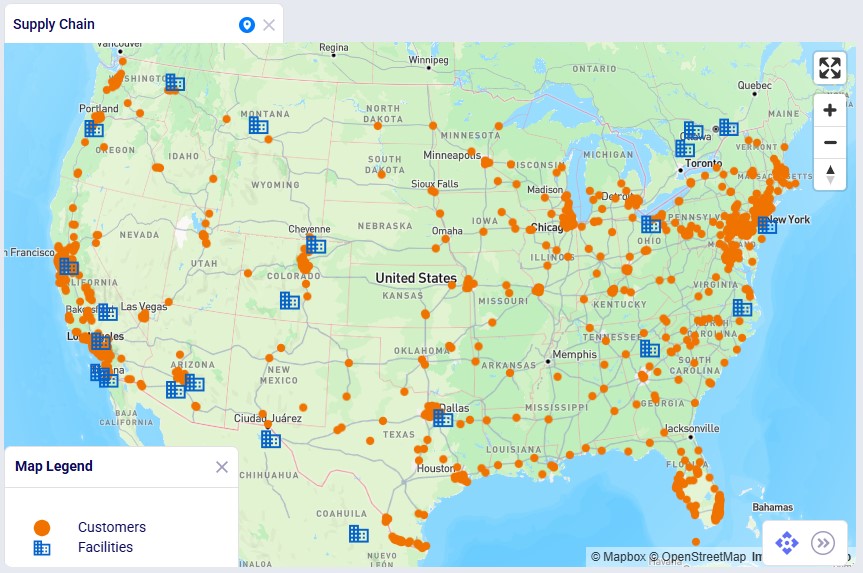
    1. The model contains 1,333 customers which are spread out over the US; we will show these locations on a map in the next screenshot too.
    2. There are 22 existing facilities which produce the product and serve it to the customers; they are mostly in the US with a few in Mexico and Canada. The facilities are considered and could be closed (which would apply a Closing Cost), and they each have a maximum throughput capacity of 3M units. These facilities are also shown on the map in the next screenshot.
    3. There is 1 product, Rockets, in the model. It has a value of $50, which is used for inventory holding cost calculations.
    4. The model has 6 monthly periods: January through June of 2026.
    5. In the Production Policies table, it is specified that the product Rockets can be made at each facility for a unit cost of $0.20.
    6. The Rockets product can be held in inventory in each of the 22 facilities, per the Inventory Policies table.
    7. In the Warehousing Policies table, a policy for each facility is set up where Outbound Handling costs for the Rockets product vary from $0.50 to $1.00 per unit. These variations can be due to regional variations in labor costs and different levels of automation at the facilities.
    8. The Transportation Policies table specifies that all facilities can serve all customers, the cost applied is $0.01 per mile per unit.
  5. The Groups table is also a standard table and is used here to create a group “All Customers” which contains all customer locations and a group “All Facilities” which contains all facility locations. These groups are used in the Production Policies, Inventory Policies and Transportation Policies tables.
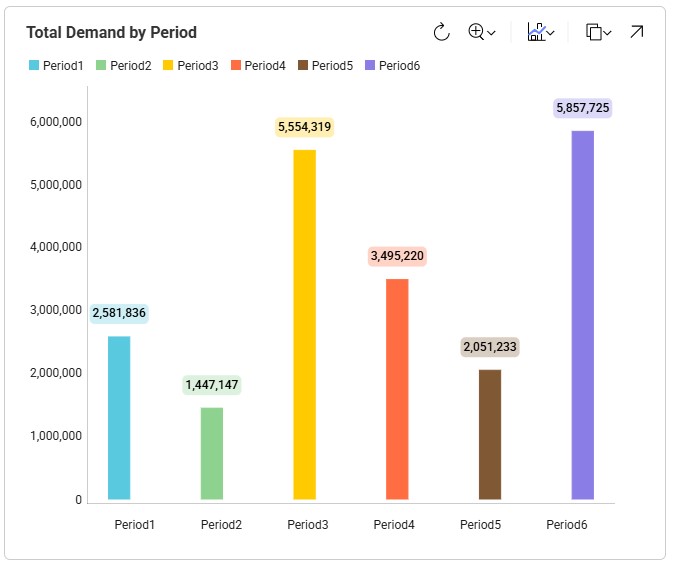
  6. The Customer Demand table is another standard table. Some customers demand the Rockets product during all 6 periods, whereas others only for a subset of the periods. The quantities vary quite a bit too. We will have a look at the totals by period in one of the next screenshots.
  7. The Incremental Change Constraints table is the new input table which needs to be utilized to take advantage of the new Incremental Change features. We will cover it in detail in one of the following screenshots.

This next screenshot shows the customer and facility locations on a map:
As mentioned, the demand varies quite a lot by period; the following bar chart shows the total demand by period:
Now, we will take a closer look at the new Incremental Change Constraints input table:
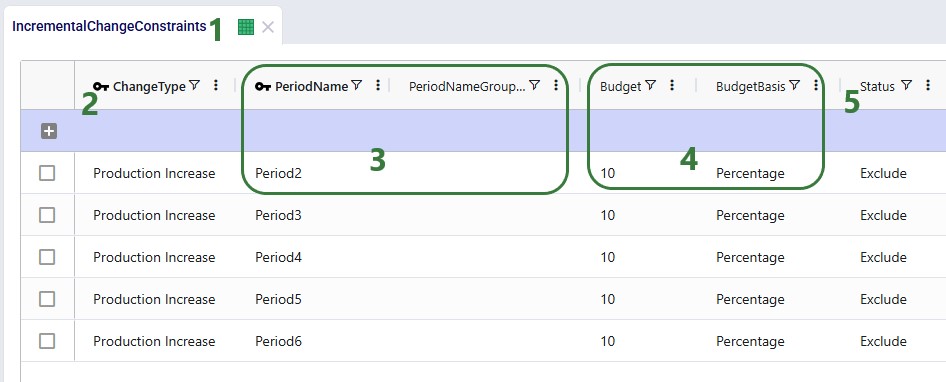
  1. We have opened the Incremental Change Constraints input table.
  2. In the first column we can choose the Change Type we want to constrain. A drop-down list with the options (Facilities Opened/Closed, Production Increase/Decrease, Lanes Added, Suppliers Added/Removed) is available. In this example model we set up “Production Increase” constraints for all periods, except Period1.
  3. Period Name and Period Name Group Behavior – specify the period the constraint applies to. Currently, the Period Name Group Behavior field will always behave like the Enumerate value, regardless of its value. This means the constraint will be applied to each period individually when the Period Name field is set to a group. Here individual records for periods 2-6 have been set up. Note that a group consisting of these 5 periods could have also been used in 1 record instead.
  4. Budget and Budget Basis – these specify how much change (the “budget”) is allowed in this period as compared to the previous period for this change type. The basis can be set to either Percentage or Quantity. Here, the budget is set to 10 percent for all records, meaning (for the first record) that the total production in Period2 cannot be more than 10% higher than the total production in Period1. Say the total production in Period1 is 3M units, then the constraint in this first record limits the total production to a maximum of 3.3M units in Period2. If the budget had been set to 100,000 with a Quantity basis, it would mean that the total production in Period2 would be limited to 3.1M units.
  5. Like most input tables in Cosmic Frog, this one also has a Status field indicating if a record should be included when the model is run (Status = Include) or not (Status = Exclude). These are often used in scenario items to switch a constraint on or off. Here, all records are set to Exclude, and we will change these to Include in the scenarios where we want to use the Incremental Change feature.

Please note that this table also has a Notes field, which is not shown in the screenshot. Notes fields are also often used by scenarios, for example to filter out a subset of records for which the Status needs to be switched based on the text contained in the Notes field.

Production Smoothing – Scenarios

The following 5 scenarios are included in this example model:
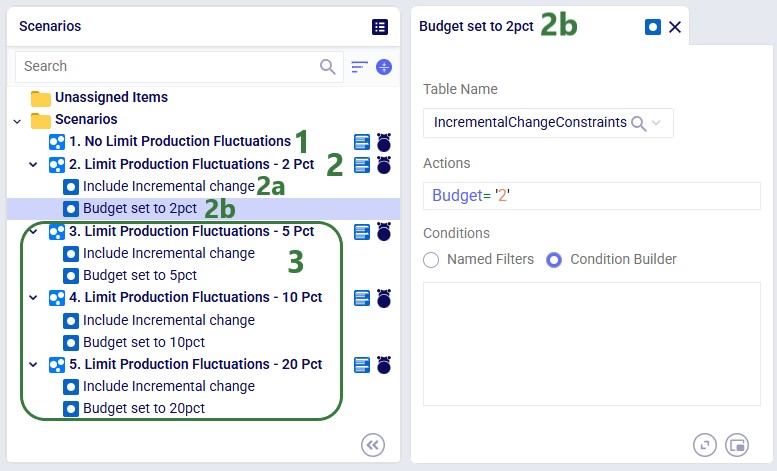
  1. In the “1. No Limit Production Fluctuations” scenario no limits are placed on production increases, and we expect production to closely match demand in order to reduce inventory holding costs as much as possible as all other costs will be equal.
  2. The “2. Limit Production Fluctuations – 2 Pct” scenario only allows a 2% increase in production from one period to the next. This is achieved through 2 scenario items:
    1. The “Include Incremental change” scenario item switches the Status of all records in the Incremental Change Constraints table to Include.
    2. The “Budget set to 2pct” scenario item sets the Budget field for all records in the Incremental Change Constraints table to 2. Its configuration is shown on the right-hand side in the screenshot.
  3. The other 3 scenarios are very similar to the second scenario: they all have the “Include Incremental change” scenario item included to turn on the constraints set up in the Incremental Change Constraints table and each has a scenario item setting the budget field to a different value:
    1. The “3. Limit Production Fluctuations – 5 Pct” scenario limits production increases from one period to the next to 5%.
    2. The “4. Limit Production Fluctuations – 10 Pct” scenario limits production increases from one period to the next to 10%.
    3. The “5. Limit Production Fluctuations – 20 Pct” scenario limits production increases from one period to the next to 20%.

Production Smoothing – Outputs

After running all 5 scenarios, we will first look at the 2 new output tables, and then at several graphs set up in the Analytics module specifically for this model.

The following screenshot shows the Optimization Incremental Change Summary output table:
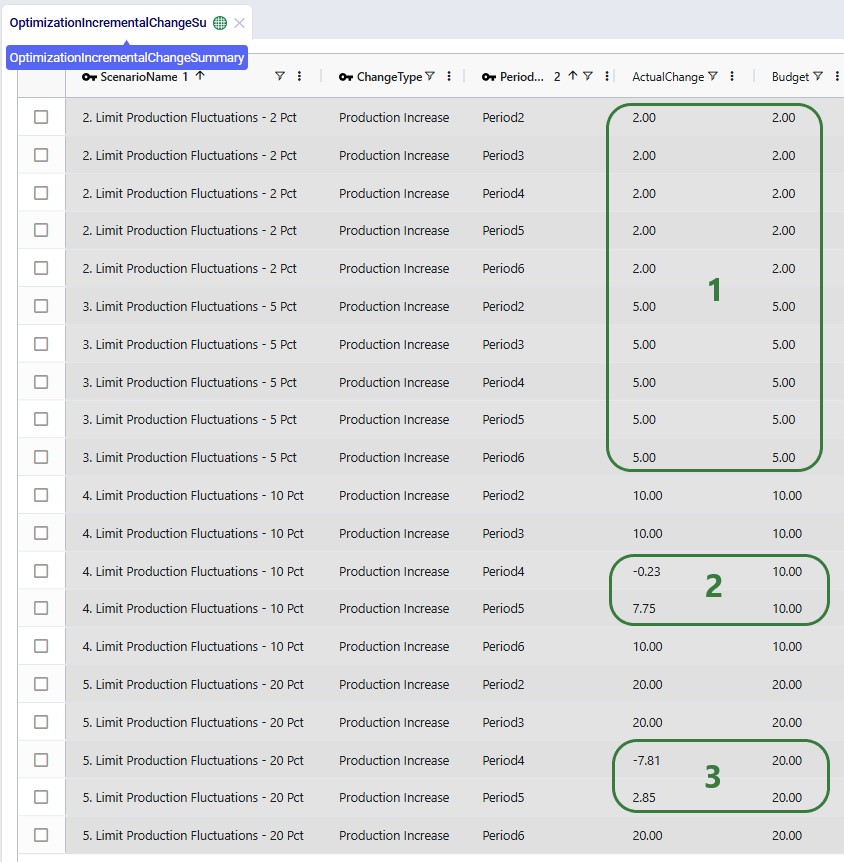
  1. For scenarios 2 (max 2% production increase for each subsequent period) and 3 (max 5% production increase), we see from the Actual Change column that for each period the maximum allowed change (the Budget column) for production increase is used.
  2. For scenario 4 where a maximum production increase of 10% for each subsequent period is allowed, periods 2, 3, and 6 use all of this budget, whereas periods 4 and 5 do not.
  3. For scenario 5 (max 20% production increase), it is the same as for scenario 4: the allowed change budget is entirely used in periods 2, 3, and 6, but not in periods 4 and 5.

The other new output table, the Optimization Incremental Change Report, contains the changes at a more detailed level. For production increase incremental change types, it indicates the change in production at the individual facilities for the periods the constraint(s) are applied. In the next screenshot, we look at the report which is filtered for the fourth scenario and only the records for Facility_01 are shown:
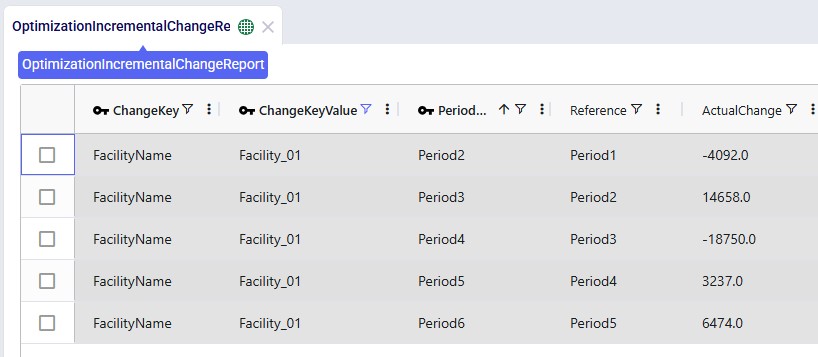
The Actual Change column here reflects the difference in the quantity produced between the period and the referenced (previous) period. The first record tells us that in Period2 Facility_01 produced 4,092 units less than it produced in Period1, etc.

Now, we will look at several graphs set up in the Analytics module. The names of the dashboards containing the graphs start with “Incremental Change - …”. The first one we will look at is the Production by Period graph found on the “Incremental Change – Production by Period” dashboard. Here we compare the first scenario (No Limit) with the most constrained scenario which is the second one (only 2% increase in production allowed in each subsequent month):
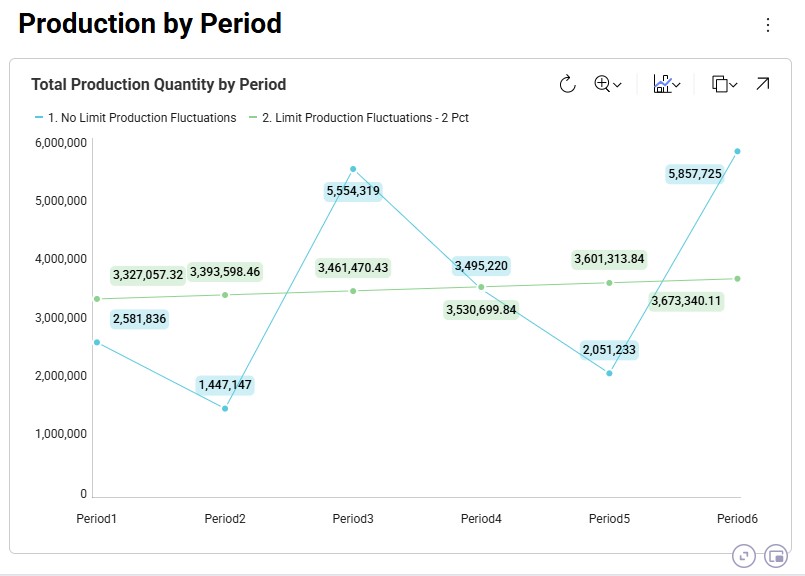
The blue line and numbers represent the production quantities of the first scenario (no limit). Since there are no limits set on how much production can fluctuate, the production is equal to the demand in that period to avoid any pre-build inventory and its holding costs. Since the demand varies greatly between each period, so does the production. For example, in Period2 the quantity produced is 1.45M units and in Period3 this is 5.55M units, which is a 280% increase.

The green line and numbers represent the production quantities of the second scenario (max 2% production increase). To even out the production and stay within the 2% increase restriction, we see that production in periods 1 and 2 is higher in this scenario as compared to the first one. We can deduce that inventory is being pre-built here in order to be able to fulfill the high demand in Period3. We will show the pre-build inventory levels by period in another upcoming dashboard.

The next graph, from the "Incremental Change - Demand and Production" dashboard, compares the production by period for all 5 scenarios using a bar-chart:
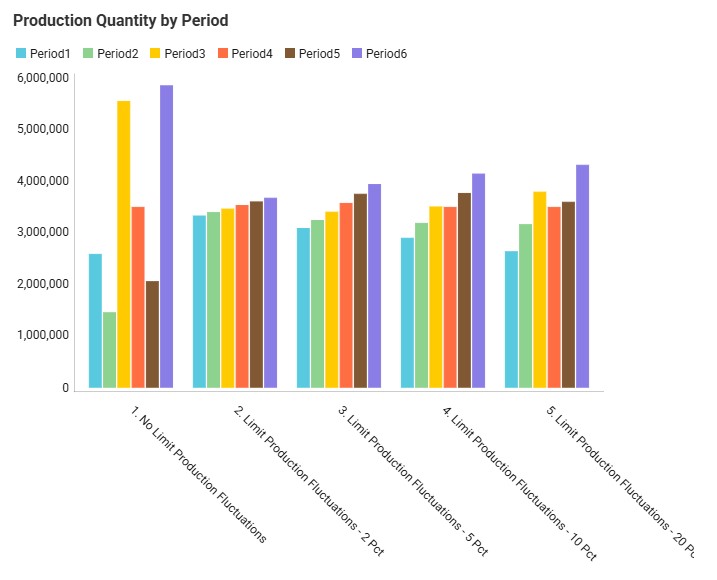
We see the same for scenarios 1 and 2 as we discussed for the previous graph: high fluctuations in scenario 1 and only slight increases period-over-period in scenario 2. Scenarios 3, 4, and 5 gradually allow higher increases in production (5%, 10%, and 20%), and we can see from the production outputs that in order to reduce cost of holding pre-build inventory in stock, the scenarios do show more fluctuations in the production quantity so that product is produced as close as possible in time to when the product is demanded, while adhering to the % increase limitations.

We can also illustrate this by looking at the amount of pre-build inventory across the periods for each scenario, which is shown on the “Incremental Change – Pre-build Inventory” dashboard:
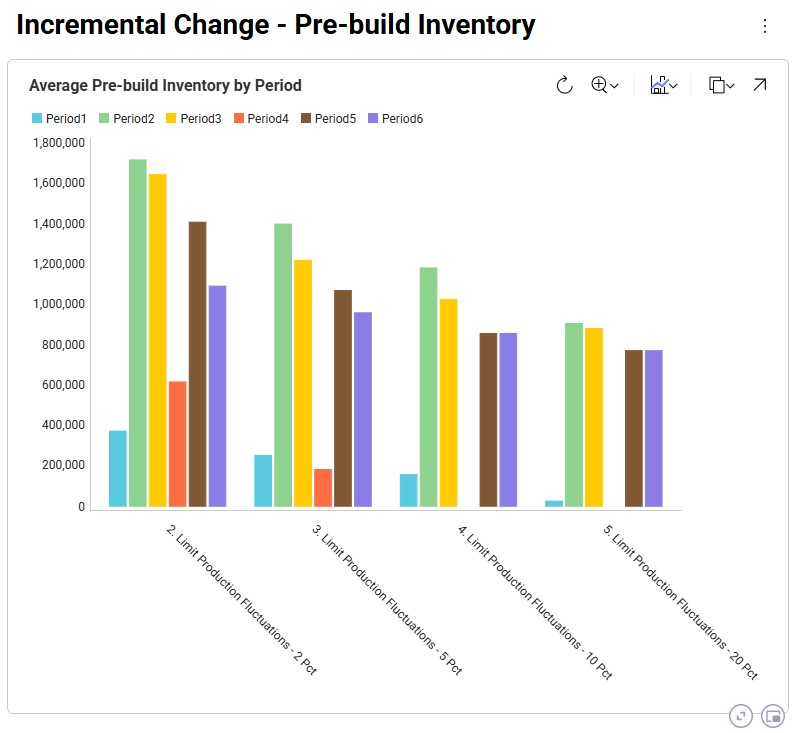
We notice that the first scenario is not shown here as it does not have any pre-build inventory in any of the periods: the production in each period matches the demand in each period to avoid any pre-build holding costs. For the other scenarios, we see, as expected, that the more stringent the limitation on the fluctuation in production quantity is, the more pre-build inventory is being held. In scenarios 4 and 5 (10% and 20% increases allowed), there is no need to have pre-build inventory in Period4 for example, whereas this is needed in scenarios 2 and 3 (2% and 5% increases allowed).

We can of course also look at the costs associated with each of the 5 scenarios, using the Optimization Network Summary output table:
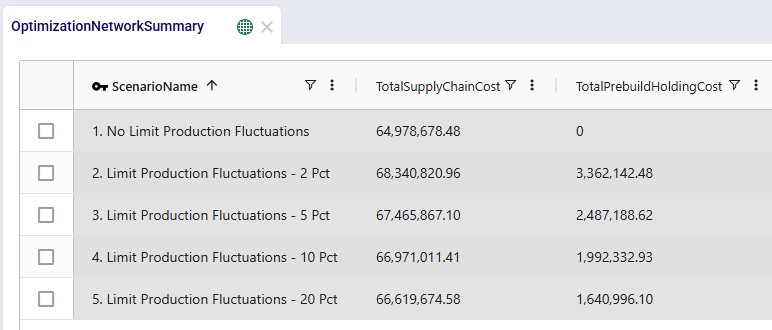
The costs are made up of transportation costs ($41.2M for all scenarios), in transit holding costs ($51k for all scenarios), production costs ($4.2M for all scenarios), outbound handling costs ($19.5M for all scenarios), and pre-build holding costs. Only the pre-build holding costs differ between the scenarios due to the timing of production being different because of the production increase incremental change constraints. As we saw above, no pre-build inventory was held in scenario 1, so the pre-build holding cost for this scenario is 0. Most pre-build inventory was held in the most stringent scenario, scenario #2, and therefore the pre-build holding costs are highest for this scenario, decreasing as the production increase change constraint is gradually loosened from 2 to 20%.

Finally, we will have a look at a map to see the flows from the facilities to the customers:
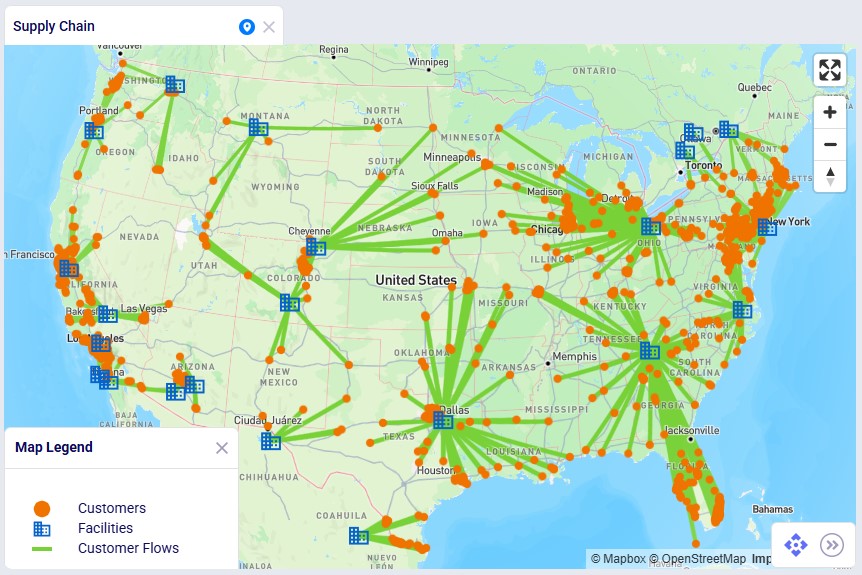
In this map we see all flows for all periods for scenario 3. We notice that customers source from their closest facility. Since this is a multi-period model, we can also configure the map to see the flows for just a single period or a subset of the periods, by using the fold-out periods toolbar located at the bottom-right in the screenshot.

Example Model 2 – Supplier Base Transition

This example demonstrates how Incremental Change can be used to determine the optimal sequence of supplier changes when transitioning from a mixed supplier base to a single-region sourcing strategy.

The model evaluates two potential transitions:

  • Moving to all China suppliers
  • Moving to all Europe suppliers

Supplier onboarding is limited to two suppliers per quarter, reflecting operational onboarding limits.

In addition, the model evaluates whether adding a new West Coast port and factory improves the network. These locations could realistically only become operational starting in 2028, which is modeled using incremental change constraints.

This example model, "Incremental Change - Supplier Base Transition", can be copied from the Resource Library if you want to follow along.

Supplier Base Transition - Inputs

Model Background

This example is based on the Global Supply Chain Strategy model from the Resource Library (here) and has been modified to demonstrate Incremental Change functionality.

Supplier Base

This model includes two supplier regions:

Europe

  • 39 suppliers (Spain, France, Belgium, Germany)
  • Ship through Rotterdam Port

China

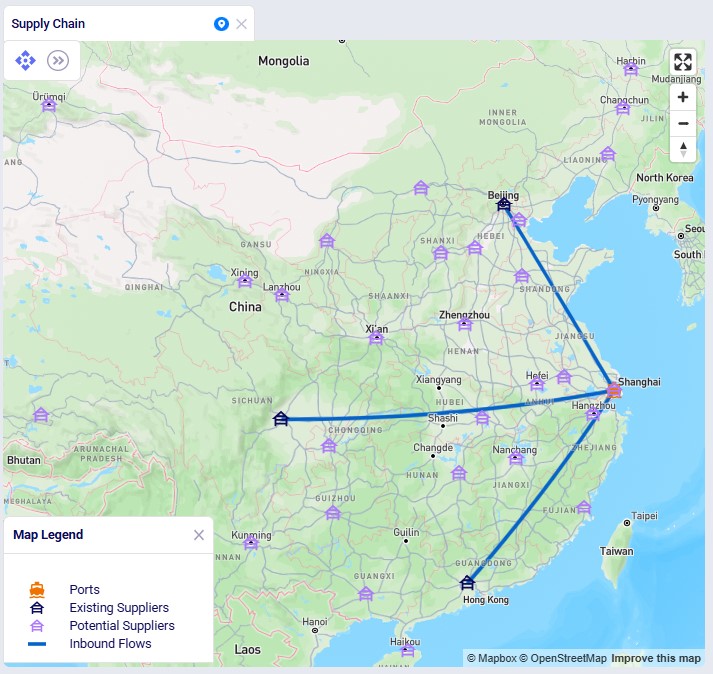
  • 31 suppliers
  • Ship through Shanghai Port

The current supplier base consists of:

  • 6 European suppliers; they supply 1 raw material each
  • 3 Chines suppliers; they supply 1 raw material each

The additional suppliers are included in the model but initially inactive.

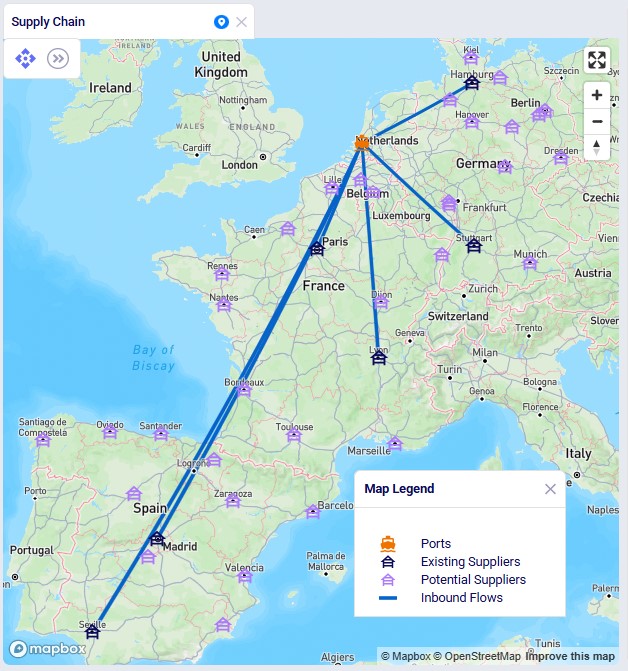
This screenshot shows the existing and potential suppliers in Europe:
The next screenshot shows the existing and potential suppliers in China:
Network Structure

Materials flow through the network as follows:

  1. Local Suppliers → Overseas Ports (Raw Materials)
    • Rotterdam (Europe)
    • Shanghai (China)
  2. Overseas Ports → North America Ports (Raw Materials)
    • Charleston Port (USA)
    • Altamira Port (Mexico)
  3. US / Mexico Ports → Factories (Raw Materials)
    • Princeton Factory (USA)
    • El Bajio Factory (Mexico)
  4. Factories → Distribution Centers (Finished Goods)
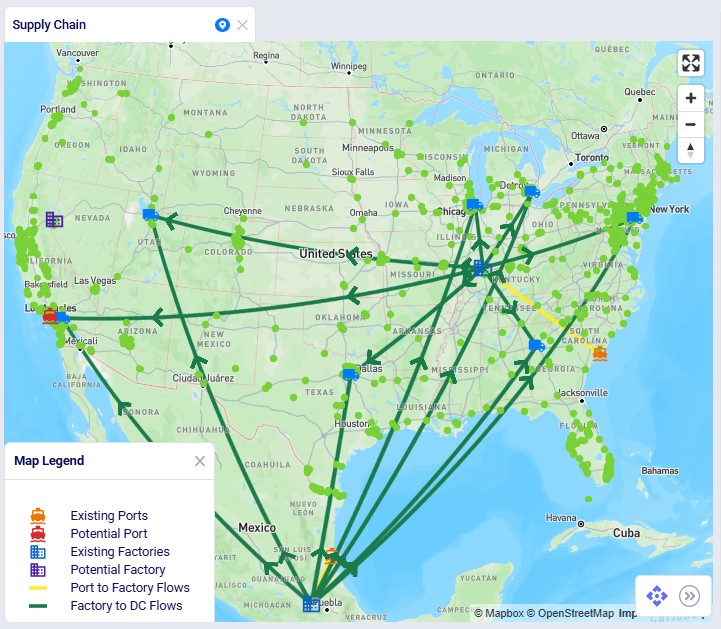
    • 7 U.S. DCs serving 1,333 customers

The model also includes potential West Coast expansion locations:

  • Los Angeles Port
  • Reno Factory

These facilities are evaluated in selected scenarios.

The following screenshot shows the port, factory, DC, and customer locations in North America, with the port to factory and factory to DC flows showing too:
First, we will cover the basic inputs in this model that were added / modified from the original Global Supply Chain Strategy model. After that we will explain the inputs that have been added to model the supplier base transition and those that enable consideration of using the new port and factory on the US west coast.

Basic Model Adjustments

Several changes were made to the base model to support the incremental change example:
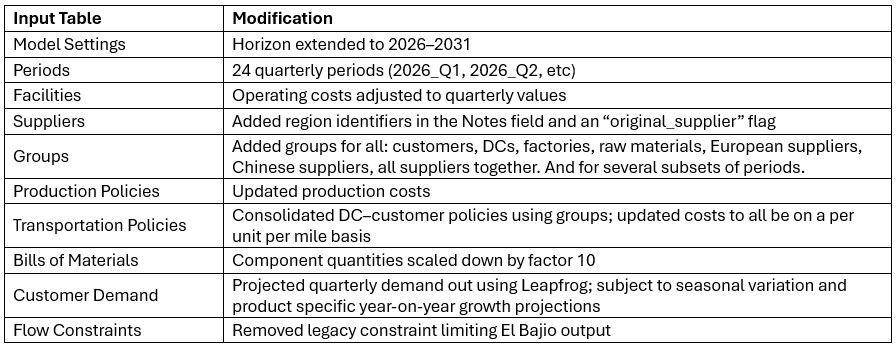
Supplier Base Transition

Transition Requirements

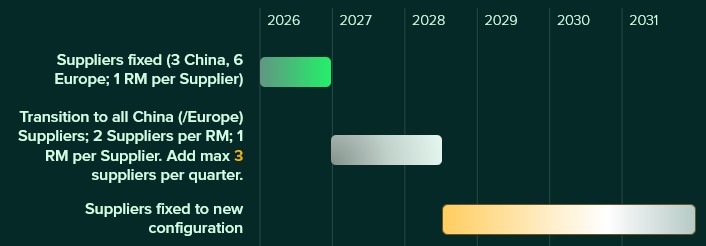
The model evaluates transitions to either an all-Europe or all-China supplier base under the following rules:

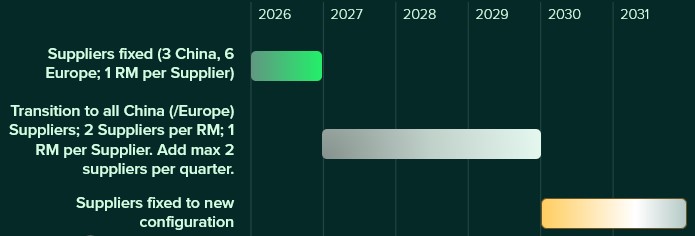
  • Maximum 2 suppliers added per quarter
  • Original suppliers remain fixed during 2026
  • Transition occurs during 2027–2029 (12 periods)
  • To reduce risk of relying on a single supplier for a raw material (current situation), the final configuration requires:
    • 2 suppliers per raw material, where each supplies at least ~35% of the total
    • 1 raw material per supplier

This supplier base transition is visualized on the following timeline:
After running scenarios with the above transition settings, we will also run 2 accelerated transition scenarios:

  • Maximum 3 suppliers added per quarter
  • Transition completed in 6 quarters (Q1 2027 – Q2 2028)

This looks as follows on a timeline:

Supplier Configuration Logic

Supplier Capabilities

Supplier availability is controlled using two input tables:

Supplier Capabilities

  • Defines which suppliers can supply which raw material – each supplier generally is able to supply 2 different raw materials
  • Specifies supply costs – on average the unit cost from Chinese suppliers is 25% less than from European suppliers

Supplier Capabilities Multi-Time Period

  • Controls when supplier relationships are allowed

Three configuration sets are included:

Scenarios activate the appropriate configuration by switching the Status field to Include for the relevant records.

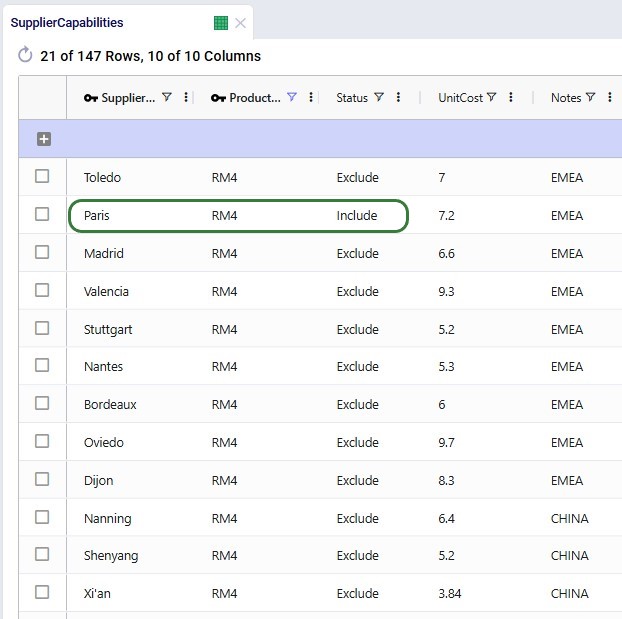
In the following screenshot of the Supplier Capabilities table, we see 12 (of the 21) suppliers that can supply RM4. Since the Paris supplier is the one which currently supplies this raw material, we see that the Status for that record is set to Include, whereas it is set to Exclude for all others. This is similarly set up for the other 8 raw materials. In scenarios where the supplier base is being shifted, the Status of the other records is set to Include.
The next screenshot shows the Supplier Capabilities Multi-Time Period table which is filtered for Supplier Name = Chengdu or Mainz and Product Name = RM3. Chengdu (China) is the original supplier for RM3, while Mainz (Europe) is not currently used at all and will be considered for supplying RM3 in scenarios that transition the supplier base to Europe:
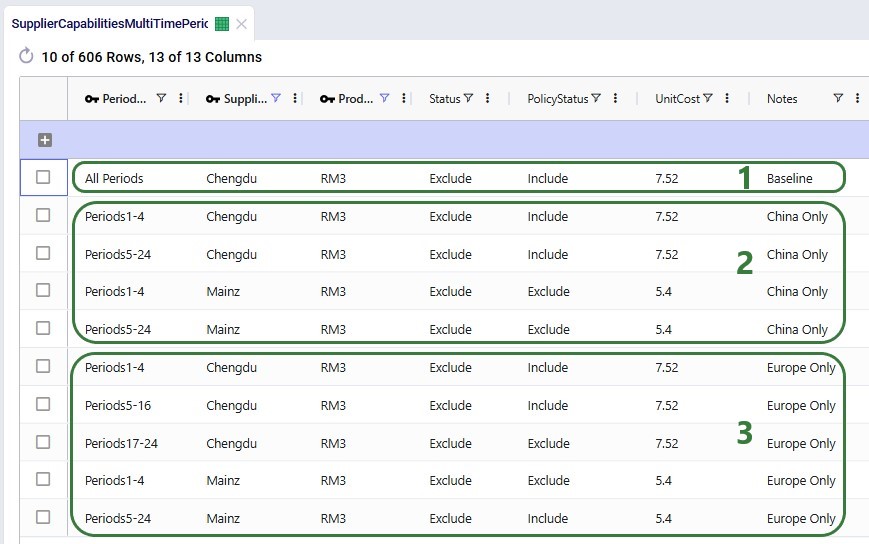
  1. The first set of records is to be used in scenarios where the currently used 9 suppliers should continue to be used as is. This set of records contains “Baseline” in the Notes field. The total set consists of 9 records, 1 for each RM and its current supplier, where Policy Status = Include indicates they can be used once the record is included (i.e., Status switched to Include) during the whole model horizon (Period Name is set to the “All Periods” group).
  2. The second set of records has “China Only” in its Notes field and this set is used in scenarios where we want to transition the whole supplier base to China.
    • For Chengdu – RM3 (the first 2 “China Only” records), we see that once the Status is switched to “Include”, these records indicate that this supplier – RM combination can be used throughout the model horizon since the Policy Status of both these records is set to Include. Since this is the original supplier for RM3, it needs to be able to be used in 2026 (periods 1-4). And, because it is a Chinese supplier, we also want to consider it to be used in periods 5-24 (2027-2031).
    • For Mainz – RM3 (3rd and 4th “China Only” records), we see that its Policy Status for both records is set to Exclude. This is because we only want to use the original suppliers during periods 1-4 (2026), which Mainz is not one of and because we are transitioning to only Chinese suppliers and Mainz is in Europe.
  3. The third set of records has “Europe Only” in its Notes field and this set is used (its Status switched to Include) in scenarios where we want to transition the whole supplier base to Europe.
    • For Chengdu – RM3 (first 3 “Europe Only” records), we see that once the Status is switched to “Include”, the first 2 of these records have Policy Status = Include. These specify that this supplier – RM combination can be used during the initial fixed supplier phase since it is the current supplier for RM3 (first record for periods 1-4) and also during the transition period (periods 5-16, 2027-2029) as we do not know ahead of time exactly when this supplier will be phased out. The third of these records for periods 17-24 (2030-2031) has Policy Status = Exclude, which means that during this new fixed supplier period it cannot be used. This is because we are moving to an all European supplier base and this is a Chinese supplier.
    • For Mainz – RM3 (4th and 5th “Europe Only” records), we see that its Policy Status for the first record is set to Exclude, since it is not the original supplier of this RM. Then for the remaining periods (5-24, 2027-2031) its Policy Status is set to Include. Because it is a European supplier, we want it to be considered during the transition phase (periods 5-16, 2027 - 2029) and should it be selected it needs to be able to be used during periods 17-24 (2030 – 2031) too.

Risk Mitigation Constraints

Minimum Supplier Utilization

To ensure meaningful dual sourcing, each raw material must be supplied by two suppliers.

To prevent trivial allocations (e.g., one supplier providing only a few units), conditional minimum flow constraints require that each active supplier provides approximately 35% of total supply. This ensures both suppliers meaningfully contribute to supply.

The 2 screenshots below show the setup for RM6 on the Flow Constraints input table:
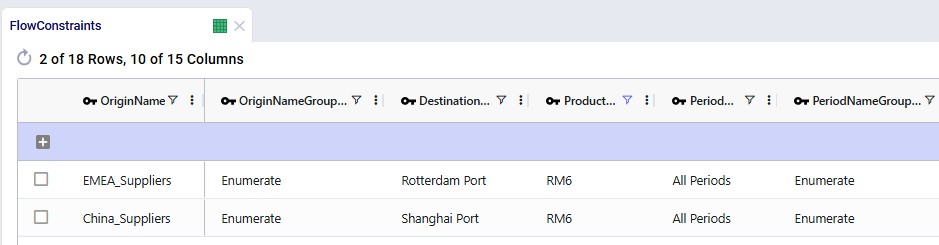
  • Constraint Type = Conditional Minimum means that the flow on the specific lane should either be 0 or otherwise be at least the value set in the Constraint Value field
  • Groups are used for the Origin Name and Period Name fields with their associated Group Name Behavior fields set to Enumerate – these constraints will therefore be expanded into all individual origin – period combinations at runtime and be applied each quarter to each supplier – port lane.

Supplier Structure Constraints

Additional flow count constraints enforce the supplier structure:

  • Maximum 3 suppliers per raw material across the entire horizon – the original supplier and the final 2 suppliers
  • Maximum 1 raw material per supplier
  • Maximum 2 suppliers per raw material during transition
  • Final configuration must include two suppliers from the selected region only

These 2 screenshots show the flow count constraints which are used (Status switched from Exclude to Include) in the scenarios where the supplier base is shifted; they are explained underneath the second screenshot:

  1. This constraint is used in all scenarios where the supplier base is shifted and ensures that during the whole model horizon (2026 – 2031) each raw material is not supplied by more than 3 suppliers: its original supplier and the 2 in the final supplier base configuration.
  2. These 2 constraints are also included in all scenarios where the supplier base is shifted, and they ensure that each supplier does not supply more than 1 raw material.
  3. This constraint is also used in all scenarios where the supplier base is shifted; it limits the number of suppliers for each RM to 2 during the transition period. Because the constraint is for the transition period, it is over all suppliers together, since it can be a mix of Chinese and European suppliers during this timeframe.
  4. These 2 constraints are included in scenarios where the supplier base is shifted to Europe. They ensure there are 2 European and 0 Chinese suppliers for each RM during the phase of the model where the supplier base is fixed to the new configuration (periods 17-24, 2030 – 2031).
  5. These 2 constraints are included in scenarios where the supplier base is shifted to China. They ensure there are 2 Chines and 0 European suppliers for each RM during the phase of the model where the supplier base is fixed to the new configuration (periods 17-24, 2030 – 2031).

Incremental Change Constraints

Incremental Change controls the rate of supplier onboarding.

Two configurations are included:

Additional constraints prevent supplier changes after the transition period.

The first 2 constraints shown in the screenshot below are for the standard transition type (Budget = 2 during transition, 0 after) and are included (Status switched to Include) in the scenarios where the supplier base is shifted. The bottom 2 constraints are used together with the one in the second record for scenarios modeling the accelerated transition (Budget =3 during transition, 0 after):

West Coast Expansion Modeling

The model evaluates adding:

  1. Los Angeles Port
  2. Reno Factory

These facilities:

  • Are initially set as Potential
  • Can only be opened starting 2028
  • Are controlled through incremental facility opened change constraints

Facilities table:

Records were added for Los Angeles Port and Reno Factory. As these are currently not existing locations and will be considered for inclusion, their Facility Status = Consider and Initial State = Potential:

Facilities Multi-Time Period table:

Since we only want to consider including the west coast locations from 2028 onwards, we need to make sure that at the beginning of the model horizon they are closed. This is done by adding 2 records for 2026_Q1 to the Facilities Multi-Time Period table setting the Status for both the Reno Factory and the Los Angeles Port to Closed, see screenshot below. For the remaining periods in the model the Incremental Change Constraints (see further below in this section) take care of when the factory and port are considered for opening.

Production Policies table:

Records are added for the Reno Factory so it can manufacture all 3 finished goods, using the existing BOMs:

Transportation Policies table:

Records are added so that Los Angeles Port can receive raw materials from the ports in Rotterdam and Shanghai, the Los Angeles Port can ship these to the factory in Reno, and Reno Factory can serve the finished goods to all 7 DCs:

Incremental Change Constraints table:

Here, 2 records are added to set up the desired behavior of allowing the Reno Factory and Los Angeles Port to be added to the network from 2028_Q1 onwards.

  • The first record indicates that for periods 2 through 8 (Q2 2026 through Q4 2027) the budget for the Change Type of Facilities Opened is 0. In other words, no facilities can be added to the network during this timeframe.
  • The second record specifies that for periods 9 through 24 (Q1 2028 through Q4 2031) the budget for the Change Type of Facilities Opened is 2. This budget is available for each quarter within this period. Since we are only considering adding 2 locations in total (the West Coast port and factory), the budget will only be used in one period or not at all.

The other 4 "Facilities Opened" records in this table are not used in this model. They were added in case users want to set up and run some scenarios themselves where the west coast port and factory are allowed to be added from 2029 (records 3 and 4) or from 2030 (records 5 and 6) onwards.

Supplier Base Transition – Scenarios

The following table shows the scenarios that were run in this example model. Initially the first 5 were run and based on the results, number 6 and 7 were added and run too:

The Scenarios module of this example model looks as follows:

  1. For the Baseline scenario, we only need 1 scenario item: the one that sets the Status to Include for the set of Notes = “Baseline” records on the Supplier Capabilities Multi-Time Period table.
  2. Scenarios which consider using the west coast port and factory (scenarios 4, 5, and 6) include these 5 scenario items which switch the Status to Include for the records that specify the model elements needed, e.g. including the locations on the Facilities table, including the production and transportation policies, etc. The “Include Reno Considered from 2028 Constraint” scenario item changes the Status of the 2 records with Notes = “Reno from 2028” on the Incremental Change Constraints table to Include.
  3. Scenarios which transition the supplier base to China (scenarios 2, 4 and 6) include these 7 scenario items. The scenarios that transition the supplier base to Europe (scenarios 3, 5, and 7) also use 4 of these and they have 3 scenario items that are the Europe-specific version of the other scenario items. The “Include Suppliers Added P5-16 Budget 2 Constraints” scenario item changes the status of the 2 records needed to set the transition period and budget on the Incremental Change Constraints table to Include.
  4. If users want to see for themselves what happens when the west coast port and facility are allowed to be used from 2029 or 2030 onwards, instead of from 2028 onwards, they can use these 2 unassigned items to do so. Steps to set up a new scenario using these would for example be: 1) copy the scenario of interest, say scenario 4, 2) remove the “Include Reno Considered from 2028 Constraint” from this scenario, and 3) add 1 of the 2 currently unassigned scenario items to this copied scenario.

For running the scenarios, 2 of the technology parameters were changed from their defaults:

  • The MIP Relative Gap Percentage was reduced to 0.00001 (=0.001%). Due to the large numbers in the model and the relatively small differences between feasible solutions (e.g. the cost difference between phasing a supplier in or out a period earlier or later could be smaller than 0.01% of the total supply chain cost), better solutions were found with this smaller gap, while all scenarios solve in less than 3 minutes.
  • The Feasibility tolerance was increased to 0.00001 to avoid incorrect infeasible results.

Supplier Base Transition – Outputs

After running all scenarios, it is time to examine the outputs. We will start by looking at the new Optimization Incremental Change Summary and Optimization Incremental Change Report output tables and then visualize the supplier base changes on maps and a timeline grid. For these, we will mostly focus on scenarios 4 and 5 which show all incremental change constructs we have used in the model. Finally, we will also have a look at the financial impact and compare all scenarios.

The Optimization Incremental Change Summary table shows how much of each change budget is used in each period. Two screenshots of this output table are shown next; in both, the table is filtered for scenario number 5 (field not shown) where the supplier base is moved to Europe and adding the west coast locations to the network is considered:

During each of the first 3 quarters of the transition period 2 suppliers were added, then there is a pause in adding suppliers, and towards the end of the transition period, another 9 suppliers are added, essentially as late as possible. We can interpret this as:

  1. Several European suppliers are added early because they are the cheapest options for 6 of the RMs. These suppliers are added in the most cost-efficient order possible (i.e., those providing the highest cost savings first).
  2. Since the model is not adding 9 new suppliers at this stage, we can hypothesize (and we will check this through other outputs further below) that 3 of the original suppliers keep being used, either to supply the RM they have been supplying until now or a different one.
  3. The 9 Remaining suppliers are added towards the end of the transition period to satisfy the two-supplier requirement while minimizing costs.

The next screenshot shows the same table, still filtered for scenario 5, but now the records for the Facilities Opened change type constraints are shown:

We see that the budget was 2 for each of the periods in the 2028 – 2031 timeframe, but the Actual Change column indicates that no change (0) happened in any of those periods. In this scenario, it is not beneficial to start using the west coast port and factory anytime from Q1 2028 onwards.

Next, we will cover the Optimization Incremental Change Report output table. This table has a record for each incremental change that was made, including details on what the change was. This table is filtered for scenario 4 (field not shown) where the supplier base is moved to China and the west coast locations are considered (note that records beyond Q1 2029 are not shown here):

From the first 4 records for Q1 of 2027, we can tell that suppliers in Hefei and Taiyuan were added to the supplier base, while suppliers in Lyon and Madrid were removed. Similarly, 2 suppliers are added and removed in each of the next 2 quarters. Then in Q1 of 2028, the Reno Factory is opened, which is apparently beneficial to do as early as possible when moving the supplier base to China. This is due to the lower transportation costs because of the shorter distance from Shanghai to Los Angeles as compared to going to the Charleston or Altamira ports.

In summary:

  • When transitioning to European suppliers, the model does not open the Los Angeles Port or Reno Factory, indicating the west coast expansion is not cost-effective under this sourcing strategy.
  • When transitioning to Chinese suppliers, the model opens the Reno Factory and Los Angeles Port as early as possible, reducing ocean shipping distance and transportation costs.

The next map shows the final configuration of the supplier base for scenario 4 where it is moved entirely to China. Notice that we have used the Period selector bar (at the top of the map) to show the map for Q1 of 2030 when the transition is complete. You can use this period selector to step through the periods to see the gradual changes over time.

The next map is also for scenario 4 but now showing the North American locations and flows (except for the DC – Customer flows) for the same period of Q1 2030. We see that the Los Angeles Port and Reno Factory are being used in this scenario.

Similar to the first map shown above, the next map shows the final supplier configuration in Q1 2030 for scenario 5, where the whole base is moved to Europe:

The next 2 timeline grids on the Supplier Transition Timeline dashboard (Analytics module) are generated from a custom table “timeline_rm_bysupplier_byperiod”, which in turn was generated from the Optimization Supply Summary output table. The appendix describes the steps to create the custom table and how to re-create it in case (new) scenarios are added / adjusted and run.

The first screenshot is for scenario 4, the second for scenario 5. They show which supplier supplies which RM when. Note that Q1-Q3 of 2026 are not included as the supplier configuration is equal to the Q4 2026 configuration. Similarly, the timeframe of Q2 2030 through Q4 2031 is not included in this dashboard either, since the supplier configuration is equal to the Q1 2030 configuration. Not all suppliers and period columns are shown in the screenshots, users can scroll horizontally and vertically in the dashboard to examine the full timeline.

Some things we notice here for scenario 4 are:

  1. Guangzhou is the original supplier for RM1 and is phased out from Q3 2027. However, it is also the second-best option to supply RM7, so it is phased back in from Q4 2029.
  2. Chengdu is the original supplier for RM3, which it drops as soon as possible, and then switches to supplying RM5.
  3. European suppliers Hamburg and Sevilla are being used for RM7 and RM8 for as long as possible, suggesting all China suppliers are more expensive for these 2 RMs.

Some things we notice examining the above grid for scenario 5 are:

  1. Lyon is the original supplier for RM5, which it drops as soon as possible, and then supplies RM9 for the rest of the model horizon for which it must be the cheapest supplier.
  2. Madrid originally supplies RM6, and once Lille comes online it stops supplying it. However, it must still be the second-best option for supplying this raw material as it comes back online supplying RM6 from Q3 2029 onwards. The same thing happens with RM8 at Sevilla.
  3. Stuttgart is the original supplier for RM9, which it drops as soon as possible, and then supplies RM4 for the rest of the model horizon for which it must be the cheapest supplier.

Since we are interested in looking at the impact of requiring the supplier base to be transitioned over sooner, scenarios 6 and 7 were run too where the budget for adding suppliers is set to 3 per quarter. We know from scenarios 4 and 5 that the west coast locations are only used when moving the supplier base to China, therefore we run scenario 6 (where we speed up the transition to the China supplier base) with these locations still considered. We do not consider them in scenario 7 where we speed up the transition to the Europe supplier base.

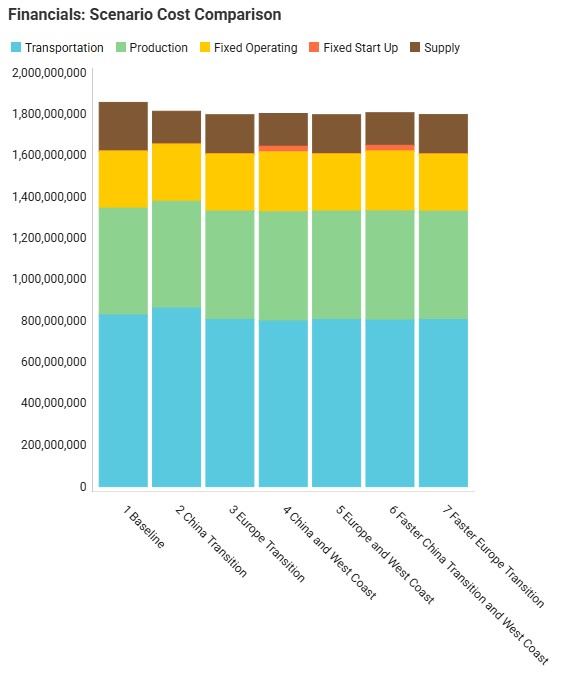
We will now have a look at how the costs compare for all 7 scenarios that were run with the next 2 screenshots of the Optimization Network Summary output table and the screenshot of the “Financials: Scenario Cost Comparison” chart. The latter can be found on the Scenario Comparison dashboard in the Analytics module:

Comparing all scenarios reveals:

  1. The baseline configuration is the most expensive.
    1. It is the overall most expensive scenario by more than $40M (over 6 years) as compared to the other 6 scenarios, which are all relatively close to each other when looking at the total supply chain cost.
  2. Transitioning to European suppliers provides the lowest overall cost.
    1. Scenarios 2 and 3 where the supplier base is transitioned entirely to China and Europe, respectively, both show considerable cost savings as compared to the baseline. This reduction mostly comes from the lower supply costs, even outweighing the increased transportation costs of scenario 2 (more expensive ocean shipping from Shanghai as compared to from Rotterdam). In scenario 3 it is interesting to see that the production costs increase as compared to the baseline, but these are more than offset by the reduction in transportation costs: the European suppliers ship more to Charleston Port than Altamira Port (reducing the transportation costs as they are distance based), which leads to producing more at the Princeton factory where it is on average more expensive to produce than at the El Bajio Factory. Based on these 2 scenarios, moving the supplier base to Europe makes the most sense financially, since it would be nearly $17M cheaper than moving the supplier base to China.
  3. Transitioning to Chinese suppliers becomes more competitive when the West Coast expansion is included.
    1. For scenarios 4 and 5, which are the same as 2 and 3 but with the added option of starting to use the west coast port and factory, we see that scenario 5 has the exact same outputs as scenario 3. This is because it is not cost effective to open the US west coast locations when shifting the supplier base entirely to Europe, and therefore scenarios 3 and 5 have the same outcome. For scenario 4, we do see that using the Los Angeles Port and Reno Factory from 2028 onwards is beneficial: the overall cost of this scenario is about $11M less than for scenario 2. These savings are due to a big reduction in transportation costs ($63M) by going from China to the US west coast and a smaller reduction in supply costs (around $1M), which together outweigh the increases in production, fixed operating, and fixed startup costs (combined around $53M). Even though the total costs for the supplier base transitioning to China has come down in scenario 4 as compared to scenario 2 by using the west coast locations, the total cost is still about $6M higher as compared to transitioning to a European supplier base (scenario 3).
  4. Accelerated transition to Europe increases cost slightly but could be operationally desirable.
    1. With the knowledge from the previous 5 scenarios, we decided to run 2 more scenarios, scenarios 6 and 7. Scenario 6 still transitions the entire supplier base to China and allows the west coast locations to be used from 2028. However, the supplier base transition now needs to be completed faster within 1.5 years. Similarly, scenario 7 still shifts the entire supplier base to Europe, but also at a faster pace, and does not consider using the west coast locations. We see that requiring a quicker transition adds costs to both scenarios, but more to scenario 6 than to scenario 7 (close to $4M scenario 6 vs 4, and a little under $1M scenario 7 vs 5). The relatively low additional cost for a quicker transition to an all-European supplier base may make this option a viable one if it can be achieved operationally.

Finally, the following 4 charts for scenarios 4-7 which show the number of suppliers by region over time can be found in the “Suppliers by Region – Scenario Comparison” dashboard in the Analytics module:

Please do not hesitate to contact Optilogic support at support@optilogic.com in case of questions or feedback.

Appendix –Refreshing the Supplier Transition Timeline Dashboard

To create the timeline grid on the Supplier Transition Timeline dashboard, we first created a custom table named timeline_rm_bysupplier_byperiod, where we added columns for scenarioname, supplier, and 1 column for each period in the model. The latter we named q1_2026, q2_2026, etc. rather than 2026_Q1, 2026_Q2, etc. (which is how the periods in the model are named) as column names in custom tables cannot start with a digit.

Next, this table was populated from the outputs in the Optimization Supply Summary output table, using a SQL Query, which is saved in the model and can be used to refresh the custom table if scenarios are modified/added and (re-)run. For this we use the SQL Editor application on the Optilogic platform:

  1. The SQL Editor application can be opened by clicking on its icon in the list of applications on the left-hand side while logged into the Optilogic platform. Should you not see the icon for the SQL Editor, then click on the icon with 3 horizontal dots to see more applications in the list.
  2. Select the model, here Incremental Change – Supplier Base Transition, from the drop-down if it is not yet selected here.

The following screenshot shows the central part and right-hand side panel of the SQL Editor application:

  1. In the panel on the right-hand side click on the second icon to show the list of bookmarked queries.
  2. There is one bookmarked query in this model’s database; to edit or open it, we can click on the pencil icon.
  3. The SQL code of the query is now shown in the central part of the SQL Editor (not all is shown in the screenshot).
  4. To remove previous outputs from the custom timeline_rm_bysupplier_byperiod table and re-populate it with the latest outputs in the Optimization Supply Summary output table, click on the Execute Query button. Now the table and the Supplier Transition Timeline dashboard that uses it as input will be updated.

Please note that this custom table, the Supplier Transition Timeline dashboard, and SQL Query to populate it are specific to how this model is set up. All three will need to be updated if the model is changed in certain ways. For example, when adding/removing/renaming periods or if it becomes possible for 1 supplier to supply more than 1 raw material within a period.

Overview

Incremental Change is a powerful new capability in Cosmic Frog’s NEO engine (Network Optimization) that helps you manage the transition between two network states – such as moving from your current baseline network to an optimized future state. Rather than implementing all changes at once, Incremental Change allows you to control the pace and sequence of changes over time, making network transformations more practical and manageable.

This feature bridges the gap between theoretical optimization results and realistic implementation plans by generating a sequenced roadmap of network changes.

In this documentation, we will discuss the impact of Incremental Change, explain how to use it, and then walk through 2 demo models showing examples of the new capabilities.

Please also see the following brief video for an introduction to Incremental Change and an overview of the second demo model, Incremental Change - Supplier Base Transition:

Why It Matters

Supply chain networks rarely change overnight. Whether you are opening new distribution centers, shifting supplier bases, or adapting to seasonal demand fluctuations, real-world constraints limit how quickly you can implement changes. Organizations face practical limitations including:

  • Operational capacity - You can only onboard a limited number of new customers or suppliers per month
  • Financial constraints - Capital investments must be spread across budget cycles
  • Risk management - Gradual transitions reduce disruption and allow for course corrections
  • Seasonal variability - Production and demand patterns require stability within acceptable ranges

Incremental Change addresses these realities by helping you answer critical questions: What is the best order of changes? What is the optimal rate of change? What tolerance levels are appropriate for different types of modifications?

Key Benefits

1. Identify High-Impact Changes

Understand which network modifications deliver the greatest value earliest in your transition. Incremental Change provides clear visibility into expected savings versus the number of changes required, along with detailed change checklists for each scenario.

2. Build Practical Transition Plans

Create realistic, step-by-step roadmaps for moving from your current network to your target network. You will receive:

  • Period-by-period change checklists
  • Expected transition timelines
  • Monthly cost projections throughout the transition window

3. Adapt Smoothly to Dynamic Environments

Manage network evolution in response to changing business conditions while respecting operational constraints. Balance total cost optimization against your tolerance for change, with detailed monthly implementation plans.

Supported Change Types

Cosmic Frog's Incremental Change currently supports the following network changes:

  • Facilities Opened – Number of new facilities added
  • Facilities Closed – Number of existing facilities removed
  • Suppliers Added – Number of new suppliers introduced
  • Suppliers Removed – Number of existing suppliers discontinued
  • Production Increase – Total production increase across all products and facilities
  • Production Decrease – Total production decrease across all products and facilities
  • Lanes Added – Number of new transportation lanes utilized

Practical Applications

Progressive Facility Expansion: When opening a new distribution center, specify that you want to reassign up to 10 customers per month, and the system determines which customers to transition each month to maximize savings.

Seasonal Production Smoothing: For products with seasonal demand patterns, set constraints to ensure facility production never varies by more than 10% month-over-month, maintaining operational stability.

Multi-Year Facility Rollouts: Plan the optimal sequence for opening 10 facilities over five years including a detailed 2-year implementation roadmap.

Strategic Supplier Transitions: Systematically shift your supplier base. For example, progressively move sourcing out of or into a particular region – with Incremental Change determining the optimal sequence of supplier changes.

How to Use

Incremental Change uses a new input table and generates 2 new output tables with different levels of detail:

Input: Use the Incremental Change Constraints table to set the change type(s) being included and your change budget for each period.

Outputs:

  • Optimization Incremental Change Summary - Overview of the amount of change occurring in each period
  • Optimization Incremental Change Report - Detailed information about each specific change taking place

By leveraging Incremental Change, you can transform theoretical network optimization results into actionable, phased implementation plans that respect real-world operational constraints while maximizing value delivery.

Tips & Tricks

Some additional pointers that may prove helpful are as follows:

  • You can initially setup any Incremental Change Constraints with a large budget. This may not impose any actual limits, but it will show you the Incremental Change Outputs and can give additional direction on how to limit the changes.
  • Different change types can be used in the same model / scenario.
  • If no change has happened, the Optimization Incremental Change Report output table will be empty, but the Optimization Incremental Change Summary output table will show the zero change amount(s)/count(s).
  • Users are encouraged to check outputs to ensure the desired behavior is achieved. If not, the most common solution is to add additional constraints to eliminate any undesired behavior.
    • For example, requiring at least 2 suppliers for 1 product can lead to the cheapest supplier being used for almost all units and only using the second cheapest supplier for a few units. Adding (conditional) minimum flow constraints can resolve this.
  • Important: the Period Name Group Behavior field on the Incremental Change Constraints table always uses the Enumerate value, regardless of the value it is set to.

Example Model 1 – Production Smoothing

In this example model, "Incremental Change - Production Smoothing", we will see how we can ensure that increases in production from one month to the next are limited to a certain percentage using the Incremental Change feature. This model can be copied from the Resource Library to your own account in case you want to follow along.

Production Smoothing – Inputs

The following screenshot shows which input tables are populated in this example model:

  1. We have used the Module menu to open the Data module.
  2. Input tables are being shown in the list; use the left most of the 3 icons to show input tables. Clicking on the middle icon will show output tables, and clicking on the icon on the right will show custom tables if any are present.
  3. We have turned on the option to only show tables that are populated in the list, which you can do by clicking on the second of the 4 icons here.
  4. These are the standard tables which are populated in this model:
    1. The model contains 1,333 customers which are spread out over the US; we will show these locations on a map in the next screenshot too.
    2. There are 22 existing facilities which produce the product and serve it to the customers; they are mostly in the US with a few in Mexico and Canada. The facilities are considered and could be closed (which would apply a Closing Cost), and they each have a maximum throughput capacity of 3M units. These facilities are also shown on the map in the next screenshot.
    3. There is 1 product, Rockets, in the model. It has a value of $50, which is used for inventory holding cost calculations.
    4. The model has 6 monthly periods: January through June of 2026.
    5. In the Production Policies table, it is specified that the product Rockets can be made at each facility for a unit cost of $0.20.
    6. The Rockets product can be held in inventory in each of the 22 facilities, per the Inventory Policies table.
    7. In the Warehousing Policies table, a policy for each facility is set up where Outbound Handling costs for the Rockets product vary from $0.50 to $1.00 per unit. These variations can be due to regional variations in labor costs and different levels of automation at the facilities.
    8. The Transportation Policies table specifies that all facilities can serve all customers, the cost applied is $0.01 per mile per unit.
  5. The Groups table is also a standard table and is used here to create a group “All Customers” which contains all customer locations and a group “All Facilities” which contains all facility locations. These groups are used in the Production Policies, Inventory Policies and Transportation Policies tables.
  6. The Customer Demand table is another standard table. Some customers demand the Rockets product during all 6 periods, whereas others only for a subset of the periods. The quantities vary quite a bit too. We will have a look at the totals by period in one of the next screenshots.
  7. The Incremental Change Constraints table is the new input table which needs to be utilized to take advantage of the new Incremental Change features. We will cover it in detail in one of the following screenshots.

This next screenshot shows the customer and facility locations on a map:

As mentioned, the demand varies quite a lot by period; the following bar chart shows the total demand by period:

Now, we will take a closer look at the new Incremental Change Constraints input table:

  1. We have opened the Incremental Change Constraints input table.
  2. In the first column we can choose the Change Type we want to constrain. A drop-down list with the options (Facilities Opened/Closed, Production Increase/Decrease, Lanes Added, Suppliers Added/Removed) is available. In this example model we set up “Production Increase” constraints for all periods, except Period1.
  3. Period Name and Period Name Group Behavior – specify the period the constraint applies to. Currently, the Period Name Group Behavior field will always behave like the Enumerate value, regardless of its value. This means the constraint will be applied to each period individually when the Period Name field is set to a group. Here individual records for periods 2-6 have been set up. Note that a group consisting of these 5 periods could have also been used in 1 record instead.
  4. Budget and Budget Basis – these specify how much change (the “budget”) is allowed in this period as compared to the previous period for this change type. The basis can be set to either Percentage or Quantity. Here, the budget is set to 10 percent for all records, meaning (for the first record) that the total production in Period2 cannot be more than 10% higher than the total production in Period1. Say the total production in Period1 is 3M units, then the constraint in this first record limits the total production to a maximum of 3.3M units in Period2. If the budget had been set to 100,000 with a Quantity basis, it would mean that the total production in Period2 would be limited to 3.1M units.
  5. Like most input tables in Cosmic Frog, this one also has a Status field indicating if a record should be included when the model is run (Status = Include) or not (Status = Exclude). These are often used in scenario items to switch a constraint on or off. Here, all records are set to Exclude, and we will change these to Include in the scenarios where we want to use the Incremental Change feature.

Please note that this table also has a Notes field, which is not shown in the screenshot. Notes fields are also often used by scenarios, for example to filter out a subset of records for which the Status needs to be switched based on the text contained in the Notes field.

Production Smoothing – Scenarios

The following 5 scenarios are included in this example model:

  1. In the “1. No Limit Production Fluctuations” scenario no limits are placed on production increases, and we expect production to closely match demand in order to reduce inventory holding costs as much as possible as all other costs will be equal.
  2. The “2. Limit Production Fluctuations – 2 Pct” scenario only allows a 2% increase in production from one period to the next. This is achieved through 2 scenario items:
    1. The “Include Incremental change” scenario item switches the Status of all records in the Incremental Change Constraints table to Include.
    2. The “Budget set to 2pct” scenario item sets the Budget field for all records in the Incremental Change Constraints table to 2. Its configuration is shown on the right-hand side in the screenshot.
  3. The other 3 scenarios are very similar to the second scenario: they all have the “Include Incremental change” scenario item included to turn on the constraints set up in the Incremental Change Constraints table and each has a scenario item setting the budget field to a different value:
    1. The “3. Limit Production Fluctuations – 5 Pct” scenario limits production increases from one period to the next to 5%.
    2. The “4. Limit Production Fluctuations – 10 Pct” scenario limits production increases from one period to the next to 10%.
    3. The “5. Limit Production Fluctuations – 20 Pct” scenario limits production increases from one period to the next to 20%.

Production Smoothing – Outputs

After running all 5 scenarios, we will first look at the 2 new output tables, and then at several graphs set up in the Analytics module specifically for this model.

The following screenshot shows the Optimization Incremental Change Summary output table:

  1. For scenarios 2 (max 2% production increase for each subsequent period) and 3 (max 5% production increase), we see from the Actual Change column that for each period the maximum allowed change (the Budget column) for production increase is used.
  2. For scenario 4 where a maximum production increase of 10% for each subsequent period is allowed, periods 2, 3, and 6 use all of this budget, whereas periods 4 and 5 do not.
  3. For scenario 5 (max 20% production increase), it is the same as for scenario 4: the allowed change budget is entirely used in periods 2, 3, and 6, but not in periods 4 and 5.

The other new output table, the Optimization Incremental Change Report, contains the changes at a more detailed level. For production increase incremental change types, it indicates the change in production at the individual facilities for the periods the constraint(s) are applied. In the next screenshot, we look at the report which is filtered for the fourth scenario and only the records for Facility_01 are shown:

The Actual Change column here reflects the difference in the quantity produced between the period and the referenced (previous) period. The first record tells us that in Period2 Facility_01 produced 4,092 units less than it produced in Period1, etc.

Now, we will look at several graphs set up in the Analytics module. The names of the dashboards containing the graphs start with “Incremental Change - …”. The first one we will look at is the Production by Period graph found on the “Incremental Change – Production by Period” dashboard. Here we compare the first scenario (No Limit) with the most constrained scenario which is the second one (only 2% increase in production allowed in each subsequent month):

The blue line and numbers represent the production quantities of the first scenario (no limit). Since there are no limits set on how much production can fluctuate, the production is equal to the demand in that period to avoid any pre-build inventory and its holding costs. Since the demand varies greatly between each period, so does the production. For example, in Period2 the quantity produced is 1.45M units and in Period3 this is 5.55M units, which is a 280% increase.

The green line and numbers represent the production quantities of the second scenario (max 2% production increase). To even out the production and stay within the 2% increase restriction, we see that production in periods 1 and 2 is higher in this scenario as compared to the first one. We can deduce that inventory is being pre-built here in order to be able to fulfill the high demand in Period3. We will show the pre-build inventory levels by period in another upcoming dashboard.

The next graph, from the "Incremental Change - Demand and Production" dashboard, compares the production by period for all 5 scenarios using a bar-chart:

We see the same for scenarios 1 and 2 as we discussed for the previous graph: high fluctuations in scenario 1 and only slight increases period-over-period in scenario 2. Scenarios 3, 4, and 5 gradually allow higher increases in production (5%, 10%, and 20%), and we can see from the production outputs that in order to reduce cost of holding pre-build inventory in stock, the scenarios do show more fluctuations in the production quantity so that product is produced as close as possible in time to when the product is demanded, while adhering to the % increase limitations.

We can also illustrate this by looking at the amount of pre-build inventory across the periods for each scenario, which is shown on the “Incremental Change – Pre-build Inventory” dashboard:

We notice that the first scenario is not shown here as it does not have any pre-build inventory in any of the periods: the production in each period matches the demand in each period to avoid any pre-build holding costs. For the other scenarios, we see, as expected, that the more stringent the limitation on the fluctuation in production quantity is, the more pre-build inventory is being held. In scenarios 4 and 5 (10% and 20% increases allowed), there is no need to have pre-build inventory in Period4 for example, whereas this is needed in scenarios 2 and 3 (2% and 5% increases allowed).

We can of course also look at the costs associated with each of the 5 scenarios, using the Optimization Network Summary output table:

The costs are made up of transportation costs ($41.2M for all scenarios), in transit holding costs ($51k for all scenarios), production costs ($4.2M for all scenarios), outbound handling costs ($19.5M for all scenarios), and pre-build holding costs. Only the pre-build holding costs differ between the scenarios due to the timing of production being different because of the production increase incremental change constraints. As we saw above, no pre-build inventory was held in scenario 1, so the pre-build holding cost for this scenario is 0. Most pre-build inventory was held in the most stringent scenario, scenario #2, and therefore the pre-build holding costs are highest for this scenario, decreasing as the production increase change constraint is gradually loosened from 2 to 20%.

Finally, we will have a look at a map to see the flows from the facilities to the customers:

In this map we see all flows for all periods for scenario 3. We notice that customers source from their closest facility. Since this is a multi-period model, we can also configure the map to see the flows for just a single period or a subset of the periods, by using the fold-out periods toolbar located at the bottom-right in the screenshot.

Example Model 2 – Supplier Base Transition

This example demonstrates how Incremental Change can be used to determine the optimal sequence of supplier changes when transitioning from a mixed supplier base to a single-region sourcing strategy.

The model evaluates two potential transitions:

  • Moving to all China suppliers
  • Moving to all Europe suppliers

Supplier onboarding is limited to two suppliers per quarter, reflecting operational onboarding limits.

In addition, the model evaluates whether adding a new West Coast port and factory improves the network. These locations could realistically only become operational starting in 2028, which is modeled using incremental change constraints.

This example model, "Incremental Change - Supplier Base Transition", can be copied from the Resource Library if you want to follow along.

Supplier Base Transition - Inputs

Model Background

This example is based on the Global Supply Chain Strategy model from the Resource Library (here) and has been modified to demonstrate Incremental Change functionality.

Supplier Base

This model includes two supplier regions:

Europe

  • 39 suppliers (Spain, France, Belgium, Germany)
  • Ship through Rotterdam Port

China

  • 31 suppliers
  • Ship through Shanghai Port

The current supplier base consists of:

  • 6 European suppliers; they supply 1 raw material each
  • 3 Chines suppliers; they supply 1 raw material each

The additional suppliers are included in the model but initially inactive.

This screenshot shows the existing and potential suppliers in Europe:

The next screenshot shows the existing and potential suppliers in China:

Network Structure

Materials flow through the network as follows:

  1. Local Suppliers → Overseas Ports (Raw Materials)
    • Rotterdam (Europe)
    • Shanghai (China)
  2. Overseas Ports → North America Ports (Raw Materials)
    • Charleston Port (USA)
    • Altamira Port (Mexico)
  3. US / Mexico Ports → Factories (Raw Materials)
    • Princeton Factory (USA)
    • El Bajio Factory (Mexico)
  4. Factories → Distribution Centers (Finished Goods)
    • 7 U.S. DCs serving 1,333 customers

The model also includes potential West Coast expansion locations:

  • Los Angeles Port
  • Reno Factory

These facilities are evaluated in selected scenarios.

The following screenshot shows the port, factory, DC, and customer locations in North America, with the port to factory and factory to DC flows showing too:

First, we will cover the basic inputs in this model that were added / modified from the original Global Supply Chain Strategy model. After that we will explain the inputs that have been added to model the supplier base transition and those that enable consideration of using the new port and factory on the US west coast.

Basic Model Adjustments

Several changes were made to the base model to support the incremental change example:

Supplier Base Transition

Transition Requirements

The model evaluates transitions to either an all-Europe or all-China supplier base under the following rules:

  • Maximum 2 suppliers added per quarter
  • Original suppliers remain fixed during 2026
  • Transition occurs during 2027–2029 (12 periods)
  • To reduce risk of relying on a single supplier for a raw material (current situation), the final configuration requires:
    • 2 suppliers per raw material, where each supplies at least ~35% of the total
    • 1 raw material per supplier

This supplier base transition is visualized on the following timeline:

After running scenarios with the above transition settings, we will also run 2 accelerated transition scenarios:

  • Maximum 3 suppliers added per quarter
  • Transition completed in 6 quarters (Q1 2027 – Q2 2028)

This looks as follows on a timeline:

Supplier Configuration Logic

Supplier Capabilities

Supplier availability is controlled using two input tables:

Supplier Capabilities

  • Defines which suppliers can supply which raw material – each supplier generally is able to supply 2 different raw materials
  • Specifies supply costs – on average the unit cost from Chinese suppliers is 25% less than from European suppliers

Supplier Capabilities Multi-Time Period

  • Controls when supplier relationships are allowed

Three configuration sets are included:

Scenarios activate the appropriate configuration by switching the Status field to Include for the relevant records.

In the following screenshot of the Supplier Capabilities table, we see 12 (of the 21) suppliers that can supply RM4. Since the Paris supplier is the one which currently supplies this raw material, we see that the Status for that record is set to Include, whereas it is set to Exclude for all others. This is similarly set up for the other 8 raw materials. In scenarios where the supplier base is being shifted, the Status of the other records is set to Include.

The next screenshot shows the Supplier Capabilities Multi-Time Period table which is filtered for Supplier Name = Chengdu or Mainz and Product Name = RM3. Chengdu (China) is the original supplier for RM3, while Mainz (Europe) is not currently used at all and will be considered for supplying RM3 in scenarios that transition the supplier base to Europe:

  1. The first set of records is to be used in scenarios where the currently used 9 suppliers should continue to be used as is. This set of records contains “Baseline” in the Notes field. The total set consists of 9 records, 1 for each RM and its current supplier, where Policy Status = Include indicates they can be used once the record is included (i.e., Status switched to Include) during the whole model horizon (Period Name is set to the “All Periods” group).
  2. The second set of records has “China Only” in its Notes field and this set is used in scenarios where we want to transition the whole supplier base to China.
    • For Chengdu – RM3 (the first 2 “China Only” records), we see that once the Status is switched to “Include”, these records indicate that this supplier – RM combination can be used throughout the model horizon since the Policy Status of both these records is set to Include. Since this is the original supplier for RM3, it needs to be able to be used in 2026 (periods 1-4). And, because it is a Chinese supplier, we also want to consider it to be used in periods 5-24 (2027-2031).
    • For Mainz – RM3 (3rd and 4th “China Only” records), we see that its Policy Status for both records is set to Exclude. This is because we only want to use the original suppliers during periods 1-4 (2026), which Mainz is not one of and because we are transitioning to only Chinese suppliers and Mainz is in Europe.
  3. The third set of records has “Europe Only” in its Notes field and this set is used (its Status switched to Include) in scenarios where we want to transition the whole supplier base to Europe.
    • For Chengdu – RM3 (first 3 “Europe Only” records), we see that once the Status is switched to “Include”, the first 2 of these records have Policy Status = Include. These specify that this supplier – RM combination can be used during the initial fixed supplier phase since it is the current supplier for RM3 (first record for periods 1-4) and also during the transition period (periods 5-16, 2027-2029) as we do not know ahead of time exactly when this supplier will be phased out. The third of these records for periods 17-24 (2030-2031) has Policy Status = Exclude, which means that during this new fixed supplier period it cannot be used. This is because we are moving to an all European supplier base and this is a Chinese supplier.
    • For Mainz – RM3 (4th and 5th “Europe Only” records), we see that its Policy Status for the first record is set to Exclude, since it is not the original supplier of this RM. Then for the remaining periods (5-24, 2027-2031) its Policy Status is set to Include. Because it is a European supplier, we want it to be considered during the transition phase (periods 5-16, 2027 - 2029) and should it be selected it needs to be able to be used during periods 17-24 (2030 – 2031) too.

Risk Mitigation Constraints

Minimum Supplier Utilization

To ensure meaningful dual sourcing, each raw material must be supplied by two suppliers.

To prevent trivial allocations (e.g., one supplier providing only a few units), conditional minimum flow constraints require that each active supplier provides approximately 35% of total supply. This ensures both suppliers meaningfully contribute to supply.

The 2 screenshots below show the setup for RM6 on the Flow Constraints input table:
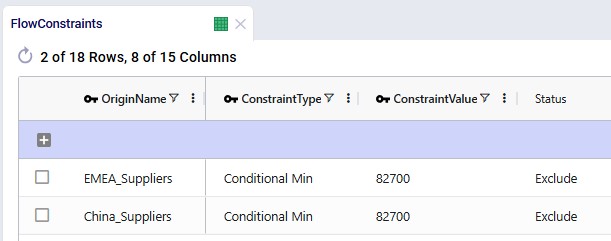
  • Constraint Type = Conditional Minimum means that the flow on the specific lane should either be 0 or otherwise be at least the value set in the Constraint Value field
  • Groups are used for the Origin Name and Period Name fields with their associated Group Name Behavior fields set to Enumerate – these constraints will therefore be expanded into all individual origin – period combinations at runtime and be applied each quarter to each supplier – port lane.

Supplier Structure Constraints

Additional flow count constraints enforce the supplier structure:

  • Maximum 3 suppliers per raw material across the entire horizon – the original supplier and the final 2 suppliers
  • Maximum 1 raw material per supplier
  • Maximum 2 suppliers per raw material during transition
  • Final configuration must include two suppliers from the selected region only

These 2 screenshots show the flow count constraints which are used (Status switched from Exclude to Include) in the scenarios where the supplier base is shifted; they are explained underneath the second screenshot:
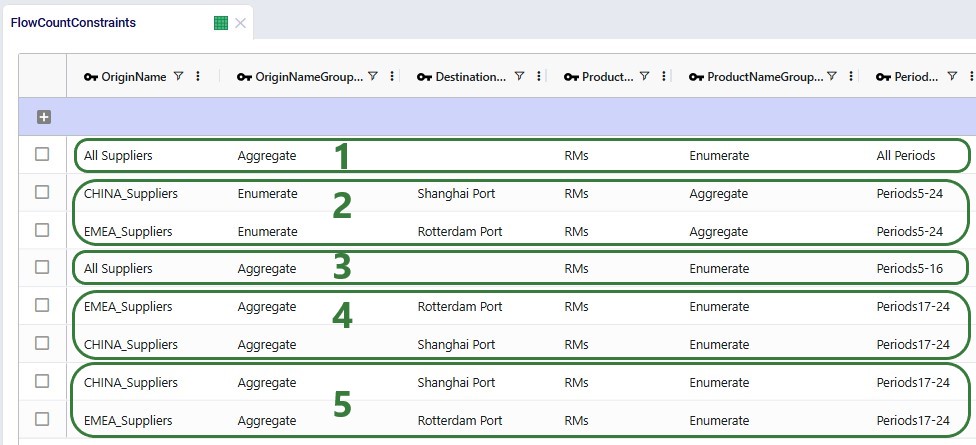
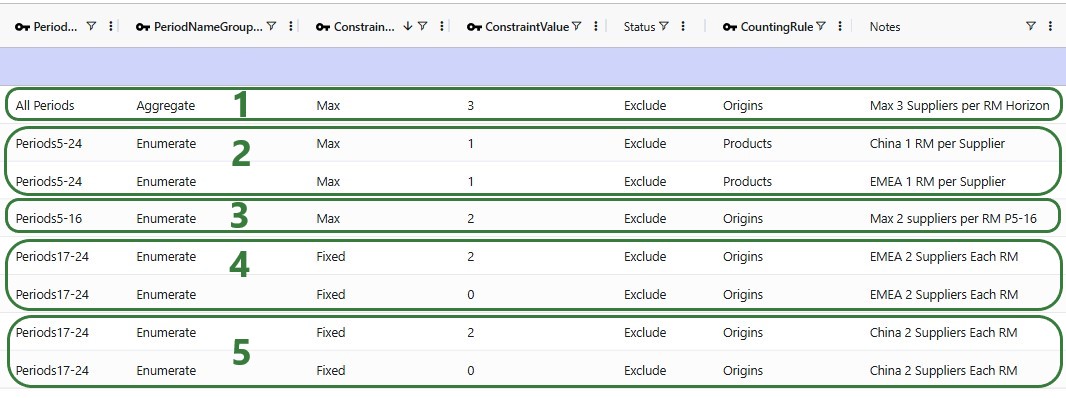
  1. This constraint is used in all scenarios where the supplier base is shifted and ensures that during the whole model horizon (2026 – 2031) each raw material is not supplied by more than 3 suppliers: its original supplier and the 2 in the final supplier base configuration.
  2. These 2 constraints are also included in all scenarios where the supplier base is shifted, and they ensure that each supplier does not supply more than 1 raw material.
  3. This constraint is also used in all scenarios where the supplier base is shifted; it limits the number of suppliers for each RM to 2 during the transition period. Because the constraint is for the transition period, it is over all suppliers together, since it can be a mix of Chinese and European suppliers during this timeframe.
  4. These 2 constraints are included in scenarios where the supplier base is shifted to Europe. They ensure there are 2 European and 0 Chinese suppliers for each RM during the phase of the model where the supplier base is fixed to the new configuration (periods 17-24, 2030 – 2031).
  5. These 2 constraints are included in scenarios where the supplier base is shifted to China. They ensure there are 2 Chines and 0 European suppliers for each RM during the phase of the model where the supplier base is fixed to the new configuration (periods 17-24, 2030 – 2031).

Incremental Change Constraints

Incremental Change controls the rate of supplier onboarding.

Two configurations are included:

Additional constraints prevent supplier changes after the transition period.

The first 2 constraints shown in the screenshot below are for the standard transition type (Budget = 2 during transition, 0 after) and are included (Status switched to Include) in the scenarios where the supplier base is shifted. The bottom 2 constraints are used together with the one in the second record for scenarios modeling the accelerated transition (Budget =3 during transition, 0 after):
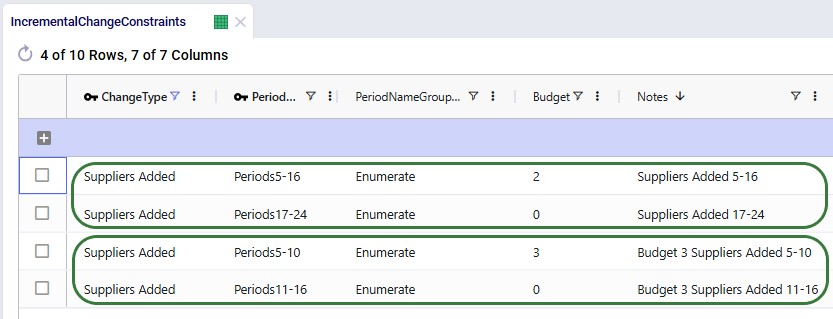
West Coast Expansion Modeling

The model evaluates adding:

  1. Los Angeles Port
  2. Reno Factory

These facilities:

  • Are initially set as Potential
  • Can only be opened starting 2028
  • Are controlled through incremental facility opened change constraints

Facilities table:

Records were added for Los Angeles Port and Reno Factory. As these are currently not existing locations and will be considered for inclusion, their Facility Status = Consider and Initial State = Potential:
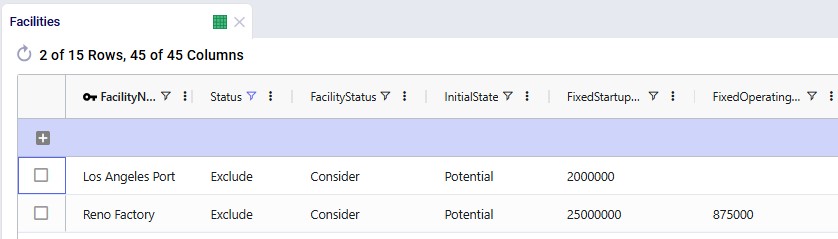
Facilities Multi-Time Period table:

Since we only want to consider including the west coast locations from 2028 onwards, we need to make sure that at the beginning of the model horizon they are closed. This is done by adding 2 records for 2026_Q1 to the Facilities Multi-Time Period table setting the Status for both the Reno Factory and the Los Angeles Port to Closed, see screenshot below. For the remaining periods in the model the Incremental Change Constraints (see further below in this section) take care of when the factory and port are considered for opening.
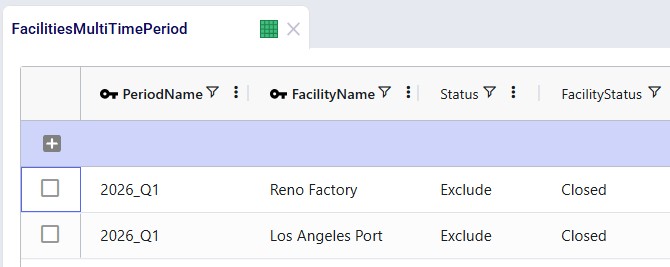
Production Policies table:

Records are added for the Reno Factory so it can manufacture all 3 finished goods, using the existing BOMs:
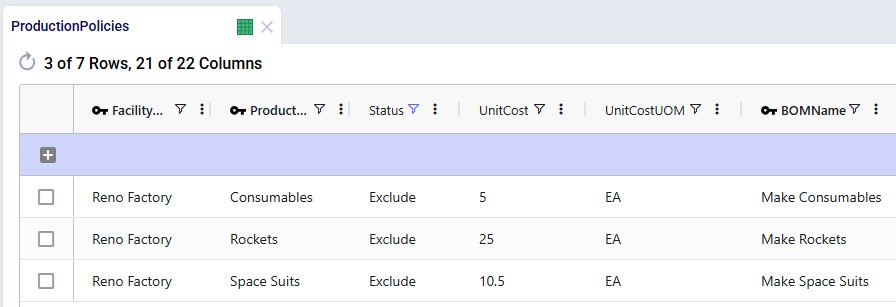
Transportation Policies table:

Records are added so that Los Angeles Port can receive raw materials from the ports in Rotterdam and Shanghai, the Los Angeles Port can ship these to the factory in Reno, and Reno Factory can serve the finished goods to all 7 DCs:
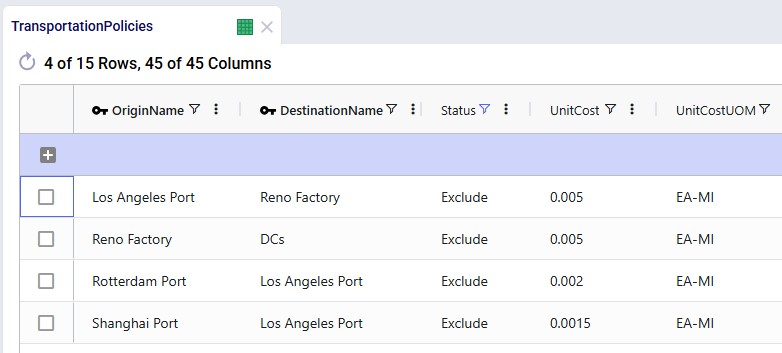
Incremental Change Constraints table:

Here, 2 records are added to set up the desired behavior of allowing the Reno Factory and Los Angeles Port to be added to the network from 2028_Q1 onwards.
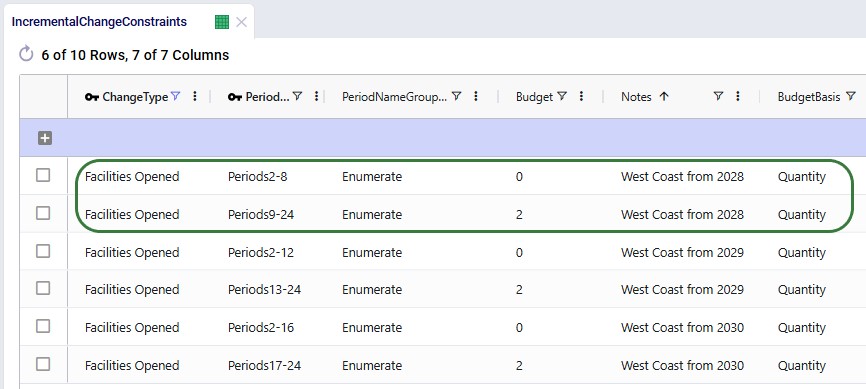
  • The first record indicates that for periods 2 through 8 (Q2 2026 through Q4 2027) the budget for the Change Type of Facilities Opened is 0. In other words, no facilities can be added to the network during this timeframe.
  • The second record specifies that for periods 9 through 24 (Q1 2028 through Q4 2031) the budget for the Change Type of Facilities Opened is 2. This budget is available for each quarter within this period. Since we are only considering adding 2 locations in total (the West Coast port and factory), the budget will only be used in one period or not at all.

The other 4 "Facilities Opened" records in this table are not used in this model. They were added in case users want to set up and run some scenarios themselves where the west coast port and factory are allowed to be added from 2029 (records 3 and 4) or from 2030 (records 5 and 6) onwards.

Supplier Base Transition – Scenarios

The following table shows the scenarios that were run in this example model. Initially the first 5 were run and based on the results, number 6 and 7 were added and run too:
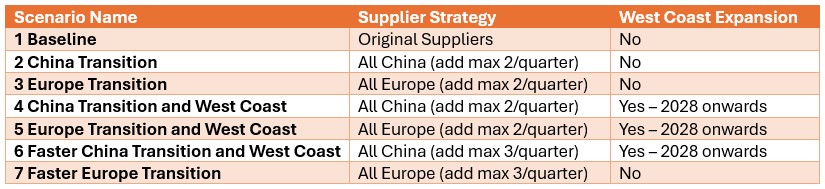
The Scenarios module of this example model looks as follows:
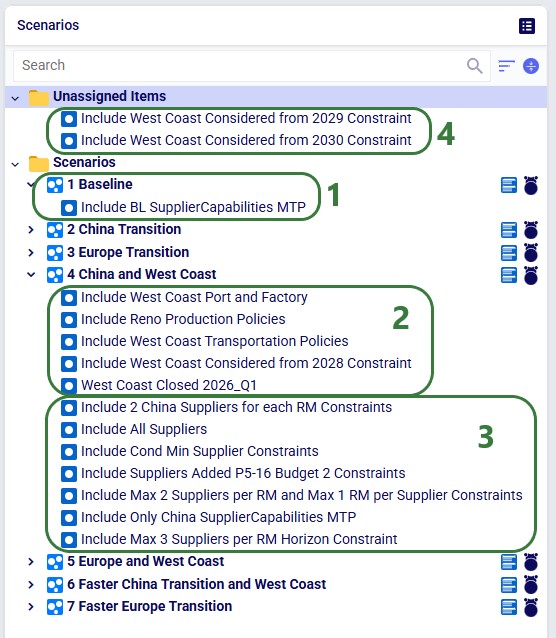
  1. For the Baseline scenario, we only need 1 scenario item: the one that sets the Status to Include for the set of Notes = “Baseline” records on the Supplier Capabilities Multi-Time Period table.
  2. Scenarios which consider using the west coast port and factory (scenarios 4, 5, and 6) include these 5 scenario items which switch the Status to Include for the records that specify the model elements needed, e.g. including the locations on the Facilities table, including the production and transportation policies, etc. The “Include Reno Considered from 2028 Constraint” scenario item changes the Status of the 2 records with Notes = “Reno from 2028” on the Incremental Change Constraints table to Include.
  3. Scenarios which transition the supplier base to China (scenarios 2, 4 and 6) include these 7 scenario items. The scenarios that transition the supplier base to Europe (scenarios 3, 5, and 7) also use 4 of these and they have 3 scenario items that are the Europe-specific version of the other scenario items. The “Include Suppliers Added P5-16 Budget 2 Constraints” scenario item changes the status of the 2 records needed to set the transition period and budget on the Incremental Change Constraints table to Include.
  4. If users want to see for themselves what happens when the west coast port and facility are allowed to be used from 2029 or 2030 onwards, instead of from 2028 onwards, they can use these 2 unassigned items to do so. Steps to set up a new scenario using these would for example be: 1) copy the scenario of interest, say scenario 4, 2) remove the “Include Reno Considered from 2028 Constraint” from this scenario, and 3) add 1 of the 2 currently unassigned scenario items to this copied scenario.

For running the scenarios, 2 of the technology parameters were changed from their defaults:
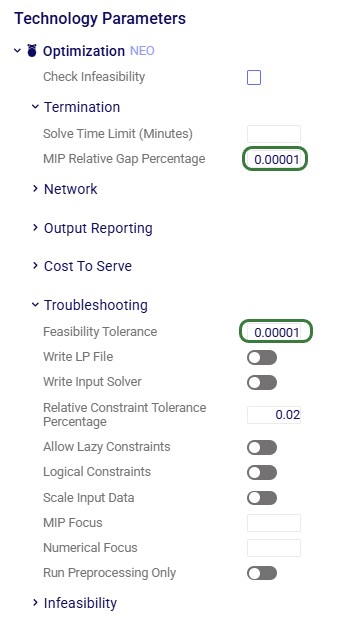
  • The MIP Relative Gap Percentage was reduced to 0.00001 (=0.001%). Due to the large numbers in the model and the relatively small differences between feasible solutions (e.g. the cost difference between phasing a supplier in or out a period earlier or later could be smaller than 0.01% of the total supply chain cost), better solutions were found with this smaller gap, while all scenarios solve in less than 3 minutes.
  • The Feasibility tolerance was increased to 0.00001 to avoid incorrect infeasible results.

Supplier Base Transition – Outputs

After running all scenarios, it is time to examine the outputs. We will start by looking at the new Optimization Incremental Change Summary and Optimization Incremental Change Report output tables and then visualize the supplier base changes on maps and a timeline grid. For these, we will mostly focus on scenarios 4 and 5 which show all incremental change constructs we have used in the model. Finally, we will also have a look at the financial impact and compare all scenarios.

The Optimization Incremental Change Summary table shows how much of each change budget is used in each period. Two screenshots of this output table are shown next; in both, the table is filtered for scenario number 5 (field not shown) where the supplier base is moved to Europe and adding the west coast locations to the network is considered:
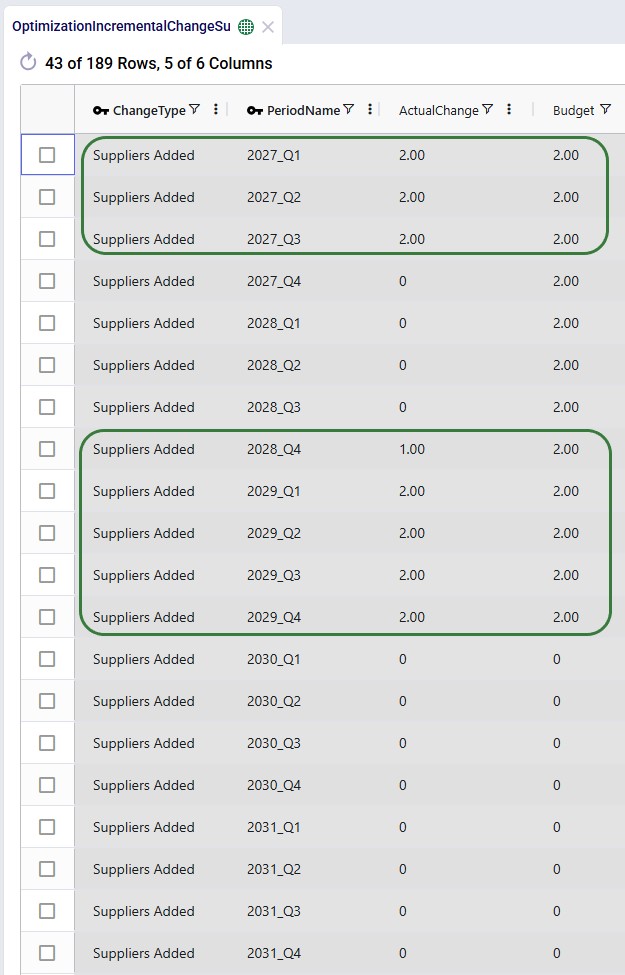
During each of the first 3 quarters of the transition period 2 suppliers were added, then there is a pause in adding suppliers, and towards the end of the transition period, another 9 suppliers are added, essentially as late as possible. We can interpret this as:

  1. Several European suppliers are added early because they are the cheapest options for 6 of the RMs. These suppliers are added in the most cost-efficient order possible (i.e., those providing the highest cost savings first).
  2. Since the model is not adding 9 new suppliers at this stage, we can hypothesize (and we will check this through other outputs further below) that 3 of the original suppliers keep being used, either to supply the RM they have been supplying until now or a different one.
  3. The 9 Remaining suppliers are added towards the end of the transition period to satisfy the two-supplier requirement while minimizing costs.

The next screenshot shows the same table, still filtered for scenario 5, but now the records for the Facilities Opened change type constraints are shown:
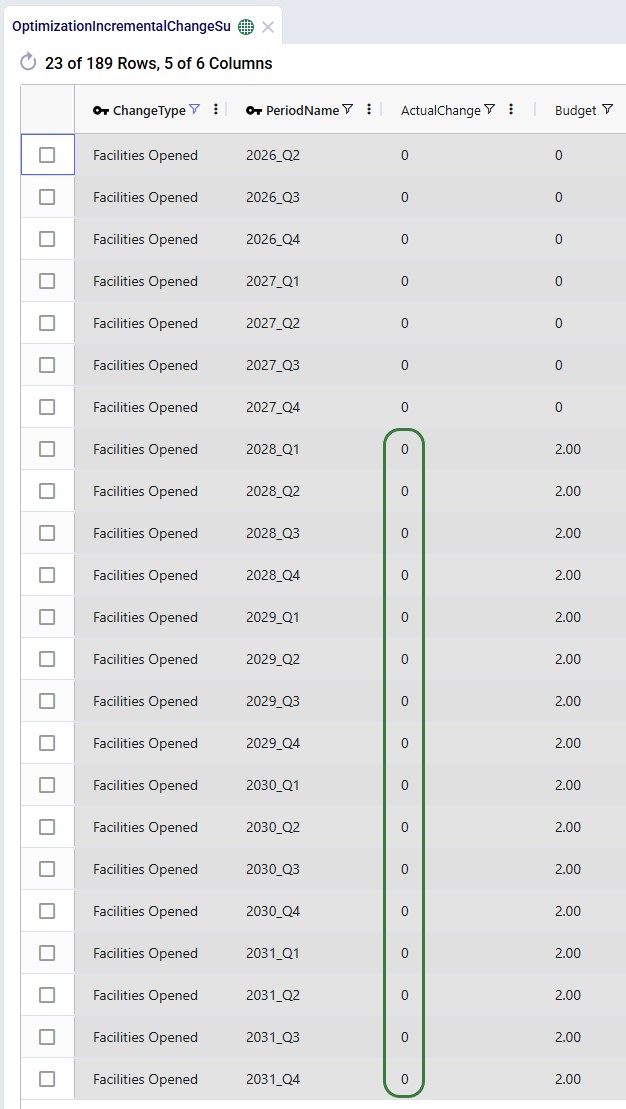
We see that the budget was 2 for each of the periods in the 2028 – 2031 timeframe, but the Actual Change column indicates that no change (0) happened in any of those periods. In this scenario, it is not beneficial to start using the west coast port and factory anytime from Q1 2028 onwards.

Next, we will cover the Optimization Incremental Change Report output table. This table has a record for each incremental change that was made, including details on what the change was. This table is filtered for scenario 4 (field not shown) where the supplier base is moved to China and the west coast locations are considered (note that records beyond Q1 2029 are not shown here):

From the first 4 records for Q1 of 2027, we can tell that suppliers in Hefei and Taiyuan were added to the supplier base, while suppliers in Lyon and Madrid were removed. Similarly, 2 suppliers are added and removed in each of the next 2 quarters. Then in Q1 of 2028, the Reno Factory is opened, which is apparently beneficial to do as early as possible when moving the supplier base to China. This is due to the lower transportation costs because of the shorter distance from Shanghai to Los Angeles as compared to going to the Charleston or Altamira ports.

In summary:

  • When transitioning to European suppliers, the model does not open the Los Angeles Port or Reno Factory, indicating the west coast expansion is not cost-effective under this sourcing strategy.
  • When transitioning to Chinese suppliers, the model opens the Reno Factory and Los Angeles Port as early as possible, reducing ocean shipping distance and transportation costs.

The next map shows the final configuration of the supplier base for scenario 4 where it is moved entirely to China. Notice that we have used the Period selector bar (at the top of the map) to show the map for Q1 of 2030 when the transition is complete. You can use this period selector to step through the periods to see the gradual changes over time.
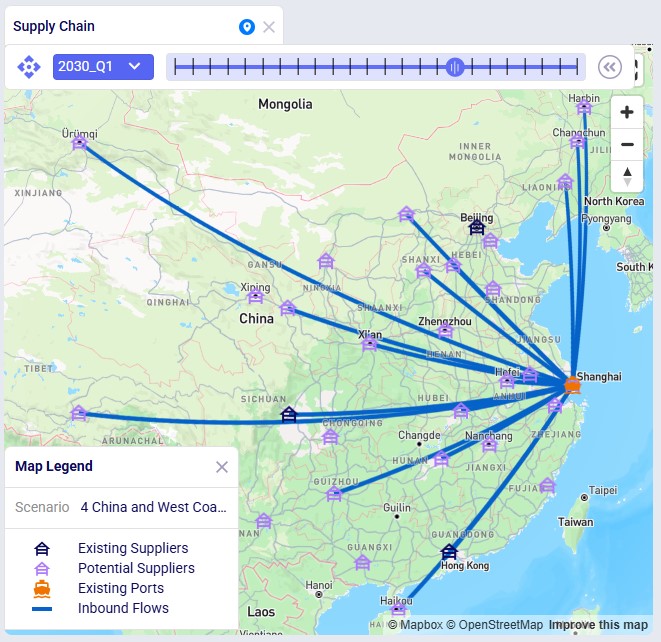
The next map is also for scenario 4 but now showing the North American locations and flows (except for the DC – Customer flows) for the same period of Q1 2030. We see that the Los Angeles Port and Reno Factory are being used in this scenario.
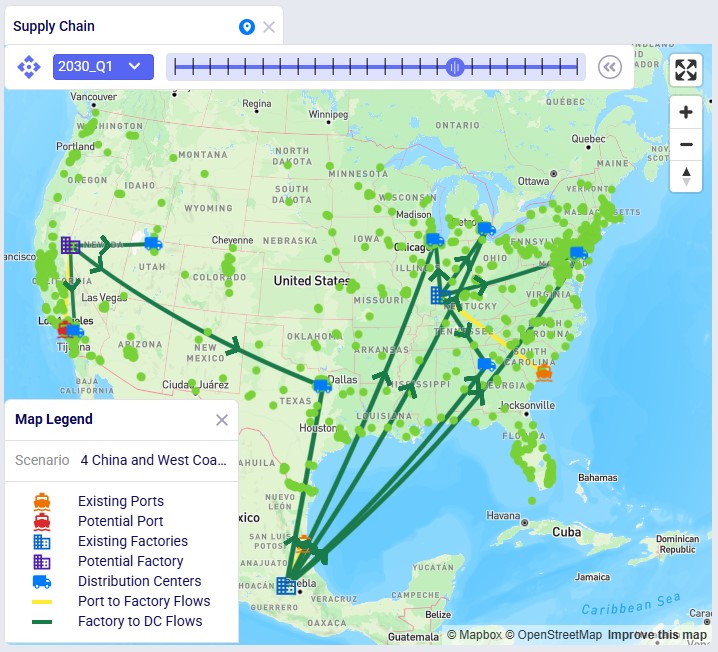
Similar to the first map shown above, the next map shows the final supplier configuration in Q1 2030 for scenario 5, where the whole base is moved to Europe:
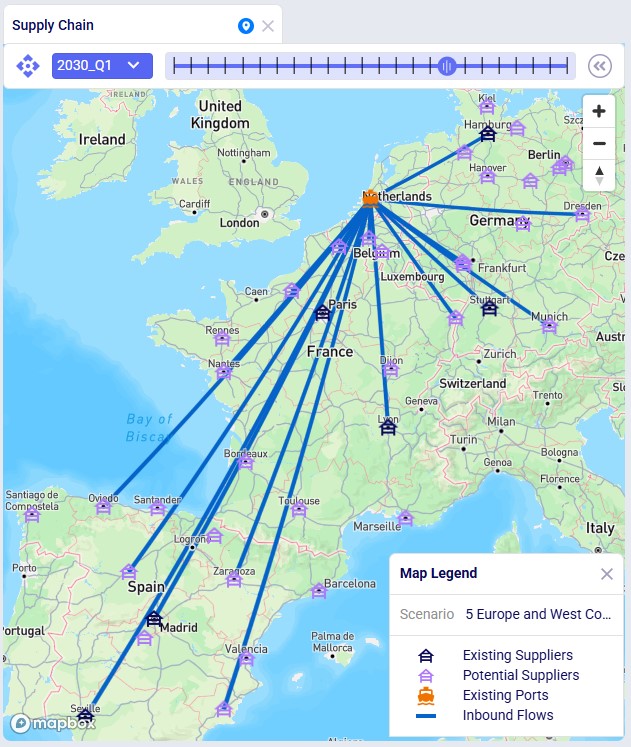
The next 2 timeline grids on the Supplier Transition Timeline dashboard (Analytics module) are generated from a custom table “timeline_rm_bysupplier_byperiod”, which in turn was generated from the Optimization Supply Summary output table. The appendix describes the steps to create the custom table and how to re-create it in case (new) scenarios are added / adjusted and run.

The first screenshot is for scenario 4, the second for scenario 5. They show which supplier supplies which RM when. Note that Q1-Q3 of 2026 are not included as the supplier configuration is equal to the Q4 2026 configuration. Similarly, the timeframe of Q2 2030 through Q4 2031 is not included in this dashboard either, since the supplier configuration is equal to the Q1 2030 configuration. Not all suppliers and period columns are shown in the screenshots, users can scroll horizontally and vertically in the dashboard to examine the full timeline.
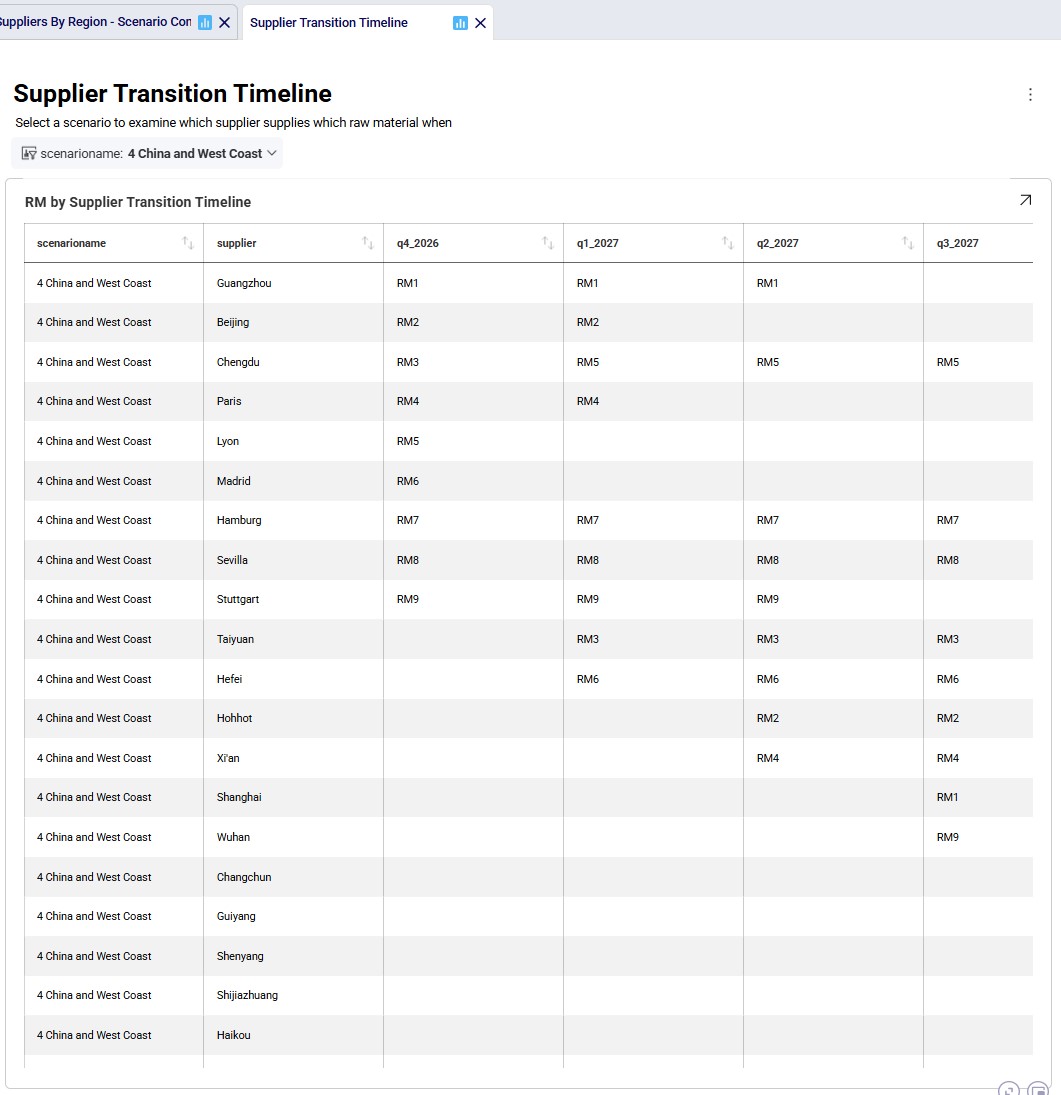
Some things we notice here for scenario 4 are:
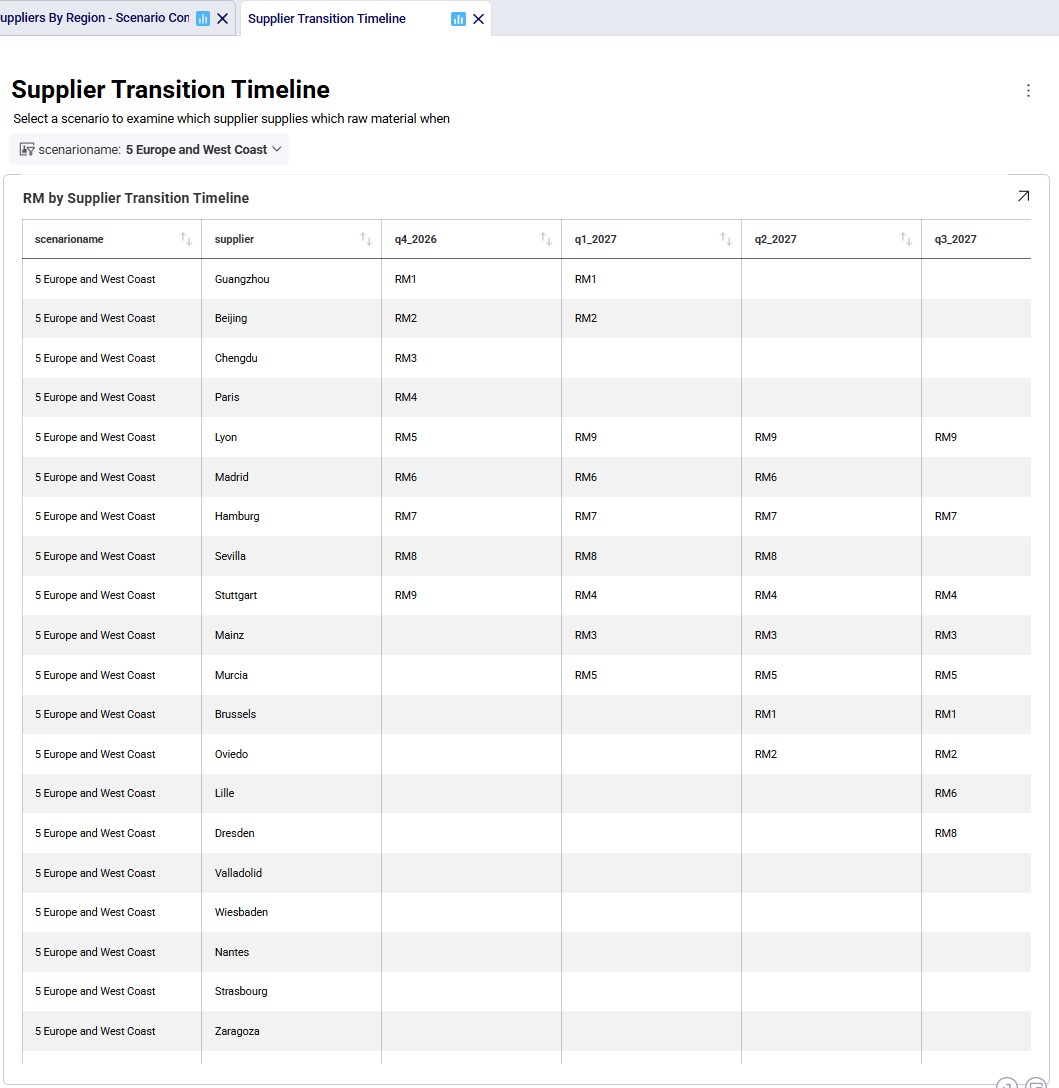
  1. Guangzhou is the original supplier for RM1 and is phased out from Q3 2027. However, it is also the second-best option to supply RM7, so it is phased back in from Q4 2029.
  2. Chengdu is the original supplier for RM3, which it drops as soon as possible, and then switches to supplying RM5.
  3. European suppliers Hamburg and Sevilla are being used for RM7 and RM8 for as long as possible, suggesting all China suppliers are more expensive for these 2 RMs.

Some things we notice examining the above grid for scenario 5 are:

  1. Lyon is the original supplier for RM5, which it drops as soon as possible, and then supplies RM9 for the rest of the model horizon for which it must be the cheapest supplier.
  2. Madrid originally supplies RM6, and once Lille comes online it stops supplying it. However, it must still be the second-best option for supplying this raw material as it comes back online supplying RM6 from Q3 2029 onwards. The same thing happens with RM8 at Sevilla.
  3. Stuttgart is the original supplier for RM9, which it drops as soon as possible, and then supplies RM4 for the rest of the model horizon for which it must be the cheapest supplier.

Since we are interested in looking at the impact of requiring the supplier base to be transitioned over sooner, scenarios 6 and 7 were run too where the budget for adding suppliers is set to 3 per quarter. We know from scenarios 4 and 5 that the west coast locations are only used when moving the supplier base to China, therefore we run scenario 6 (where we speed up the transition to the China supplier base) with these locations still considered. We do not consider them in scenario 7 where we speed up the transition to the Europe supplier base.

We will now have a look at how the costs compare for all 7 scenarios that were run with the next 2 screenshots of the Optimization Network Summary output table and the screenshot of the “Financials: Scenario Cost Comparison” chart. The latter can be found on the Scenario Comparison dashboard in the Analytics module:
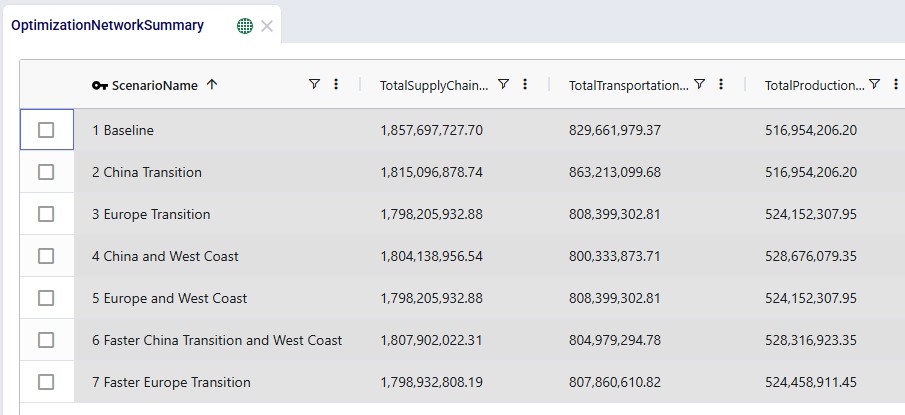
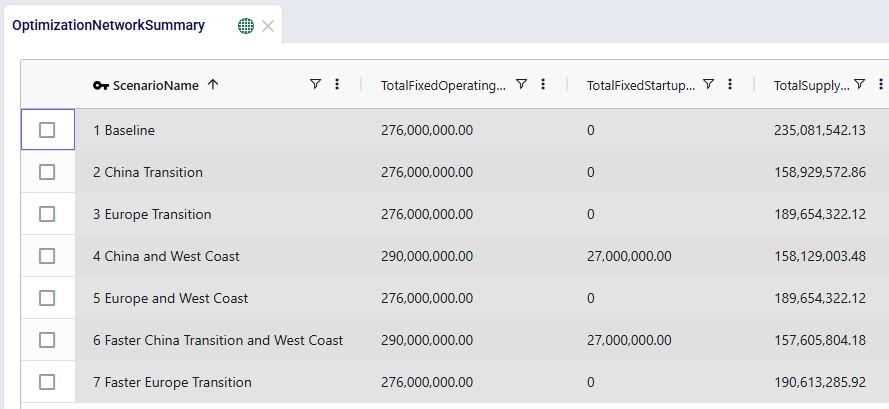
Comparing all scenarios reveals:

  1. The baseline configuration is the most expensive.
    1. It is the overall most expensive scenario by more than $40M (over 6 years) as compared to the other 6 scenarios, which are all relatively close to each other when looking at the total supply chain cost.
  2. Transitioning to European suppliers provides the lowest overall cost.
    1. Scenarios 2 and 3 where the supplier base is transitioned entirely to China and Europe, respectively, both show considerable cost savings as compared to the baseline. This reduction mostly comes from the lower supply costs, even outweighing the increased transportation costs of scenario 2 (more expensive ocean shipping from Shanghai as compared to from Rotterdam). In scenario 3 it is interesting to see that the production costs increase as compared to the baseline, but these are more than offset by the reduction in transportation costs: the European suppliers ship more to Charleston Port than Altamira Port (reducing the transportation costs as they are distance based), which leads to producing more at the Princeton factory where it is on average more expensive to produce than at the El Bajio Factory. Based on these 2 scenarios, moving the supplier base to Europe makes the most sense financially, since it would be nearly $17M cheaper than moving the supplier base to China.
  3. Transitioning to Chinese suppliers becomes more competitive when the West Coast expansion is included.
    1. For scenarios 4 and 5, which are the same as 2 and 3 but with the added option of starting to use the west coast port and factory, we see that scenario 5 has the exact same outputs as scenario 3. This is because it is not cost effective to open the US west coast locations when shifting the supplier base entirely to Europe, and therefore scenarios 3 and 5 have the same outcome. For scenario 4, we do see that using the Los Angeles Port and Reno Factory from 2028 onwards is beneficial: the overall cost of this scenario is about $11M less than for scenario 2. These savings are due to a big reduction in transportation costs ($63M) by going from China to the US west coast and a smaller reduction in supply costs (around $1M), which together outweigh the increases in production, fixed operating, and fixed startup costs (combined around $53M). Even though the total costs for the supplier base transitioning to China has come down in scenario 4 as compared to scenario 2 by using the west coast locations, the total cost is still about $6M higher as compared to transitioning to a European supplier base (scenario 3).
  4. Accelerated transition to Europe increases cost slightly but could be operationally desirable.
    1. With the knowledge from the previous 5 scenarios, we decided to run 2 more scenarios, scenarios 6 and 7. Scenario 6 still transitions the entire supplier base to China and allows the west coast locations to be used from 2028. However, the supplier base transition now needs to be completed faster within 1.5 years. Similarly, scenario 7 still shifts the entire supplier base to Europe, but also at a faster pace, and does not consider using the west coast locations. We see that requiring a quicker transition adds costs to both scenarios, but more to scenario 6 than to scenario 7 (close to $4M scenario 6 vs 4, and a little under $1M scenario 7 vs 5). The relatively low additional cost for a quicker transition to an all-European supplier base may make this option a viable one if it can be achieved operationally.

Finally, the following 4 charts for scenarios 4-7 which show the number of suppliers by region over time can be found in the “Suppliers by Region – Scenario Comparison” dashboard in the Analytics module:
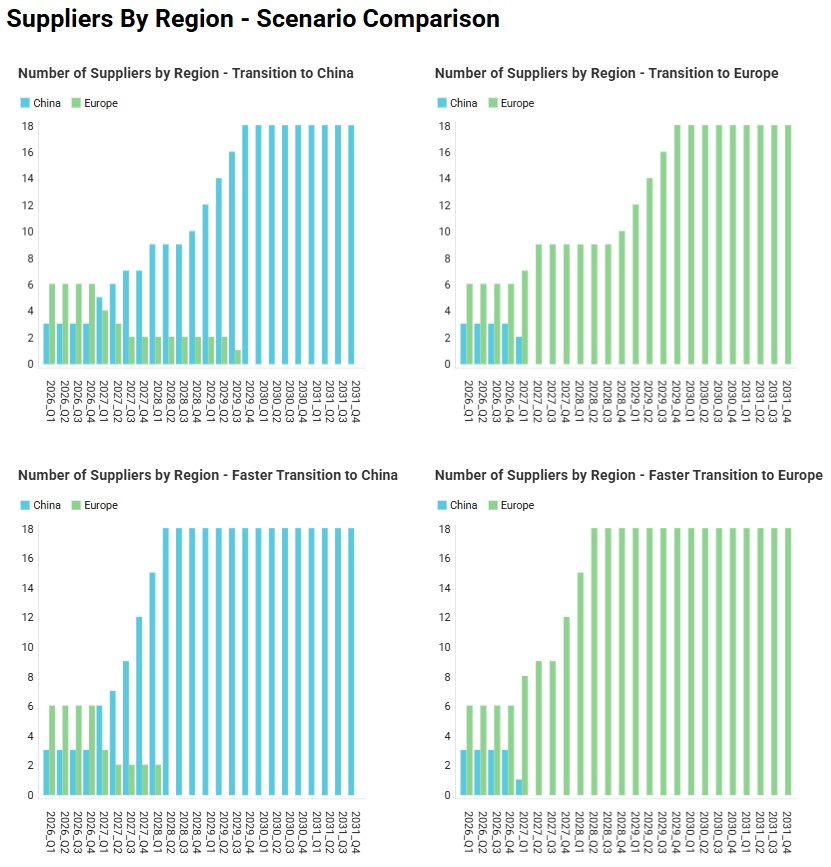
Please do not hesitate to contact Optilogic support at support@optilogic.com in case of questions or feedback.

Appendix –Refreshing the Supplier Transition Timeline Dashboard

To create the timeline grid on the Supplier Transition Timeline dashboard, we first created a custom table named timeline_rm_bysupplier_byperiod, where we added columns for scenarioname, supplier, and 1 column for each period in the model. The latter we named q1_2026, q2_2026, etc. rather than 2026_Q1, 2026_Q2, etc. (which is how the periods in the model are named) as column names in custom tables cannot start with a digit.

Next, this table was populated from the outputs in the Optimization Supply Summary output table, using a SQL Query, which is saved in the model and can be used to refresh the custom table if scenarios are modified/added and (re-)run. For this we use the SQL Editor application on the Optilogic platform:
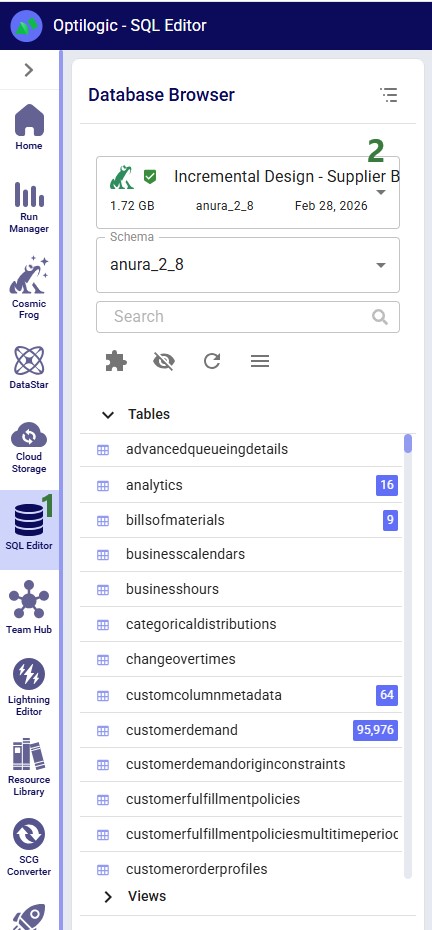
  1. The SQL Editor application can be opened by clicking on its icon in the list of applications on the left-hand side while logged into the Optilogic platform. Should you not see the icon for the SQL Editor, then click on the icon with 3 horizontal dots to see more applications in the list.
  2. Select the model, here Incremental Change – Supplier Base Transition, from the drop-down if it is not yet selected here.

The following screenshot shows the central part and right-hand side panel of the SQL Editor application:
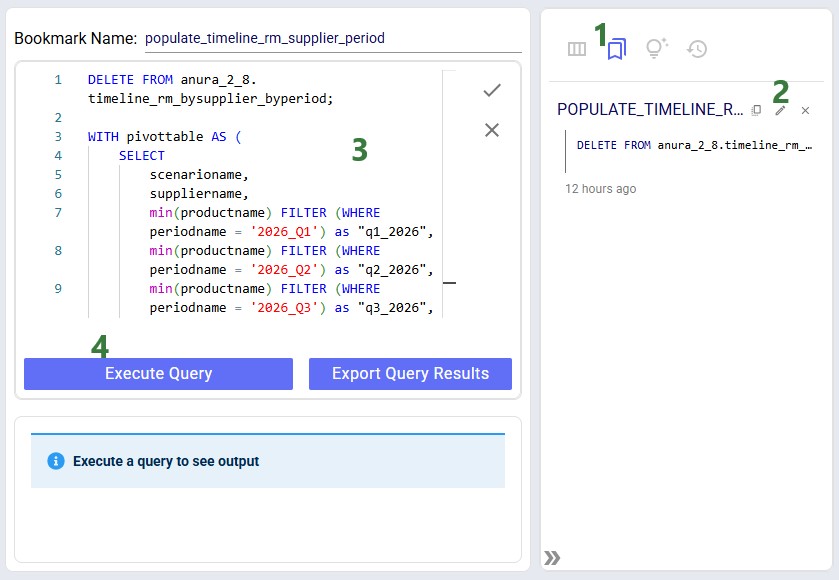
  1. In the panel on the right-hand side click on the second icon to show the list of bookmarked queries.
  2. There is one bookmarked query in this model’s database; to edit or open it, we can click on the pencil icon.
  3. The SQL code of the query is now shown in the central part of the SQL Editor (not all is shown in the screenshot).
  4. To remove previous outputs from the custom timeline_rm_bysupplier_byperiod table and re-populate it with the latest outputs in the Optimization Supply Summary output table, click on the Execute Query button. Now the table and the Supplier Transition Timeline dashboard that uses it as input will be updated.

Please note that this custom table, the Supplier Transition Timeline dashboard, and SQL Query to populate it are specific to how this model is set up. All three will need to be updated if the model is changed in certain ways. For example, when adding/removing/renaming periods or if it becomes possible for 1 supplier to supply more than 1 raw material within a period.

Have More Questions?

Contact Support

Get in touch

Contact Sales

Get in touch

Visit Frogger Pond Community

Visit our Community