
Without dock door constraints, the transportation optimization engine (Hopper) assumes facilities and customers can load and unload any number of vehicles at the same time. In reality, a depot with 2 dock doors can only service 2 vehicles at once, and routes that look good on paper may be impossible to execute. Dock door constraints let you model that limit, so the routes and schedules Hopper produces are operationally realistic.
Example business questions that can be answered with the help of dock door constraints:
Please note that a basic knowledge of Hopper prior to diving into this content is recommended, see the Getting Started with Hopper article.
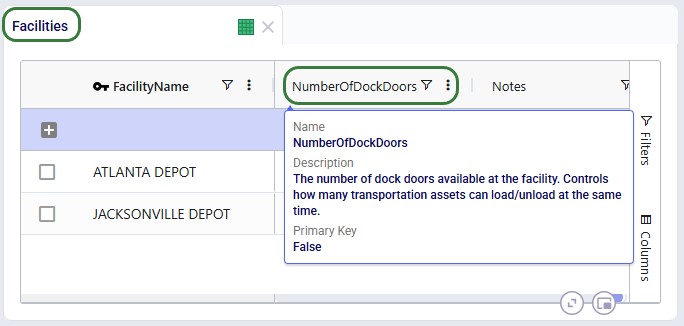
Dock door constraints are specified by using the new Number of Dock Doors column on the Facilities and Customers tables. The new field on the Facilities table is shown here:
If Number of Dock Doors is:
Dock doors can be occupied by assets (vehicles/trucks) which are loading and/or unloading.
The time an asset spends (un)loading at a dock door is determined by pickup and delivery times that can be specified in following input tables: Customers, Facilities, Transportation Assets, and Shipments. Fixed and variable (“unit”) pickup and delivery times plus their units of measure can be specified on all tables, and these times are additive.
Assets do not occupy a dock door when they are waiting.
If used, business hours and business calendars need to be satisfied as with any other Hopper runs, while the Complete Service in Time Window run setting also impacts when service at a facility can start and end.
If due to a dock door constraint, a shipment cannot be routed like it otherwise would, Hopper will take the usual steps of changing the timing of stops/routes, moving stops around, trying shipments on different routes, using more assets or a different asset mix, etc. Ultimately, it is possible that dock door constraints make it such that one or multiple shipments cannot be routed, which will be indicated with Shipment Status = Unrouted in the Transportation Shipment Summary output table.
We will use an example that is set up on a copy of a model from the Resource Library: Multi Stop Routes with Time Windows. You can copy it to your own account if you want to follow along. In this model there are 2 depots, one in Atlanta and one in Jacksonville, from which product is picked up and then delivered to 31 customers in Georgia. Several scenarios that explore routes, fleet mix, use of the second depot, and integration of a new customer base consisting of 13 customers into the existing one are already set up.
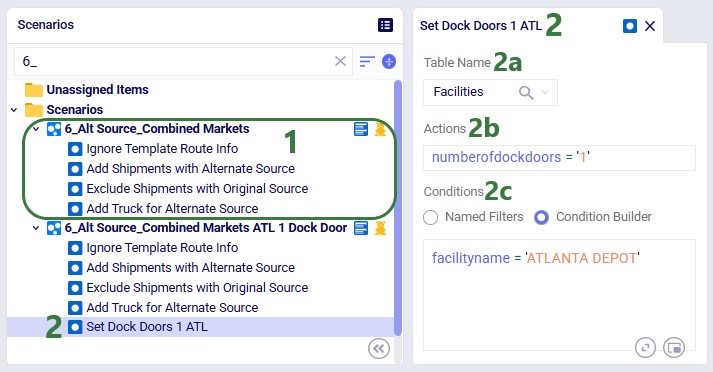
In our relatively simple example, we will update an existing scenario by specifying that the Atlanta Depot only has 1 dock door available. Then we run the original scenario without any dock door constraints together with the updated scenario and compare the outputs.
In the Scenarios module of this model:
After running both scenarios with the Solver Focus run setting set to High Precision, we filter the Transportation Stop Summary output table for the 2 scenarios we ran, ATLANTA DEPOT as the Site Name, and Stop Type = Pickup. We see that for loading that occurs at Atlanta, these 2 scenarios differ on one date, 2024-04-03:

If you review the Transportation Summary output table you will find these 2 scenarios have the exact same cost, transport distances, and transport, break, and rest times. The only difference is that one route’s timing has shifted. Without the constraint, Hopper would have loaded two trucks at once, which is impossible at the Atlanta Depot with a single dock door. So, even though the cost is unchanged, the schedule is now feasible.
As always, please do not hesitate to contact our Support team on support@optilogic.com in case of any questions or feedback.

Without dock door constraints, the transportation optimization engine (Hopper) assumes facilities and customers can load and unload any number of vehicles at the same time. In reality, a depot with 2 dock doors can only service 2 vehicles at once, and routes that look good on paper may be impossible to execute. Dock door constraints let you model that limit, so the routes and schedules Hopper produces are operationally realistic.
Example business questions that can be answered with the help of dock door constraints:
Please note that a basic knowledge of Hopper prior to diving into this content is recommended, see the Getting Started with Hopper article.
Dock door constraints are specified by using the new Number of Dock Doors column on the Facilities and Customers tables. The new field on the Facilities table is shown here:
If Number of Dock Doors is:
Dock doors can be occupied by assets (vehicles/trucks) which are loading and/or unloading.
The time an asset spends (un)loading at a dock door is determined by pickup and delivery times that can be specified in following input tables: Customers, Facilities, Transportation Assets, and Shipments. Fixed and variable (“unit”) pickup and delivery times plus their units of measure can be specified on all tables, and these times are additive.
Assets do not occupy a dock door when they are waiting.
If used, business hours and business calendars need to be satisfied as with any other Hopper runs, while the Complete Service in Time Window run setting also impacts when service at a facility can start and end.
If due to a dock door constraint, a shipment cannot be routed like it otherwise would, Hopper will take the usual steps of changing the timing of stops/routes, moving stops around, trying shipments on different routes, using more assets or a different asset mix, etc. Ultimately, it is possible that dock door constraints make it such that one or multiple shipments cannot be routed, which will be indicated with Shipment Status = Unrouted in the Transportation Shipment Summary output table.
We will use an example that is set up on a copy of a model from the Resource Library: Multi Stop Routes with Time Windows. You can copy it to your own account if you want to follow along. In this model there are 2 depots, one in Atlanta and one in Jacksonville, from which product is picked up and then delivered to 31 customers in Georgia. Several scenarios that explore routes, fleet mix, use of the second depot, and integration of a new customer base consisting of 13 customers into the existing one are already set up.
In our relatively simple example, we will update an existing scenario by specifying that the Atlanta Depot only has 1 dock door available. Then we run the original scenario without any dock door constraints together with the updated scenario and compare the outputs.
In the Scenarios module of this model:
After running both scenarios with the Solver Focus run setting set to High Precision, we filter the Transportation Stop Summary output table for the 2 scenarios we ran, ATLANTA DEPOT as the Site Name, and Stop Type = Pickup. We see that for loading that occurs at Atlanta, these 2 scenarios differ on one date, 2024-04-03:
If you review the Transportation Summary output table you will find these 2 scenarios have the exact same cost, transport distances, and transport, break, and rest times. The only difference is that one route’s timing has shifted. Without the constraint, Hopper would have loaded two trucks at once, which is impossible at the Atlanta Depot with a single dock door. So, even though the cost is unchanged, the schedule is now feasible.
As always, please do not hesitate to contact our Support team on support@optilogic.com in case of any questions or feedback.