
The Data Cleansing Agent is one of Ada’s AI-powered assistants. It helps users profile, clean, and standardize their database data without writing code. Users describe what they want in plain English -- such as "find and fix postal code issues in the customers table" or "standardize date formats in the orders table to ISO" -- and the agent autonomously discovers issues, creates safe working copies of the data, applies the appropriate fixes, and verifies the results. The agent handles common supply chain data problems including mixed date formats, inconsistent country codes, Excel-corrupted postal codes, missing values, outliers, and messy text fields. It expects a connected database with one or more tables as input. The output is a set of cleaned copies of their tables in the database which users can immediately use for Cosmic Frog model building, reporting, or further analysis, while the original data is preserved untouched for comparison or rollback.
This documentation describes how this specific agent works and can be configured, including walking through multiple examples. Please see the “AI Agents: Architecture and Components” Help Center article if you are interested in understanding how the Optilogic AI Agents work at a detailed level.
Cleaning and standardizing data for supply chain modeling typically requires significant manual effort -- writing SQL queries, inspecting column values, fixing formatting issues one at a time, and verifying results. The Data Cleansing Agent streamlines this process by turning a single natural language prompt into a full profiling, cleaning, and verification workflow.
Key Capabilities:
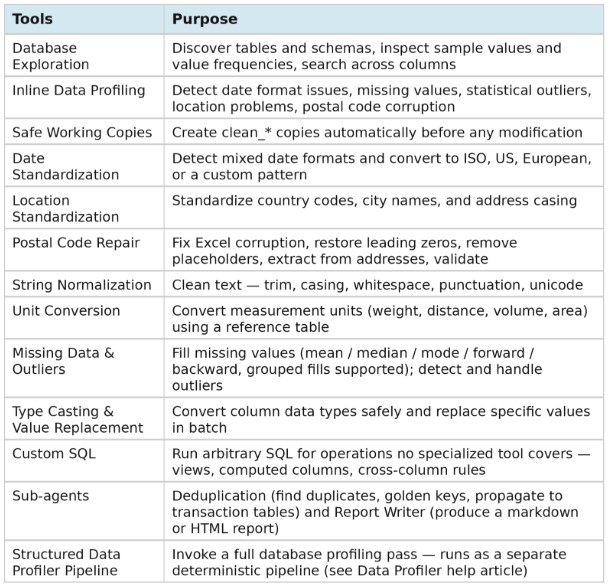
Tools:
The agent can be accessed on the next generation Optilogic platform by chatting with Ada and through the Run AI Agent task in DataStar. Both ways will be explained, via Ada first, then the DataStar workflow, followed by an overview of the main differences between the 2 methods.
It is recommended to be somewhat familiar with Ada before diving into this content. Please see the Getting Started with Ada & Agentic AI article, and in particular its How to Use Ada section.
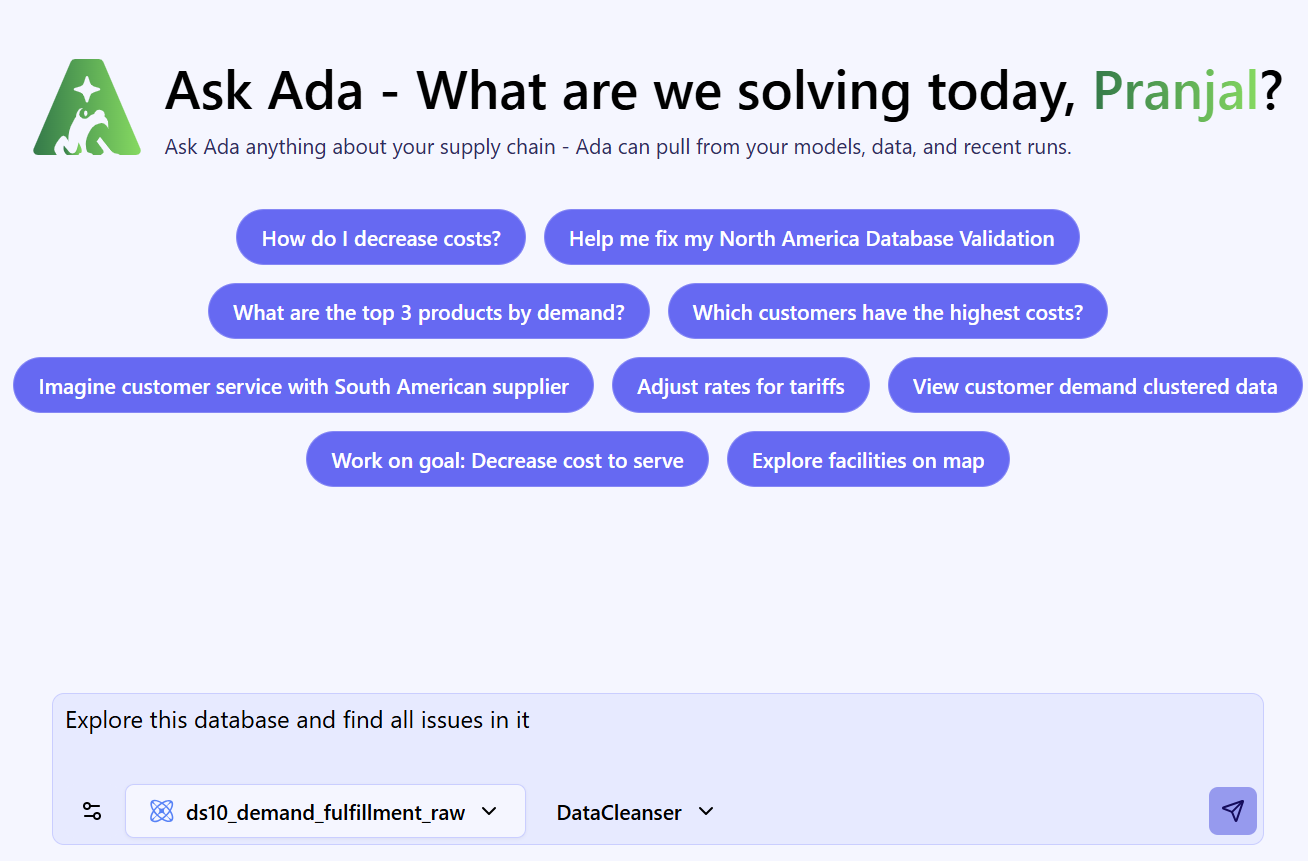
Once logged into the next-generation Optilogic platform at https://ai.optilogic.app, you can start chatting with Ada leveraging the Data Cleansing Agent right away from the central part of the Home page.
Regarding how to write good prompts, please note that the general Best Practices, Tips & Tricks, and Current Limitations and Known Behaviors included in the Getting Started with Ada documentation also apply to the Data Cleansing Agent.
After submitting a prompt, the Data Cleansing Agent will start processing and formulating a response:
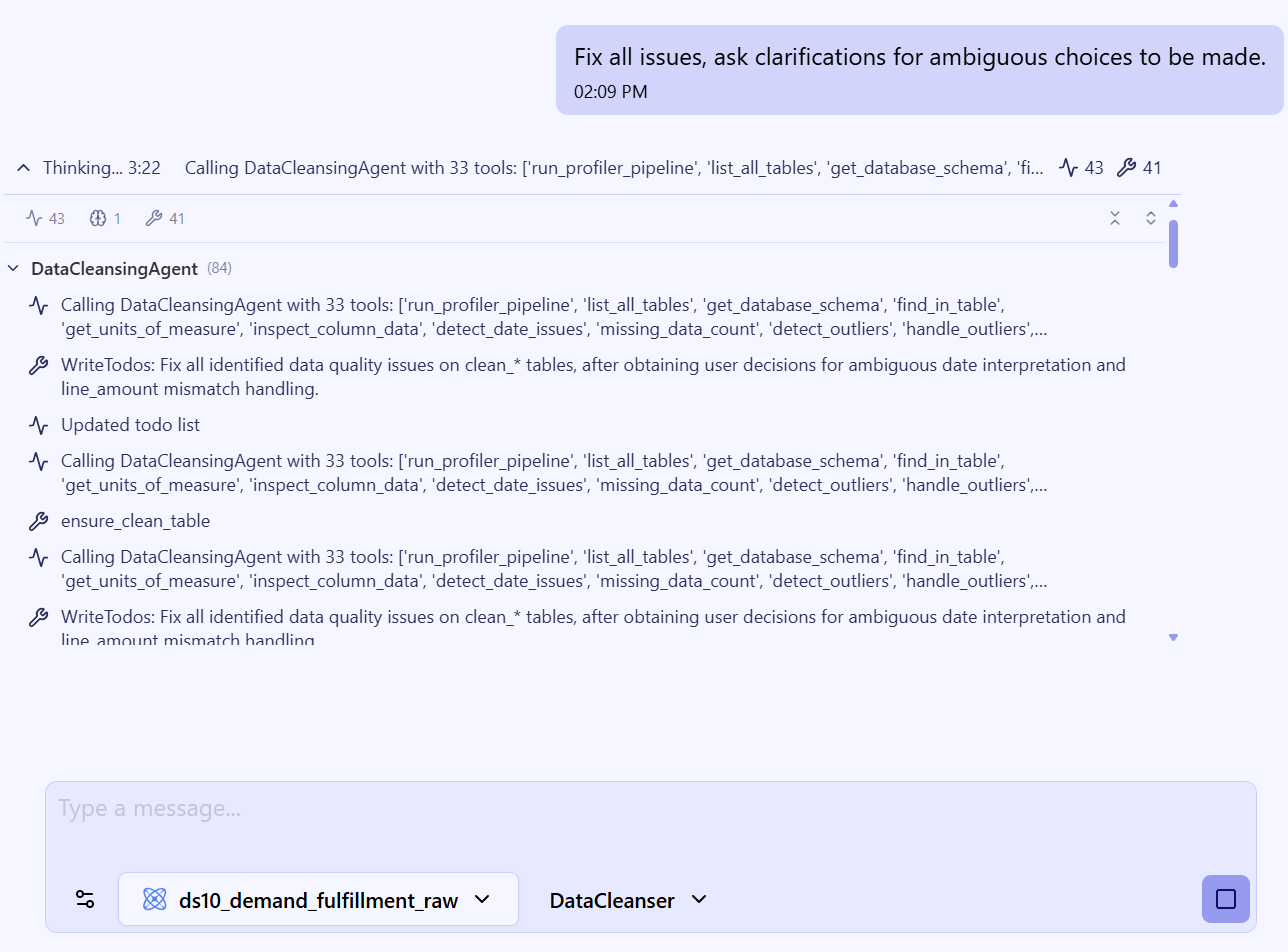
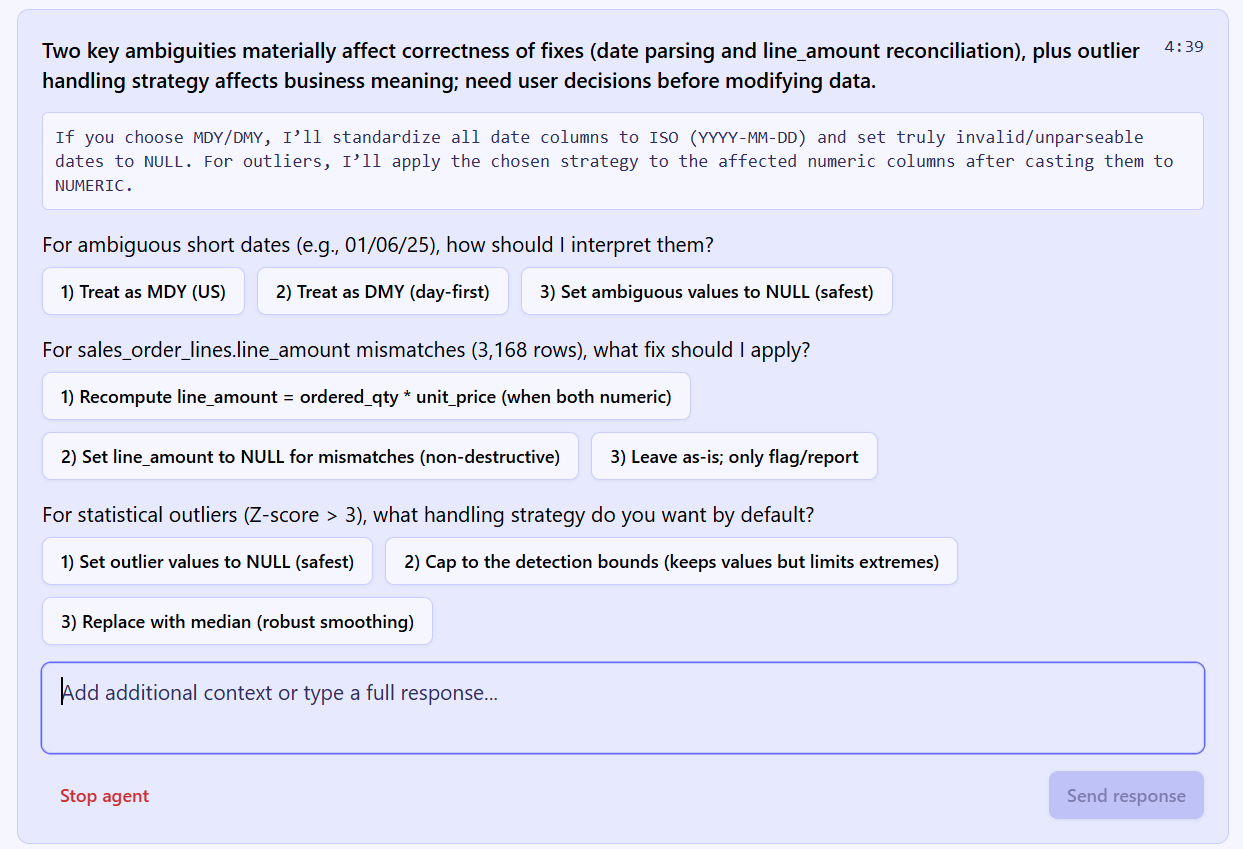
The Data Cleansing Agent may ask for feedback before proceeding — for example, when:
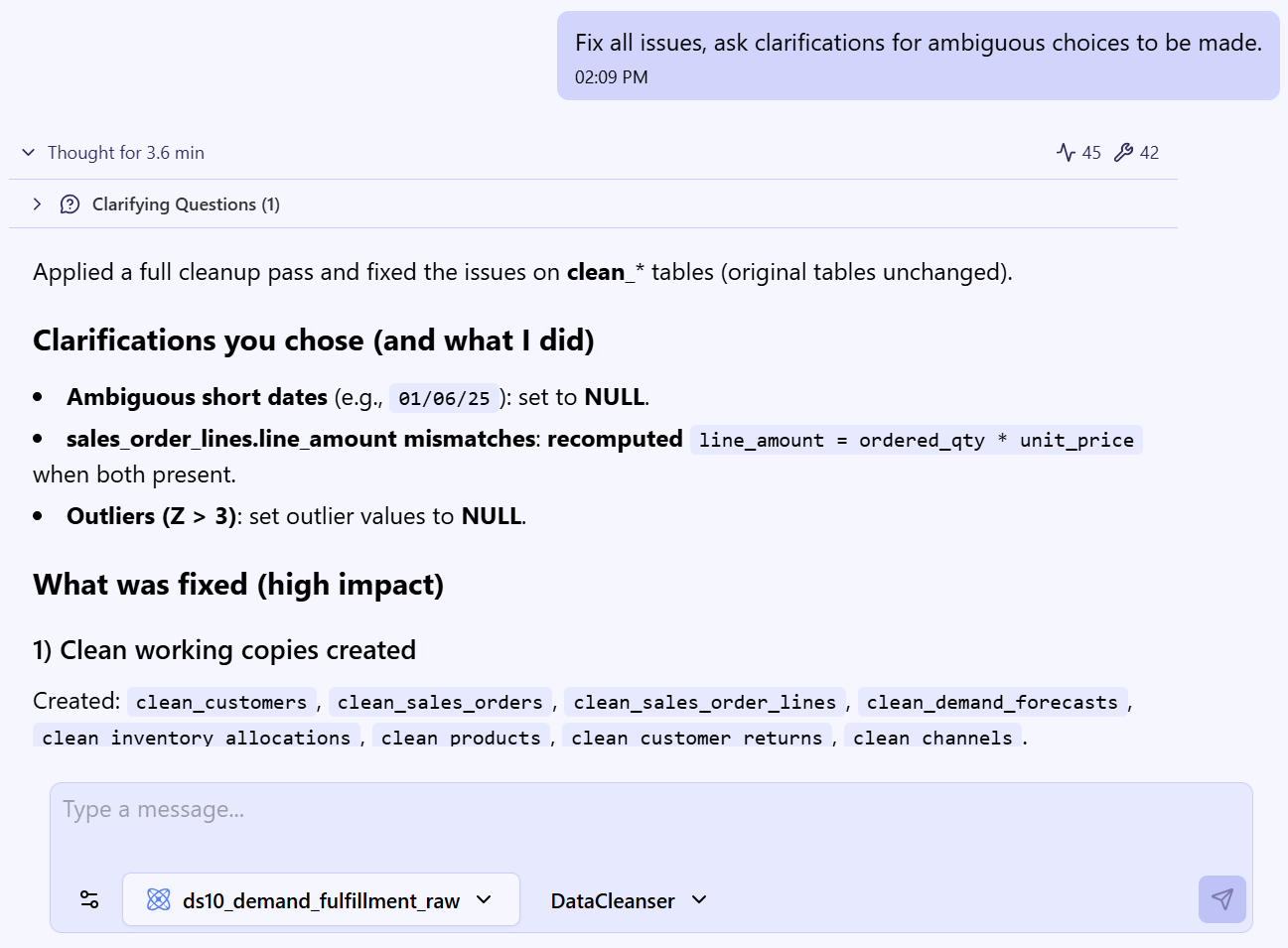
When Ada finishes, the final response is presented:
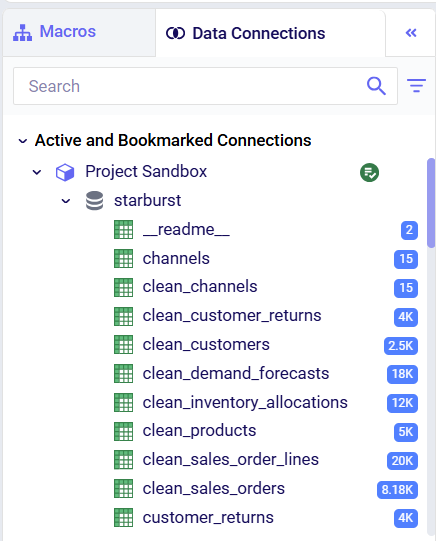
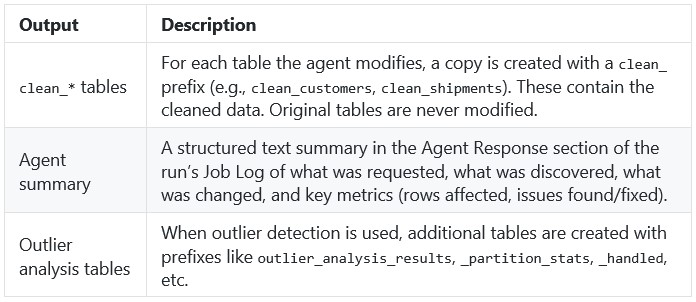
For completeness, the cleaned data shows up in the connected database as clean_* table copies — for example, clean_customers, clean_orders — with the originals preserved untouched for comparison or rollback:
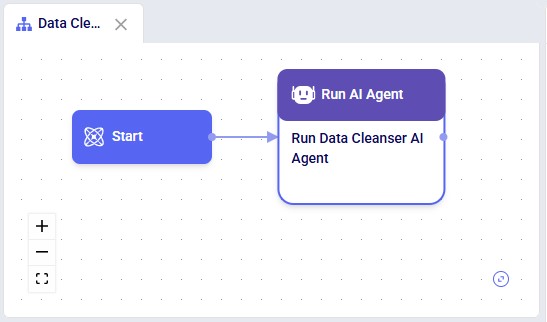
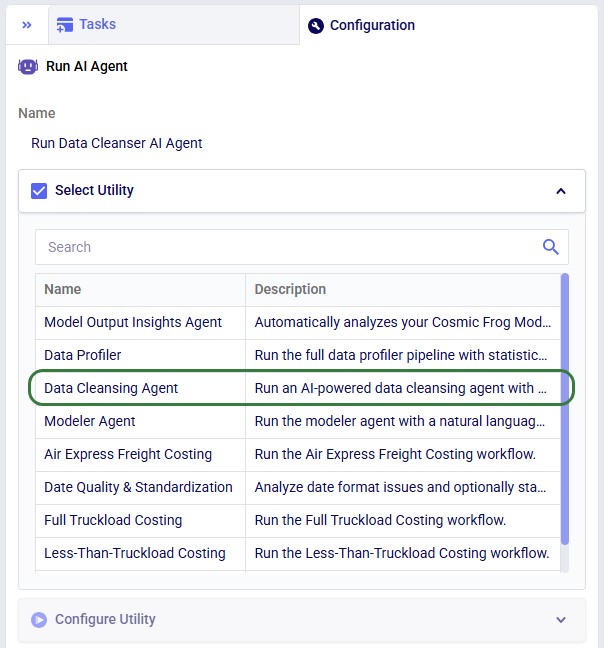
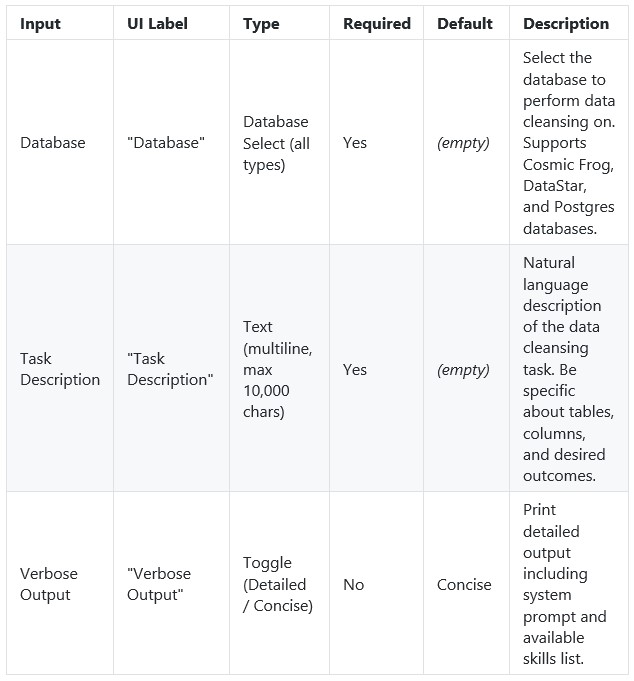
In DataStar, the Data Cleansing Agent is accessed by using a Run AI Agent task, see also the screenshots below. The key inputs are:
The Task Description field includes placeholder examples to help you get started:
Optionally, users can:
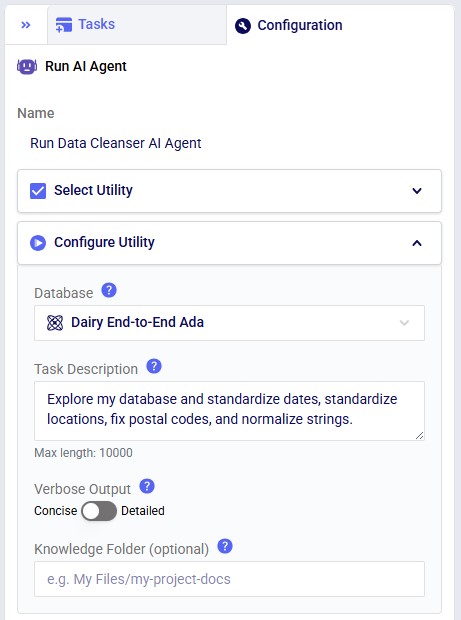
Not shown in the screenshots above, there is also a Run Configuration section, where users can add Tags to facilitate finding job runs, set a Timeout for the task, and set the Resource Size to use. Note that for most Run AI Agent tasks, the Resource Size will need to be set to XS or higher.
Suggested workflow:
After the run, the agent produces a structured summary of everything it did, including metrics on rows affected, issues found, and issues fixed; see the next section where this Job Log is described in more detail. The cleaned data is persisted as clean_* tables in the database (e.g., clean_customers, clean_shipments).
There are a few differences to keep in mind when running the Data Cleansing Agent either through chatting with Ada or from within DataStar:
Recommendation: Use the chat UI to develop and refine a prompt, then transfer the working prompt into a DataStar Run AI Agent task once you want the workflow to become repeatable.
After a run completes, the Task Log provides a detailed trace of every step the agent took. Understanding the log structure helps users verify what happened and troubleshoot if needed. The log follows a consistent structure from start to finish.
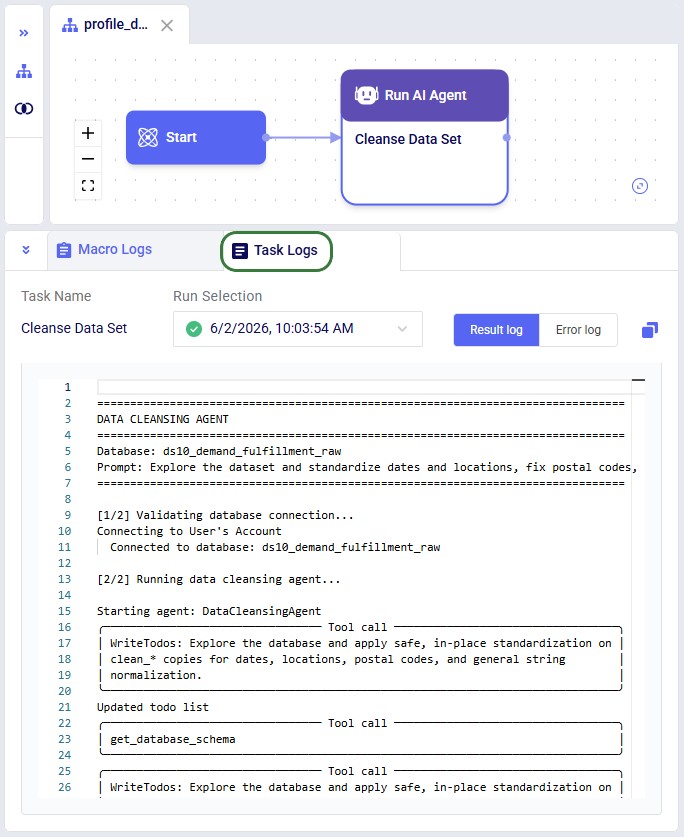
Header
Every log begins with a banner showing the database name and the exact prompt that was submitted.
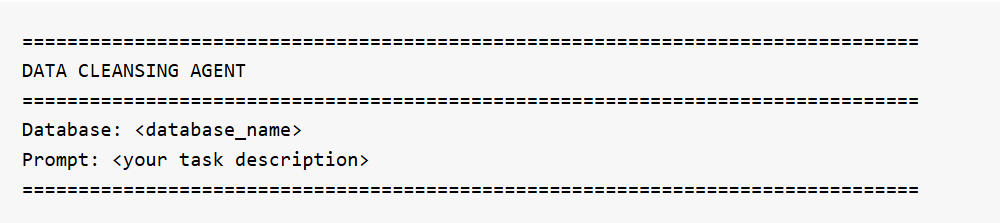
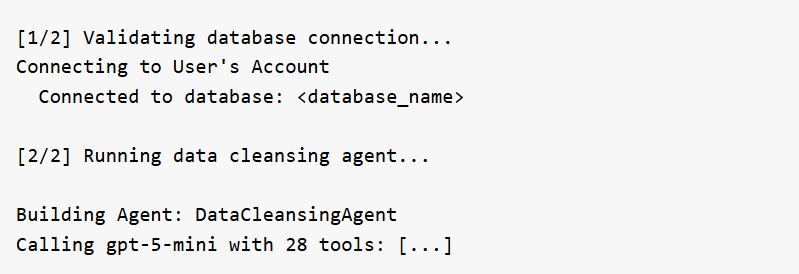
Connection & Setup
The agent validates the database connection and initializes itself with its full set of tools. If Verbose Output is set to "Detailed", the log also prints the system prompt and tool list at this stage.
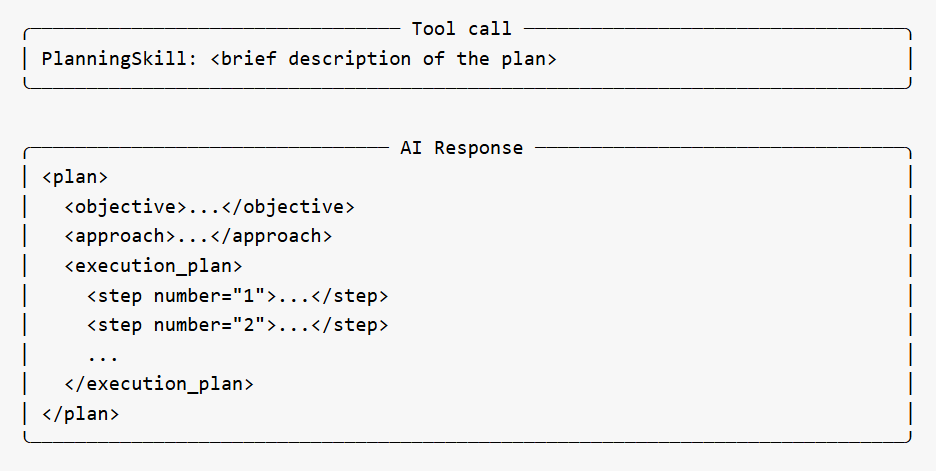
Planning Phase
For non-trivial tasks, the agent creates a strategic execution plan before taking action. This appears as a PlanningSkill tool call, followed by an AI Response box containing a structured plan with numbered steps, an objective, approach, and skill mapping. The plan gives users visibility into the agent's intended approach before it begins working.
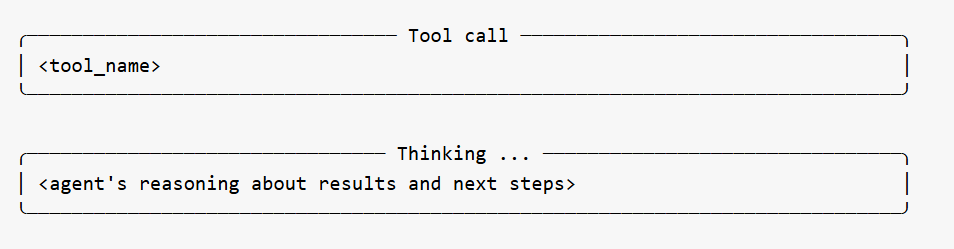
Tool Calls and Thinking
The bulk of the log shows the agent calling its specialized tools one at a time. Each tool call appears in a bordered box showing the tool name. Between tool calls, the agent's reasoning is shown in Thinking boxes -- explaining what it learned from the previous tool, what it plans to do next, and why. These thinking sections are among the most useful parts of the log for understanding the agent's decision-making.
The agent may call many tools in sequence depending on the complexity of the task. Profiling-only prompts typically involve discovery tools (schema, missing data, date issues, location issues, outliers). Cleanup prompts add transformation tools (ensure_clean_table, standardize_country_codes, standardize_date_column, etc.).
Occasionally a Memory Action Applied entry appears between steps -- this is the agent recording context for its own use and can be ignored.
Error Recovery
If the agent encounters a validation error on a tool call (e.g., a column stored as TEXT when a numeric type was expected, or a missing parameter), the log shows the error and the agent's automatic adjustment. The agent reasons about the failure in a Thinking block and retries with corrected parameters. Users do not need to intervene.
Agent Response
At the end of the run, the agent produces a structured summary of everything it discovered or changed. This is the most important section of the log for understanding outcomes:
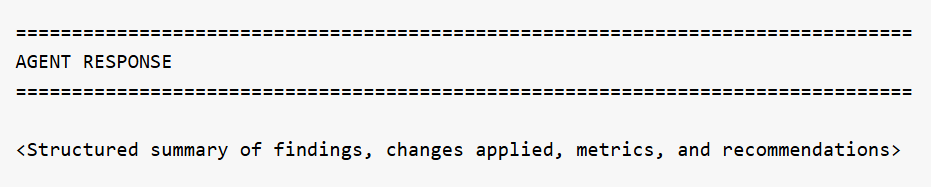
For profiling prompts, this section reports what was found across all tables -- schema details, missing data percentages, date format inconsistencies, location quality issues, numeric anomalies, and recommendations for next steps. For cleanup prompts, it reports which tables were modified, what transformations were applied, how many rows were affected, and confirmation that originals are preserved.
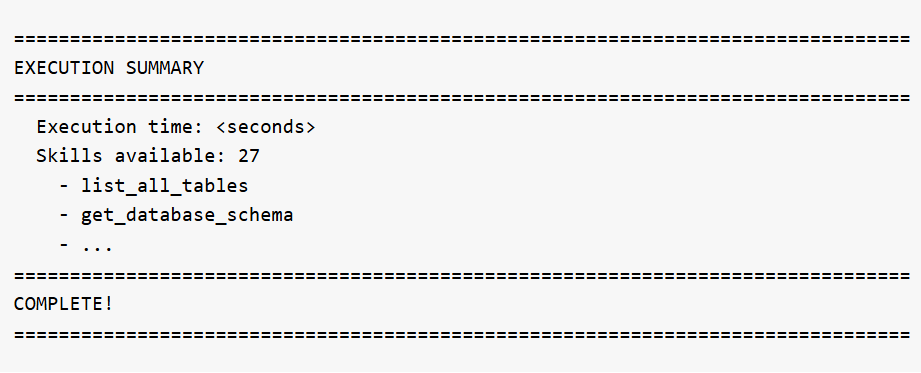
Execution Summary
The log ends with runtime statistics and the full list of skills that were available to the agent:
What the agent expects in your database:
The agent works with any tables in the selected database. There are no fixed column name requirements -- the agent discovers the schema automatically. However, for best results:
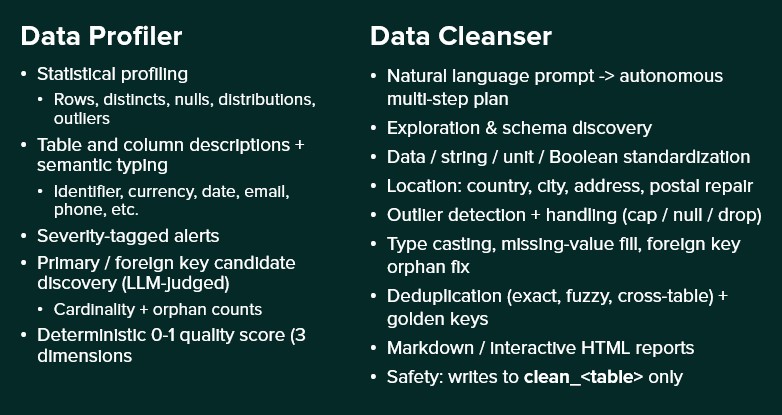
To help you decide if you should use the Data Profiler or Data Cleanser Agent for your task, here is a quick overview of both:
A user wants to understand what data is in their database before deciding what to clean.
Database: Supply Chain Dataset
Task Description: List all tables in the database and show their schemas
What happens: The agent calls get_database_schema for all tables and exits with a structured report.
Output:
Requested: List all tables and show schemas.
Discovered (schema 'starburst'):
...
Total: 12 tables, 405 rows, 112 columns
A user needs to clean up customer location data before using it in a Cosmic Frog network optimization model.
Database: Supply Chain Dataset
Task Description: Clean the customers table completely: standardize dates to ISO, fix postal codes (Excel corruption + placeholders), standardize country codes to alpha-2, clean city names, and normalize emails to lowercase
What the agent does:
Output:
Completed data cleansing of clean_customers table:
All changes applied to clean_customers (original customers table preserved).
The cleaned data is available in the clean_customers table in the database. The original customers table remains untouched.
A user with a 14-table enterprise supply chain database needs to clean and standardize all data before building Cosmic Frog models for network optimization and simulation.
Database: Enterprise Supply Chain
Task Description: Perform a complete data cleanup across all tables: standardize all dates to ISO, standardize all country codes to alpha-2, clean all city names, fix all postal codes, and normalize all email addresses to lowercase. Work systematically through each table.
What the agent does: The agent works systematically through all tables -- standardizing dates across 12+ tables, fixing country codes, cleaning city names, repairing postal codes, normalizing emails and status fields, detecting and handling negative values, converting mixed units to metric, validating calculated fields like order totals, and reporting any remaining referential integrity issues. This is the most comprehensive operation the agent can perform.
Output: A detailed summary covering every table touched, every transformation applied, and a final quality scorecard showing the before/after improvement.
A user has multiple records for the same customer in the customers table and wants golden keys created and propagated to the orders table.
Database: Supply Chain Dataset
Task Description: Find duplicate customer records in the customers table, create golden key mappings, and propagate them to the orders table.
What the agent does: Delegates the task to the Deduplication sub-agent, which detects exact and fuzzy duplicate groups, picks a canonical record for each group, and updates the orders table so every order points to the canonical customer.
Output: A summary listing how many duplicate groups were detected, how many golden keys were created, and how many rows in orders were updated to point to the canonical master record.
Below are example prompts users can try, organized by category.
Questions or feedback? Please contact the Optilogic Support team on support@optilogic.com.

The Data Cleansing Agent is one of Ada’s AI-powered assistants. It helps users profile, clean, and standardize their database data without writing code. Users describe what they want in plain English -- such as "find and fix postal code issues in the customers table" or "standardize date formats in the orders table to ISO" -- and the agent autonomously discovers issues, creates safe working copies of the data, applies the appropriate fixes, and verifies the results. The agent handles common supply chain data problems including mixed date formats, inconsistent country codes, Excel-corrupted postal codes, missing values, outliers, and messy text fields. It expects a connected database with one or more tables as input. The output is a set of cleaned copies of their tables in the database which users can immediately use for Cosmic Frog model building, reporting, or further analysis, while the original data is preserved untouched for comparison or rollback.
This documentation describes how this specific agent works and can be configured, including walking through multiple examples. Please see the “AI Agents: Architecture and Components” Help Center article if you are interested in understanding how the Optilogic AI Agents work at a detailed level.
Cleaning and standardizing data for supply chain modeling typically requires significant manual effort -- writing SQL queries, inspecting column values, fixing formatting issues one at a time, and verifying results. The Data Cleansing Agent streamlines this process by turning a single natural language prompt into a full profiling, cleaning, and verification workflow.
Key Capabilities:
Tools:
The agent can be accessed on the next generation Optilogic platform by chatting with Ada and through the Run AI Agent task in DataStar. Both ways will be explained, via Ada first, then the DataStar workflow, followed by an overview of the main differences between the 2 methods.
It is recommended to be somewhat familiar with Ada before diving into this content. Please see the Getting Started with Ada & Agentic AI article, and in particular its How to Use Ada section.
Once logged into the next-generation Optilogic platform at https://ai.optilogic.app, you can start chatting with Ada leveraging the Data Cleansing Agent right away from the central part of the Home page.
Regarding how to write good prompts, please note that the general Best Practices, Tips & Tricks, and Current Limitations and Known Behaviors included in the Getting Started with Ada documentation also apply to the Data Cleansing Agent.
After submitting a prompt, the Data Cleansing Agent will start processing and formulating a response:
The Data Cleansing Agent may ask for feedback before proceeding — for example, when:
When Ada finishes, the final response is presented:
For completeness, the cleaned data shows up in the connected database as clean_* table copies — for example, clean_customers, clean_orders — with the originals preserved untouched for comparison or rollback:
In DataStar, the Data Cleansing Agent is accessed by using a Run AI Agent task, see also the screenshots below. The key inputs are:
The Task Description field includes placeholder examples to help you get started:
Optionally, users can:
Not shown in the screenshots above, there is also a Run Configuration section, where users can add Tags to facilitate finding job runs, set a Timeout for the task, and set the Resource Size to use. Note that for most Run AI Agent tasks, the Resource Size will need to be set to XS or higher.
Suggested workflow:
After the run, the agent produces a structured summary of everything it did, including metrics on rows affected, issues found, and issues fixed; see the next section where this Job Log is described in more detail. The cleaned data is persisted as clean_* tables in the database (e.g., clean_customers, clean_shipments).
There are a few differences to keep in mind when running the Data Cleansing Agent either through chatting with Ada or from within DataStar:
Recommendation: Use the chat UI to develop and refine a prompt, then transfer the working prompt into a DataStar Run AI Agent task once you want the workflow to become repeatable.
After a run completes, the Task Log provides a detailed trace of every step the agent took. Understanding the log structure helps users verify what happened and troubleshoot if needed. The log follows a consistent structure from start to finish.
Header
Every log begins with a banner showing the database name and the exact prompt that was submitted.
Connection & Setup
The agent validates the database connection and initializes itself with its full set of tools. If Verbose Output is set to "Detailed", the log also prints the system prompt and tool list at this stage.
Planning Phase
For non-trivial tasks, the agent creates a strategic execution plan before taking action. This appears as a PlanningSkill tool call, followed by an AI Response box containing a structured plan with numbered steps, an objective, approach, and skill mapping. The plan gives users visibility into the agent's intended approach before it begins working.
Tool Calls and Thinking
The bulk of the log shows the agent calling its specialized tools one at a time. Each tool call appears in a bordered box showing the tool name. Between tool calls, the agent's reasoning is shown in Thinking boxes -- explaining what it learned from the previous tool, what it plans to do next, and why. These thinking sections are among the most useful parts of the log for understanding the agent's decision-making.
The agent may call many tools in sequence depending on the complexity of the task. Profiling-only prompts typically involve discovery tools (schema, missing data, date issues, location issues, outliers). Cleanup prompts add transformation tools (ensure_clean_table, standardize_country_codes, standardize_date_column, etc.).
Occasionally a Memory Action Applied entry appears between steps -- this is the agent recording context for its own use and can be ignored.
Error Recovery
If the agent encounters a validation error on a tool call (e.g., a column stored as TEXT when a numeric type was expected, or a missing parameter), the log shows the error and the agent's automatic adjustment. The agent reasons about the failure in a Thinking block and retries with corrected parameters. Users do not need to intervene.
Agent Response
At the end of the run, the agent produces a structured summary of everything it discovered or changed. This is the most important section of the log for understanding outcomes:
For profiling prompts, this section reports what was found across all tables -- schema details, missing data percentages, date format inconsistencies, location quality issues, numeric anomalies, and recommendations for next steps. For cleanup prompts, it reports which tables were modified, what transformations were applied, how many rows were affected, and confirmation that originals are preserved.
Execution Summary
The log ends with runtime statistics and the full list of skills that were available to the agent:
What the agent expects in your database:
The agent works with any tables in the selected database. There are no fixed column name requirements -- the agent discovers the schema automatically. However, for best results:
To help you decide if you should use the Data Profiler or Data Cleanser Agent for your task, here is a quick overview of both:
A user wants to understand what data is in their database before deciding what to clean.
Database: Supply Chain Dataset
Task Description: List all tables in the database and show their schemas
What happens: The agent calls get_database_schema for all tables and exits with a structured report.
Output:
Requested: List all tables and show schemas.
Discovered (schema 'starburst'):
...
Total: 12 tables, 405 rows, 112 columns
A user needs to clean up customer location data before using it in a Cosmic Frog network optimization model.
Database: Supply Chain Dataset
Task Description: Clean the customers table completely: standardize dates to ISO, fix postal codes (Excel corruption + placeholders), standardize country codes to alpha-2, clean city names, and normalize emails to lowercase
What the agent does:
Output:
Completed data cleansing of clean_customers table:
All changes applied to clean_customers (original customers table preserved).
The cleaned data is available in the clean_customers table in the database. The original customers table remains untouched.
A user with a 14-table enterprise supply chain database needs to clean and standardize all data before building Cosmic Frog models for network optimization and simulation.
Database: Enterprise Supply Chain
Task Description: Perform a complete data cleanup across all tables: standardize all dates to ISO, standardize all country codes to alpha-2, clean all city names, fix all postal codes, and normalize all email addresses to lowercase. Work systematically through each table.
What the agent does: The agent works systematically through all tables -- standardizing dates across 12+ tables, fixing country codes, cleaning city names, repairing postal codes, normalizing emails and status fields, detecting and handling negative values, converting mixed units to metric, validating calculated fields like order totals, and reporting any remaining referential integrity issues. This is the most comprehensive operation the agent can perform.
Output: A detailed summary covering every table touched, every transformation applied, and a final quality scorecard showing the before/after improvement.
A user has multiple records for the same customer in the customers table and wants golden keys created and propagated to the orders table.
Database: Supply Chain Dataset
Task Description: Find duplicate customer records in the customers table, create golden key mappings, and propagate them to the orders table.
What the agent does: Delegates the task to the Deduplication sub-agent, which detects exact and fuzzy duplicate groups, picks a canonical record for each group, and updates the orders table so every order points to the canonical customer.
Output: A summary listing how many duplicate groups were detected, how many golden keys were created, and how many rows in orders were updated to point to the canonical master record.
Below are example prompts users can try, organized by category.
Questions or feedback? Please contact the Optilogic Support team on support@optilogic.com.