Published by
Published on
June 17, 2026



Supply chains are constantly in flux. When demand spikes without warning or a key supplier goes offline, leadership needs answers fast on today's inventory position and tomorrow's network strategy. For Optilogic, June represents a landmark moment in our commitment to helping supply chain teams optimize the network they have today while reimagining what it needs to look like tomorrow.
Supply chain modeling used to mean months of data preparation, expert-led analysis, and presentations in leadership meetings. By the time answers were delivered, the economics had often already shifted. Critical questions went unanswered, not for lack of skill, but lack of capacity.
Ada changes that fundamentally. Ada is Optilogic's breakthrough agentic AI for supply chain design, accessible to anyone across your enterprise. Ask Ada a question in plain language and Ada cleanses and enriches data, builds a baseline model, runs scenarios, and surfaces answers.
In case you missed all the demos at OptiCon 2026 earlier this month, Optilogic’s Director of Product Management Neeru Bhopal built a full network optimization model for a US specialty food ingredients manufacturer including 11 raw data tables, a global supply base, tariff scenario analysis, all built in a single day. The same model would have taken up to 12 weeks the traditional way.
Ada doesn't replace the expertise of your modelers and analysts. It amplifies it. Every step Ada takes is visible and inspectable in Cosmic Frog and DataStar, so you can validate the work and bring defensible recommendations to leadership with confidence.
"Optilogic helps us build supply chain resilience by providing artificial intelligence and optimization tools to enhance our future." — Felipe Moraes, Head of Supply Chain and Integration, Amazon Brazil
The stakes have never been higher for supply chain teams to move faster and with more confidence. The industry is taking note.
"Supply chain leaders are navigating an era of relentless unpredictability, where the window between disruption and required action continues to shrink. Optilogic's AI for supply chain design is exactly the kind of innovation the industry needs, AI that doesn't just surface insights but also empowers teams to act with confidence." — Andrea Paciaroni, Principal Director, Accenture
Ada is available now for all Optilogic users, with open access through July 31. Starting in August, accounts will be provided with Ada tokens. Get started →
The insights exist. They just don't always reach the people who need them most. Modelers build the models, but the decisions and actions are made by production planners, demand planners, finance business partners, operations managers, and executives who depend on others to get them answers.
At OptiCon, we showcased a production planning app including demand signals, production scenarios, capacity constraints, and a scenario comparison all in a single interface, designed for a planner, not a modeler, and built in hours. The result is a shift from a handful of modeling projects a year to dozens of always-on decision tools that put supply chain intelligence in the hands of everyone who needs it.
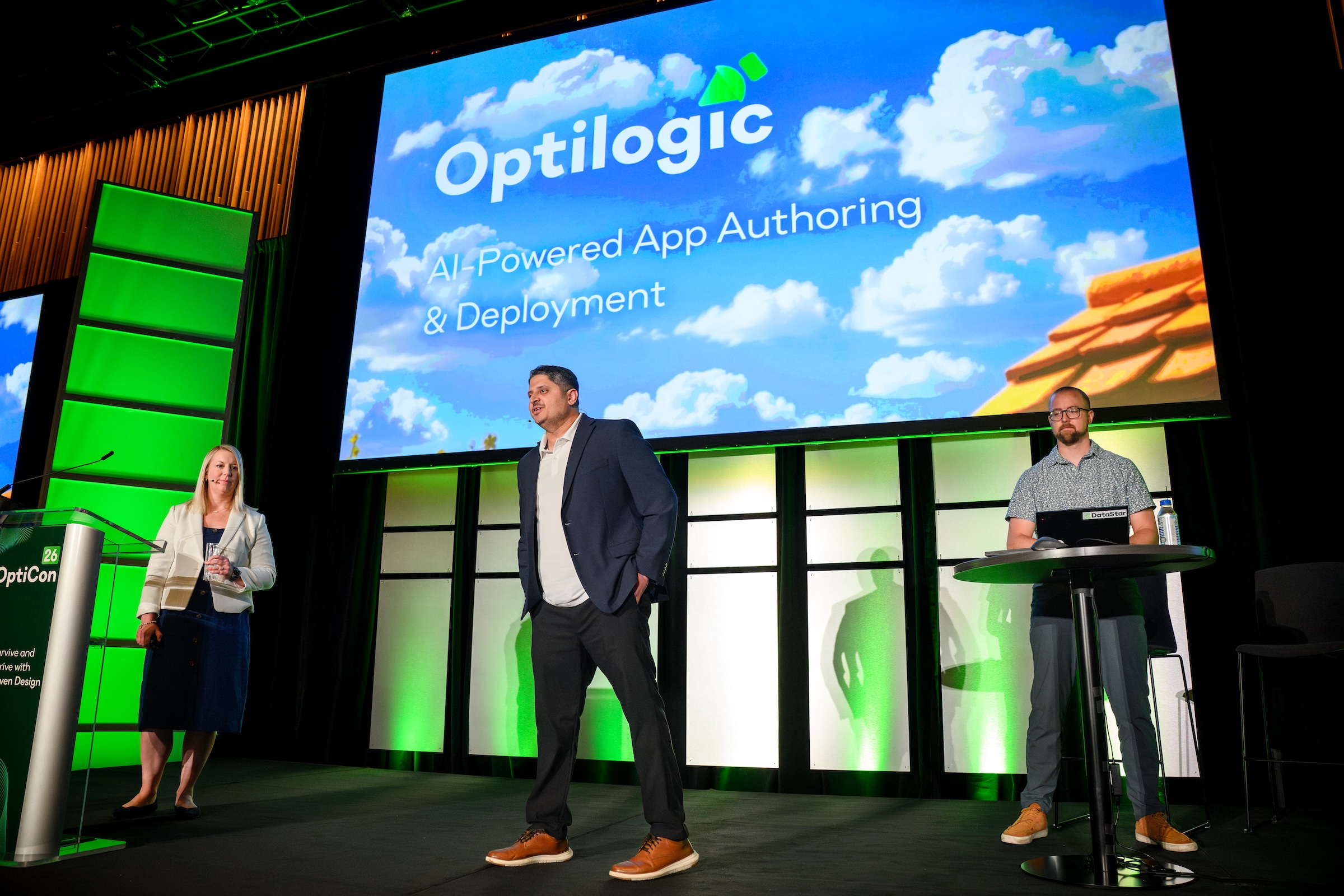
However your team works best, there's a path to get started. Choose from Optilogic's library of ready-to-use apps, build your own using Ada’s natural language interface, or bring your most pressing problem to Optilogic's Solutions team and we'll build it with you. The goal is the same in every case: supply chain intelligence in the hands of every decision maker, not just the modeling team.
Learn more about Composable Apps →
Where should safety stock be held? How much is needed at each stage? How do service level targets translate into real inventory requirements and cost?
These have always been hard questions. Not because the math is impossible, but because the answers depend on your network. And until now, inventory optimization and network design lived in separate tools, separate models, separate conversations.
Cosmic Frog's new multi-echelon inventory optimization (MEIO) changes that. Rather than optimizing each node independently, MEIO evaluates your entire network simultaneously — determining safety stock placement, quantities at each stage, and how service level commitments translate into cost. It buffers variability strategically, not by default.
Under the hood, the MEIO engine (“Cyclo”) uses a Guaranteed Service Model (GSM) approach. Instead of setting safety stock quantities directly, it optimizes the service-time commitments between facilities, then derives the inventory positioning that minimizes total holding cost while hitting your target service level.
What you can do with MEIO:
MEIO is just the beginning. Pair it with Cosmic Frog's simulation-optimization engine (“Dendro”) and the full picture comes into focus. Where Cyclo determines where safety stock should be positioned and how much is needed, Dendro lets you stress-test those recommendations against real-world variability before you commit. Together, they take you from strategic inventory positioning all the way through to operationalized policies you can defend.
The result: a supply chain model that answers both "where should facilities be?" and "where should inventory be?" in the same environment, with the same data.
Straight lines on a map tell you where your freight goes. Waypoint Routes shows you how it actually gets there.
Powered by Valhalla and OpenStreetMap, Cosmic Frog now renders real road network routes across both Transportation Optimization (“Hopper”) and Network Optimization (“NEO”), replacing crow-flies connections with the roads your vehicles actually travel. The result is a map that reflects operational reality, not geometric approximation.
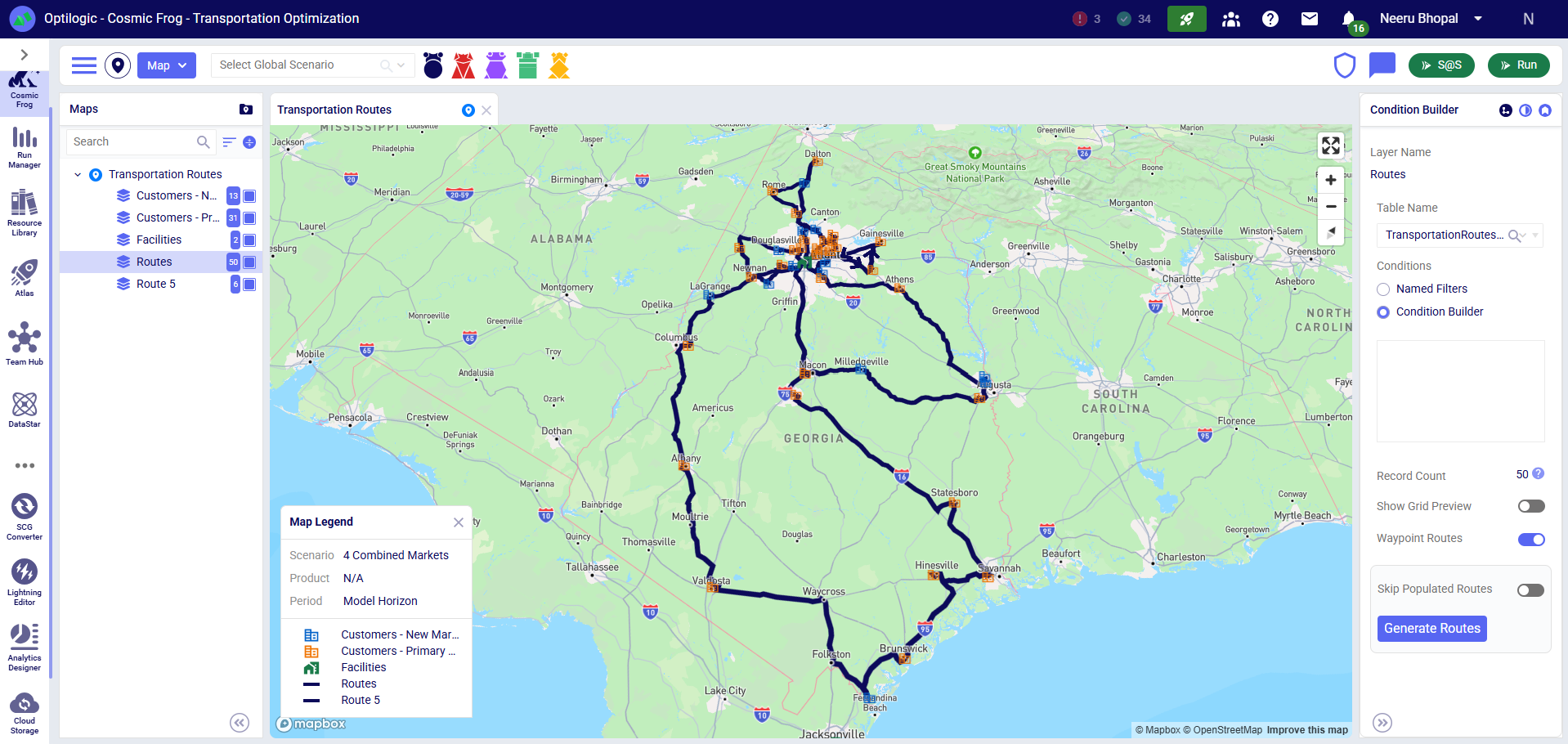
Toggle on Waypoint Routes in your map layer, select your route layer, hit Generate Routes, and watch your network come to life. It scales across thousands of origin-destination pairs, with live progress tracking in the Model Activity panel. Need to refresh only changed lanes? Skip Populated Routes keeps existing data intact and focuses calculation where it's needed.
Same powerful optimization. Now with the geographic reality to match.
Learn more about Waypoint Routes →
A small but meaningful quality-of-life improvement for single-file, single-table workflows.
File and sheet names no longer dictate where data lands. When you have one input table selected, your file imports there. No more misrouted data because your file was named "Book1" or your tab was "Sheet1." For Excel files, fallback logic routes by sheet name first, then file name, then your selected table, so imports behave predictably every time.
DataStar is built to do the work between raw data and decision-ready analysis. This month's releases extend that across the full pipeline, giving teams real-time visibility into workflows, tighter optimization integration, and smarter, more composable data transformation.
Data workflows are often treated like a black box until they finish (or fail). Live Run Viewer changes that.
Monitor macro and task execution in real time as workflows run. View task-level status updates and diagnose issues instantly — no refreshing, no waiting, no guesswork. When something needs attention, you'll know immediately. When everything runs cleanly, you'll have the confidence to act on the results.
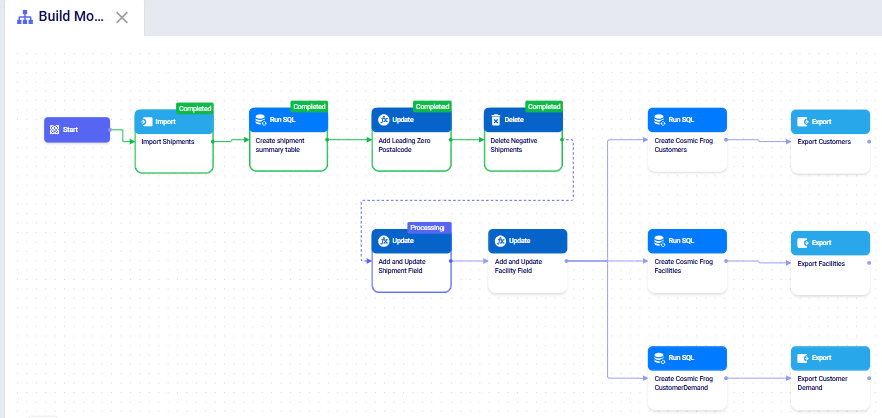
Optimization shouldn't live in a disconnected process. The Solve Model Task brings it directly into the DataStar workflow canvas, allowing teams to execute optimization scenarios alongside data preparation, AI, and machine learning steps in a single automated pipeline.
Configure and run scenarios without leaving your workflow. Move from raw data to optimized decisions faster, with fewer manual handoffs between tools.
Update and Delete Tasks now support joins, making it easier to perform targeted data modifications using related tables and lookup logic directly within workflows.
Build more advanced data transformation logic without relying on SQL tasks. Visually inspect, persist, and refine complex transformation logic directly in the workflow canvas, creating a more governed and explainable approach to AI-assisted data preparation.
Traditional workflow tools require constant reconfiguration as data structures change. Adaptive Schema eliminates that friction.
As your workflows evolve, downstream tasks can reference upstream tables and columns dynamically, even before the workflow has been run. DataStar recognizes new tables and fields in real time, keeping pipelines flexible and composable as your data grows in complexity.
All features are available now in the Optilogic platform. Have questions? Reach out to your Customer Success Manager or support@optilogic.com or visit our Help Center for documentation and tutorials.
Supply chains are constantly in flux. When demand spikes without warning or a key supplier goes offline, leadership needs answers fast on today's inventory position and tomorrow's network strategy. For Optilogic, June represents a landmark moment in our commitment to helping supply chain teams optimize the network they have today while reimagining what it needs to look like tomorrow.
Supply chain modeling used to mean months of data preparation, expert-led analysis, and presentations in leadership meetings. By the time answers were delivered, the economics had often already shifted. Critical questions went unanswered, not for lack of skill, but lack of capacity.
Ada changes that fundamentally. Ada is Optilogic's breakthrough agentic AI for supply chain design, accessible to anyone across your enterprise. Ask Ada a question in plain language and Ada cleanses and enriches data, builds a baseline model, runs scenarios, and surfaces answers.
In case you missed all the demos at OptiCon 2026 earlier this month, Optilogic’s Director of Product Management Neeru Bhopal built a full network optimization model for a US specialty food ingredients manufacturer including 11 raw data tables, a global supply base, tariff scenario analysis, all built in a single day. The same model would have taken up to 12 weeks the traditional way.
Ada doesn't replace the expertise of your modelers and analysts. It amplifies it. Every step Ada takes is visible and inspectable in Cosmic Frog and DataStar, so you can validate the work and bring defensible recommendations to leadership with confidence.
"Optilogic helps us build supply chain resilience by providing artificial intelligence and optimization tools to enhance our future." — Felipe Moraes, Head of Supply Chain and Integration, Amazon Brazil
The stakes have never been higher for supply chain teams to move faster and with more confidence. The industry is taking note.
"Supply chain leaders are navigating an era of relentless unpredictability, where the window between disruption and required action continues to shrink. Optilogic's AI for supply chain design is exactly the kind of innovation the industry needs, AI that doesn't just surface insights but also empowers teams to act with confidence." — Andrea Paciaroni, Principal Director, Accenture
Ada is available now for all Optilogic users, with open access through July 31. Starting in August, accounts will be provided with Ada tokens. Get started →
The insights exist. They just don't always reach the people who need them most. Modelers build the models, but the decisions and actions are made by production planners, demand planners, finance business partners, operations managers, and executives who depend on others to get them answers.
At OptiCon, we showcased a production planning app including demand signals, production scenarios, capacity constraints, and a scenario comparison all in a single interface, designed for a planner, not a modeler, and built in hours. The result is a shift from a handful of modeling projects a year to dozens of always-on decision tools that put supply chain intelligence in the hands of everyone who needs it.
However your team works best, there's a path to get started. Choose from Optilogic's library of ready-to-use apps, build your own using Ada’s natural language interface, or bring your most pressing problem to Optilogic's Solutions team and we'll build it with you. The goal is the same in every case: supply chain intelligence in the hands of every decision maker, not just the modeling team.
Learn more about Composable Apps →
Where should safety stock be held? How much is needed at each stage? How do service level targets translate into real inventory requirements and cost?
These have always been hard questions. Not because the math is impossible, but because the answers depend on your network. And until now, inventory optimization and network design lived in separate tools, separate models, separate conversations.
Cosmic Frog's new multi-echelon inventory optimization (MEIO) changes that. Rather than optimizing each node independently, MEIO evaluates your entire network simultaneously — determining safety stock placement, quantities at each stage, and how service level commitments translate into cost. It buffers variability strategically, not by default.
Under the hood, the MEIO engine (“Cyclo”) uses a Guaranteed Service Model (GSM) approach. Instead of setting safety stock quantities directly, it optimizes the service-time commitments between facilities, then derives the inventory positioning that minimizes total holding cost while hitting your target service level.
What you can do with MEIO:
MEIO is just the beginning. Pair it with Cosmic Frog's simulation-optimization engine (“Dendro”) and the full picture comes into focus. Where Cyclo determines where safety stock should be positioned and how much is needed, Dendro lets you stress-test those recommendations against real-world variability before you commit. Together, they take you from strategic inventory positioning all the way through to operationalized policies you can defend.
The result: a supply chain model that answers both "where should facilities be?" and "where should inventory be?" in the same environment, with the same data.
Straight lines on a map tell you where your freight goes. Waypoint Routes shows you how it actually gets there.
Powered by Valhalla and OpenStreetMap, Cosmic Frog now renders real road network routes across both Transportation Optimization (“Hopper”) and Network Optimization (“NEO”), replacing crow-flies connections with the roads your vehicles actually travel. The result is a map that reflects operational reality, not geometric approximation.
Toggle on Waypoint Routes in your map layer, select your route layer, hit Generate Routes, and watch your network come to life. It scales across thousands of origin-destination pairs, with live progress tracking in the Model Activity panel. Need to refresh only changed lanes? Skip Populated Routes keeps existing data intact and focuses calculation where it's needed.
Same powerful optimization. Now with the geographic reality to match.
Learn more about Waypoint Routes →
A small but meaningful quality-of-life improvement for single-file, single-table workflows.
File and sheet names no longer dictate where data lands. When you have one input table selected, your file imports there. No more misrouted data because your file was named "Book1" or your tab was "Sheet1." For Excel files, fallback logic routes by sheet name first, then file name, then your selected table, so imports behave predictably every time.
DataStar is built to do the work between raw data and decision-ready analysis. This month's releases extend that across the full pipeline, giving teams real-time visibility into workflows, tighter optimization integration, and smarter, more composable data transformation.
Data workflows are often treated like a black box until they finish (or fail). Live Run Viewer changes that.
Monitor macro and task execution in real time as workflows run. View task-level status updates and diagnose issues instantly — no refreshing, no waiting, no guesswork. When something needs attention, you'll know immediately. When everything runs cleanly, you'll have the confidence to act on the results.
Optimization shouldn't live in a disconnected process. The Solve Model Task brings it directly into the DataStar workflow canvas, allowing teams to execute optimization scenarios alongside data preparation, AI, and machine learning steps in a single automated pipeline.
Configure and run scenarios without leaving your workflow. Move from raw data to optimized decisions faster, with fewer manual handoffs between tools.
Update and Delete Tasks now support joins, making it easier to perform targeted data modifications using related tables and lookup logic directly within workflows.
Build more advanced data transformation logic without relying on SQL tasks. Visually inspect, persist, and refine complex transformation logic directly in the workflow canvas, creating a more governed and explainable approach to AI-assisted data preparation.
Traditional workflow tools require constant reconfiguration as data structures change. Adaptive Schema eliminates that friction.
As your workflows evolve, downstream tasks can reference upstream tables and columns dynamically, even before the workflow has been run. DataStar recognizes new tables and fields in real time, keeping pipelines flexible and composable as your data grows in complexity.
All features are available now in the Optilogic platform. Have questions? Reach out to your Customer Success Manager or support@optilogic.com or visit our Help Center for documentation and tutorials.
Fill out the form to download the full content
.jpg)